Developer technologies | C#
An object-oriented and type-safe programming language that has its roots in the C family of languages and includes support for component-oriented programming.
This browser is no longer supported.
Upgrade to Microsoft Edge to take advantage of the latest features, security updates, and technical support.
' cx='32' cy='32' r='32' /%3E%3Ctext x='50%25' y='55%25' dominant-baseline='middle' text-anchor='middle' fill='%23FFF' %3ENG%3C/text%3E%3C/svg%3E)
Hi,
I'm collecting data using System.Diagnostics.PerformanceCounter in a C# program. I made a test where I compared values from performance monitor with the one I got from my program. I can see the values look shifted. For example I put a screenshot hereafter,
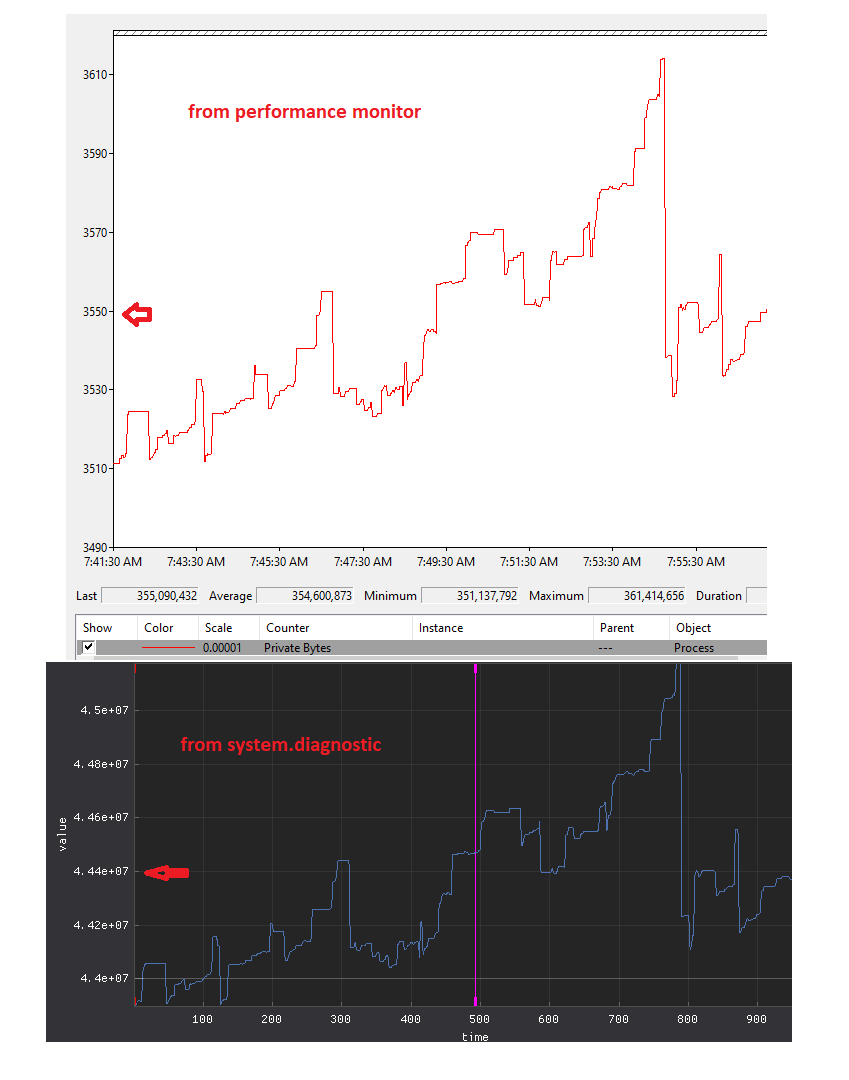
I can't figure if I should multiply or divide the values. Since I'm not just monitoring memory values, I need to know for any counter if there is some math with the value to do, otherwise I can't interpret values that come from Performance monitor, nor System.Diagnostic.
There is any documentation about that ? otherwise how can I figure that information ?
thx
(I just thx DaveM121 here to point me the right forum. Because I forgot to do so on Community forum before deleting my profile from there...)
EDIT:
the picture comes from an application we use to visualize data. I can't share the code, it is not mine... typically to get the data we do the same as describe in the documentation about system.diagnostic.
1) define a category, in this case the category is process,
PerformanceCounterCategory category = new PerformanceCounterCategory(categoryName);
2) we look in the category the instance to monitor (i.e. the process)
foreach (var instanceName in category.GetInstanceNames())
{
 // if instanceName match the process do...
}
3) we look for the counter
foreach (var counter in category.GetCounters(instanceName))
{
  // if the counter is the one we want, add it to a list
}
4) then, while the app is alive, we loop over the list to read the data using the NextValue() function,
foreach (var counter in list)
{
  // if the counter is the one we want, add it to a list
  // nextValue = counter.NextValue()
  // store nextValue with a timestamp on the disk.
}
5) when we finish to monitor, we use the app (from the second picture above) to visualize our data.
' cx='32' cy='32' r='32' /%3E%3Ctext x='50%25' y='55%25' dominant-baseline='middle' text-anchor='middle' fill='%23FFF' %3EXZ%3C/text%3E%3C/svg%3E)
Hi @Nicolas GV ,
Could you provide more details or steps about how you get the second picture from System.Diagnostics? It will help us make a test and analyze the question.
We are waiting for your update.
I edited the question
after investigation, raw values from NextValue() look fine. There is NO difference between Performance monitor counter values VS System.Diagnostics.PerformanceCounter.NextValue(), (excepted the scale factor).
The difference shown on our data viewer comes from the way the axis are configured.