Microsoft Teams | Microsoft Teams for business | Other
Additional features, settings, or issues not covered by specific Microsoft Teams categories

This browser is no longer supported.
Upgrade to Microsoft Edge to take advantage of the latest features, security updates, and technical support.
' cx='32' cy='32' r='32' /%3E%3Ctext x='50%25' y='55%25' dominant-baseline='middle' text-anchor='middle' fill='%23FFF' %3EI%3C/text%3E%3C/svg%3E)
Hello,
We have a user who is currently having a problem with "Focus in Content" in teams.
Since this year the "Focus in Content" function in teams is not working anymore.
when the user selected "focus on content" on Teams, the gallery would be hidden. After "focus on content" is selected, all the other attendants' faces would be hidden, but not mine.
This phenomenon also happens when the user use "Full Screen".
We try to upload a video too the same problem
Do anyone have any idea how to resolve this? I think it's a bug
' cx='32' cy='32' r='32' /%3E%3Ctext x='50%25' y='55%25' dominant-baseline='middle' text-anchor='middle' fill='%23FFF' %3ED%3C/text%3E%3C/svg%3E)
This functionality broke in the current version (macOS at least).
This app is so bad, I have no words for it. It's not just slow with bad UX and eats lots of RAM, but even previously working features break.
' cx='32' cy='32' r='32' /%3E%3Ctext x='50%25' y='55%25' dominant-baseline='middle' text-anchor='middle' fill='%23FFF' %3ELC%3C/text%3E%3C/svg%3E)
A workaround to this that I found helpful is that if you hit Ctrl and "-" a few times, the frame around the content panel shrinks and makes more room for the content panel area. You can then also pinch and un-pinch the content to zoom in and out.
' cx='32' cy='32' r='32' /%3E%3Ctext x='50%25' y='55%25' dominant-baseline='middle' text-anchor='middle' fill='%23FFF' %3EYS%3C/text%3E%3C/svg%3E)
Hi @IBN ,
when the user selected "focus on content" on Teams, the gallery would be hidden. After "focus on content" is selected, all the other attendants' faces would be hidden, but not mine.
This phenomenon also happens when the user use "Full Screen".
I've tested on my side and can reproduce what you described in my Microsoft Teams Version 1.4.00.32771 (64-bit):
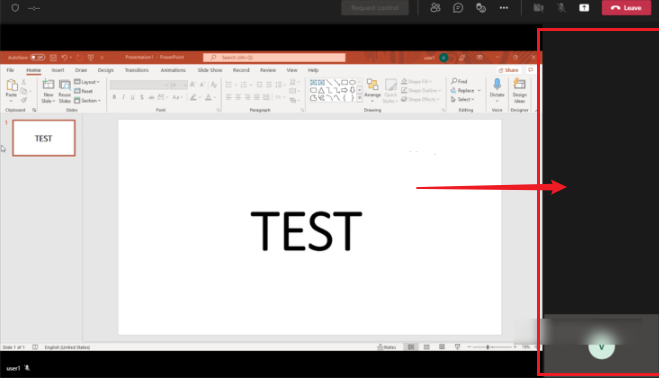
Are you running the same build of Teams client? To view the version information, you can click the "···" at the upper right conner, choose About > Version.
While after searching around I haven't seen any publicly available official document for this issue so far, I did notice serveral similar reports about it:
-Cannot hide gallery in "focus on content" or "full screen" mode
-Teams Cannot hide gallery in "focus on content" or "full screen" mode
Based on my test, the full screen mode in Teams web version can still work as expected. So for the time being, I'd recommend using Teams on the web as a workaround for entering full screen mode during a meeting.
Meanwhile, I'll keep a close eye on this issue and post back here once I find any additional informaiton.
If the answer is helpful, please click "Accept Answer" and kindly upvote it. If you have extra questions about this answer, please click "Comment".
Note: Please follow the steps in our documentation to enable e-mail notifications if you want to receive the related email notification for this thread.
Thanks, i will go ahead to use the Teams Web.
Hi @IBN ,
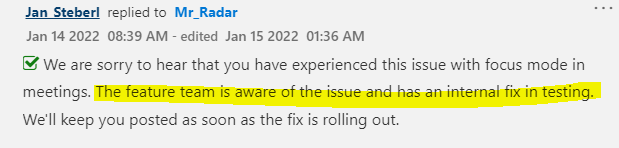
Just wanted to give you an update that according to the information in this thread, the issue has already been awared by the feature team and an internal fix is in testing:
Thanks for the update
Thanks alot. it has been resolved.
I also have another problem about a user getting an error when trying to download file on Teams Chat.
You can find the question here: https://learn.microsoft.com/en-us/answers/questions/702865/you-need-permission-to-access-this-item-microsoft.html
Please click the above link if you can help me to resolve the problem.
Hi @IBN ,
Happy to see that the issue in the link you shared has already been resolved.