How to connect to Azure SQL Database with Visual Studio 2022?

Diego Gomes dos Santos Zaratine 26 Reputation points
2022-01-12T17:22:10.317+00:00

Hello, I just upgraded to Visual Studio 2022 and I'm trying to connect to an Azure SQL Database.

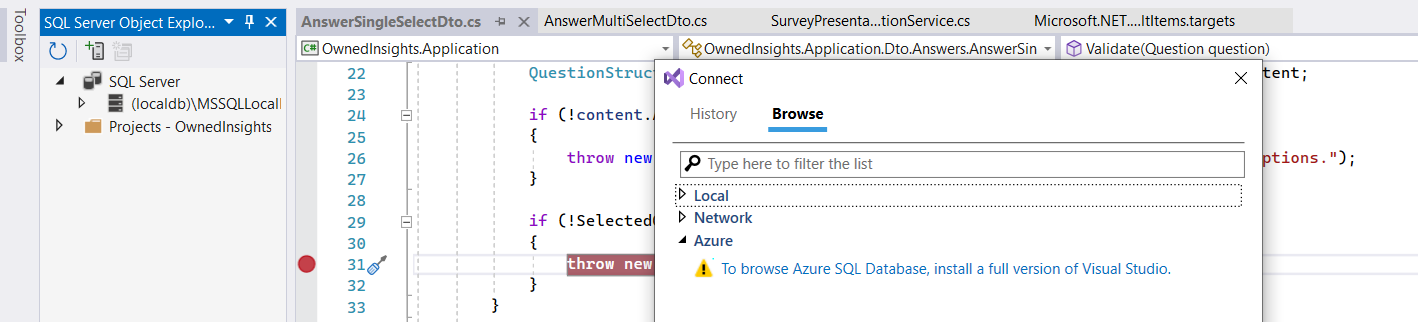
The problem is, when I go to SQL Server Object Explorer > Add SQL Server > Azure, it shows the message:
"To browse Azure SQL database, install a full version of visual studio"

Se below:
164434-image.png

My copy is licensed and I already tried to repair my instalation, but the problem still persists.
164407-image.png

Developer technologies | Visual Studio | Other
A family of Microsoft suites of integrated development tools for building applications for Windows, the web, mobile devices and many other platforms. Miscellaneous topics that do not fit into specific categories.

0 comments No comments
{count} vote

Answer accepted by question author
  1. Alan Kinane 17,356 Reputation points MVP Volunteer Moderator
    2022-01-12T17:51:00.387+00:00

    You should use the visual studio developer forum for this issue. There seems to be similar issues logged about this already - https://developercommunity.visualstudio.com/t/in-sql-schema-compare-connection-select-i-am-asked/1631510

    0 comments No comments

0 additional answers

Sort by: Most helpful

Your answer

Answers can be marked as 'Accepted' by the question author and 'Recommended' by moderators, which helps users know the answer solved the author's problem.