Microsoft Security | Intune | Configuration Manager | Deployment
Deploying software and updates using Configuration Manager

This browser is no longer supported.
Upgrade to Microsoft Edge to take advantage of the latest features, security updates, and technical support.
' cx='32' cy='32' r='32' /%3E%3Ctext x='50%25' y='55%25' dominant-baseline='middle' text-anchor='middle' fill='%23FFF' %3EBS%3C/text%3E%3C/svg%3E)
Hello,
What is meant by Architecture x86 and x64 in Boot image properties
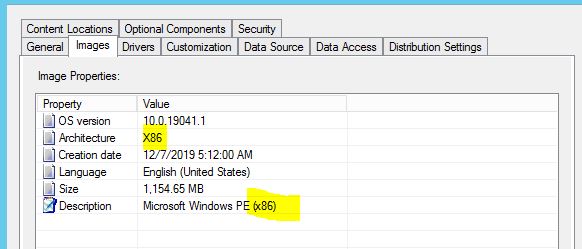
We are using Windows 10 64 bit version. Does it mean that only Architecture x64 required as Boot Image? Kindly help me to understand

Hi @Boopathi S ,
In theory, we could deploy the only Architecture x64 required as Boot Image, but it better to prepare the Architecture x32, because it is recommended that distribute both an x86 and an x64 PXE-enabled boot image to at least one PXE-enabled distribution point by Microsoft doc.

Besides, if a boot image isn't found with the same architecture, Configuration Manager looks for a boot image that's compatible with the architecture of the client. It looks in the list of task sequences found in step 2. For example, a 64-bit BIOS/MBR client is compatible with 32-bit and 64-bit boot images. A 32-bit BIOS/MBR client is compatible with only 32-bit boot images. UEFI clients are only compatible with matching architecture. A 64-bit UEFI client is compatible with only 64-bit boot images and a 32-bit UEFI client is compatible with only 32-bit boot images.
Here is the link we could refer to:
https://learn.microsoft.com/en-us/mem/configmgr/osd/deploy-use/use-pxe-to-deploy-windows-over-the-network#how-the-boot-image-is-selected-for-pxe
If the answer is the right solution, please click "Accept Answer" and kindly upvote it. If you have extra questions about this answer, please click "Comment".
Note: Please follow the steps in our documentation to enable e-mail notifications if you want to receive the related email notification for this thread.