Windows 10
A Microsoft operating system that runs on personal computers and tablets.
10,667 questions
This browser is no longer supported.
Upgrade to Microsoft Edge to take advantage of the latest features, security updates, and technical support.
' cx='32' cy='32' r='32' /%3E%3Ctext x='50%25' y='55%25' dominant-baseline='middle' text-anchor='middle' fill='%23FFF' %3EDM%3C/text%3E%3C/svg%3E)
Hello Community
How can I set the sign-in option: Password: {60B78E88-EAD8-445C-9CFD-0B87F74EA6CD} as default via registry for all users of a Windows 10/11 client?
I know the following way to do this for individual users: https://www.technine.be/?p=3831. Unfortunately, this is not enough, as this must be set automatically via script and must be set for the entire client.

' cx='32' cy='32' r='32' /%3E%3Ctext x='50%25' y='55%25' dominant-baseline='middle' text-anchor='middle' fill='%23FFF' %3ESW%3C/text%3E%3C/svg%3E)
Would setting a Group Policy help with this scenario instead of a script?
Policy Location: Computer Configuration\Administrative Templates\System\Logon
Policy: Assign a default credential providor
Policy Description:
This policy setting allows the administrator to assign a specified credential provider as the default credential provider.
If you enable this policy setting, the specified credential provider is selected on other user tile.
If you disable or do not configure this policy setting, the system picks the default credential provider on other user tile.
Note: A list of registered credential providers and their GUIDs can be found in the registry at HKEY_LOCAL_MACHINE\SOFTWARE\Microsoft\Windows\CurrentVersion\Authentication\Credential Providers.
Hey @shanewalsh1985
Thank you for your quick reply.
Until recently I did not know that Intune (Endpoint Manager) also has the GPOs of servers. I have now created a policy and will test it and give you feedback.
Thanks for your support
Very welcome, look forward to seeing if the test worked.
According to Intune the policy should be set, however when I check on the client it is not set.... (it seems that it does not pull)
Client Info:
Intune Policy:
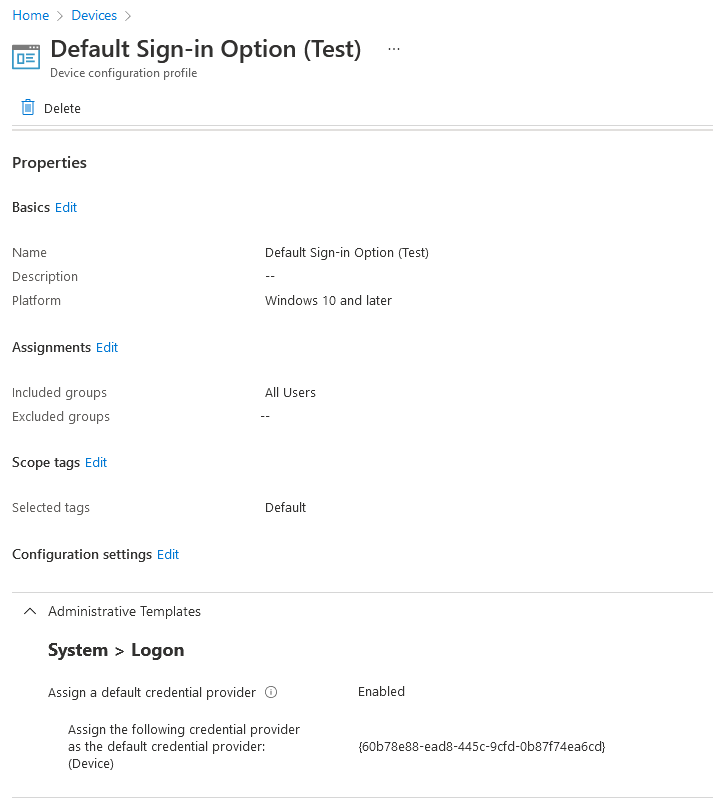

what could it be that this has not pulled?

Hello DominikMeier
Unfortunately this setting needs to be applied to the SID of each user LogonUI profile, and can't be set as default for "any" user.
--If the reply is helpful, please Upvote and Accept as answer--
Hello @Limitless Technology
I suspected that, is there any way to set this for all users on a device?

So where do we set it @Limitless Technology ? I cna script if I know where to set it.