Azure Data Factory
An Azure service for ingesting, preparing, and transforming data at scale.
This browser is no longer supported.
Upgrade to Microsoft Edge to take advantage of the latest features, security updates, and technical support.
' cx='32' cy='32' r='32' /%3E%3Ctext x='50%25' y='55%25' dominant-baseline='middle' text-anchor='middle' fill='%23FFF' %3EE%3C/text%3E%3C/svg%3E)
Our standard design practice for ADF pipelines has been to create a single generic pipeline for each source system data type (ie SQL Server, Oracle, SFTP, FileSystem, etc) were the connection and data asset details are dynamically driven by a database but we are struggling with following this approach for APIs. The initial batch of API sources were supported could be handled using the HTTPS dataset connector but we are now finding the need to move to using the REST dataset connector in order to support the additional authentication options like Managed Identity and AAD Service Principal. The problem we are running into with that move is how Header key/values are supported for the Copy activities when using a REST dataset vs a HTTPS dataset.
The HTTPS dataset usage allowed us to provide a single string value for the additionalHeaders property that contained multiple values like ["Content-Type": "application/x-www-form-urlencoded", "Accept": "application/json"]. When using a REST dataset for the Copy activity, it appears it takes a statically defined list of Header key/values. This is causing problems with our approach of generic pipelines since some REST API sources might just need a Content-Type value provided but others have additional key/value pairs. If the number of header key/value pairs was always the same, we could work around this issue but in the case where one API might have 1 required header item and another needs 3 and another needs 2, the concept falls apart. Has anyone else been able to create a method to dynamically drive both the number and key/values of Header key/value pairs in a Copy activity for a REST dataset similar to the HTTPS method?
When we try to deploy the template using the REST dataset via the json template, it appears to change the below snippet of code from:
                                    "additionalHeaders": {
                                        "value": "@{item().Headers}",
                                        "type": "Expression"
                                    }
to
"additionalHeaders": {
                                        "value": {
                                            "value": "@{item().Headers}",
                                            "type": "Expression"
                                        },
                                        "type": "Expression"
                                    }
This change is what produces the unexpected looking Additional Headers section for the REST dataset.
Copy Activity With HTTPS dataset
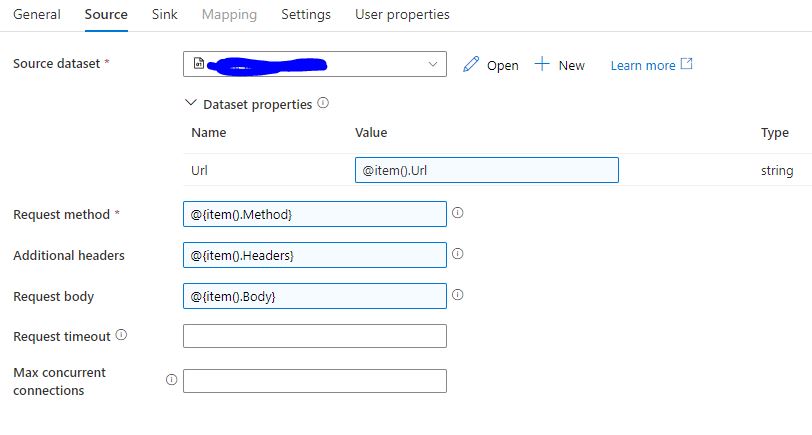
Copy Activity With REST dataset
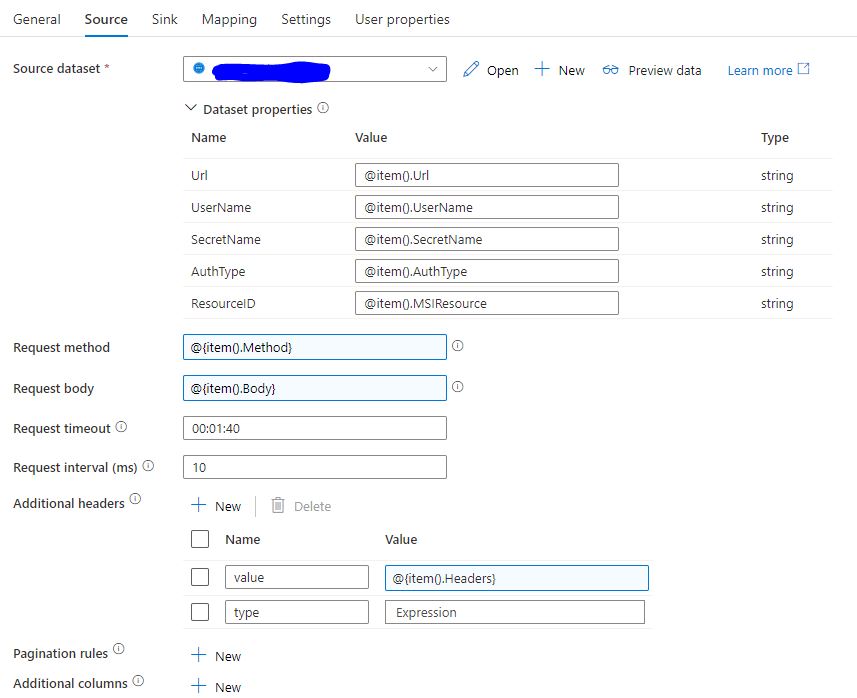
' cx='32' cy='32' r='32' /%3E%3Ctext x='50%25' y='55%25' dominant-baseline='middle' text-anchor='middle' fill='%23FFF' %3ESM%3C/text%3E%3C/svg%3E)
Hello @EES ,
Thanks for the question and using MS Q&A platform.
Unfortunately, you will not be able to set a dynamic string for the headers like you do for the HTTP Request. It expects only the key - value pair where only value can have the automated or dynamic content. You could see whether you could hardcode all the headers and pass only the values to the headers that are in your db - other headers will not have values but will be passed along the request.
Note - the accept headers are by default set for the REST Connectors - it will auto generate a header of Accept: application/json. - as only JSON response is accepted insider the rest connector.
Having said that, Understand this might not be suited approach, I would recommend you provide feedback on the same at this time.
Feedback Portal - Azure Data factory
All of the feedback you share in these forums will be monitored and reviewed by the Microsoft engineering teams responsible for building Azure.
Hope this will help. Please let us know if any further queries.
Thanks for the confirmation.
We were already aware of the accept headers limitation which did not impact us as of yet but we were concerned about it in the long term due to the lack of authentication options with the HTTPS connector which does still allow non-json options. Overall, it seems like these types of limitations in functionality might push us to other solutions besides ADF.