
we are getting below error
502 web server received an invalid response while acting as a gateway or proxy server
This browser is no longer supported.
Upgrade to Microsoft Edge to take advantage of the latest features, security updates, and technical support.
' cx='32' cy='32' r='32' /%3E%3Ctext x='50%25' y='55%25' dominant-baseline='middle' text-anchor='middle' fill='%23FFF' %3ES%3C/text%3E%3C/svg%3E)
Hello Team,
We recently implemented https to our site
Observed default page is not recognized after implementing https. - https://<websitename/<folder name>/
we need to type full url https://<websitename/<folder name>/default.htm
We already have default.htm in IIS "Default Document" list.
Please suggest.
we are getting below error
502 web server received an invalid response while acting as a gateway or proxy server
' cx='32' cy='32' r='32' /%3E%3Ctext x='50%25' y='55%25' dominant-baseline='middle' text-anchor='middle' fill='%23FFF' %3EBZ%3C/text%3E%3C/svg%3E)
Hi @SMARGRID ,
Please expand the site in IIS and check the <folder name>. Then open the Default Document module and enable it. In your case, the yellow highlight should be <folder name> home instead of <site name> home.
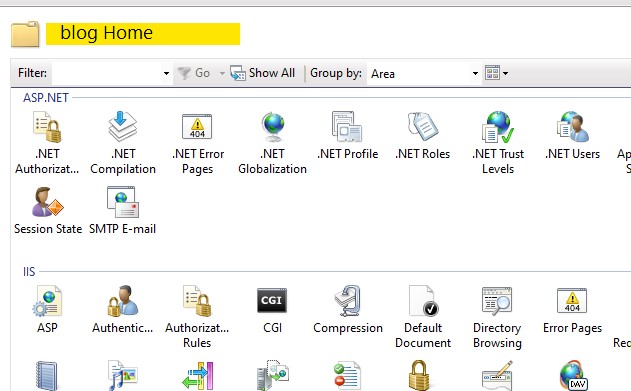
Explore <folder name> and make sure default.htm is in it, not in the root folder of site.
If you got 502 error, please show the error page and any other useful error information. Including substatus code and did you set reverse proxy or server farm, did you set gateway. If you set, how you set and configure IIS and them?
If the answer is the right solution, please click "Accept Answer" and kindly upvote it. If you have extra questions about this answer, please click "Comment".
Note: Please follow the steps in our documentation to enable e-mail notifications if you want to receive the related email notification for this thread.
Best regards,
Bruce Zhang