Azure Files
An Azure service that offers file shares in the cloud.
This browser is no longer supported.
Upgrade to Microsoft Edge to take advantage of the latest features, security updates, and technical support.

Hello,
I've an azure vm with apache web server installed and a web application there.
Since we are running low on storage, we decide to create an azure storage account with file shares and mount it on the vm. The problem is that the web application can't read the html pages stored there, even when we mount the azure files with 777 permissions.
Does anyone know's why this isn't working or telling me if this is even supported or not? I tried to do some research but couldn't find anything related to this problem exactly.
If this is not supported do we have any workaround we can try?
Thanks in advance.
An Azure service that offers file shares in the cloud.
Globally unique resources that provide access to data management services and serve as the parent namespace for the services.
Answer accepted by question author

@Daniel Nascimento Welcome to Microsoft Q&A Forum, Thank you for posting your query here!
Can you please share the screenshot of the error message?
May I know which OS are using(Mounting)?
Please cross verify the perquisites and settings : How to Mount Azure Storage as a local share in a custom container in App Service
You can also use Azure Blob Storage
Please refer to this link which helps you How to connect an app to Azure Storage and access the Storage : https://learn.microsoft.com/en-us/learn/modules/connect-an-app-to-azure-storage/
Please let us know if you have any further queries. I’m happy to assist you further.
----------
Please do not forget to  and “up-vote” wherever the information provided helps you, this can be beneficial to other community members.
OS - Ubuntu 18.04
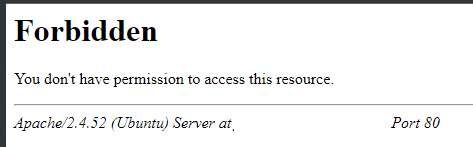
I don't know if that link will be usefull since we are using file shares in a azure vm and not app service.
I know we can use blob storage but the case here is: we want our web server to access the html pages and show them to the web. These pages are supposed to be in the file share.
To give you more information: The firewall is configured correctly, the storage account keys are correct (otherwise we couldn't access the files inside there in the vm and update the files there). So the storage account config is configured correctly.
' cx='32' cy='32' r='32' /%3E%3Ctext x='50%25' y='55%25' dominant-baseline='middle' text-anchor='middle' fill='%23FFF' %3EDG%3C/text%3E%3C/svg%3E)
Hi Daniel, Is your issue resolved ?. I see this thread is already marked as answer.
Hi,
Thanks for posting.
So you able to successfully mount the storage account but cannot access the files from website configured ? did you try to access the mount files directly without web.
Hello,
Thank you for answering
Yes inside the vm im able to access it. i created the files with nano editor just to test it and im able to open it. If that is what you mean.
One thing i forgot to say. From the quality environment we are able to access it, the different from the production vm is that the quality is not open to the internet, we are only able to access the website via the jumpbox. The jumpbox and the quality vm are all in the same vnet,
On the production website the web server is not able to read from it.
Just a resume:
Both of these VM's are exatcly the same