Microsoft Security | Microsoft Entra | Microsoft Entra ID
A cloud-based identity and access management service for securing user authentication and resource access

This browser is no longer supported.
Upgrade to Microsoft Edge to take advantage of the latest features, security updates, and technical support.
' cx='32' cy='32' r='32' /%3E%3Ctext x='50%25' y='55%25' dominant-baseline='middle' text-anchor='middle' fill='%23FFF' %3EMT%3C/text%3E%3C/svg%3E)
We've created a group in Azure Active Directory and assigned the role of "Authentication Admin". We've also added a second role "Help Desk Admin" (even though that shouldn't be necessary). The users that are members of this group should have the necessary permissions to go into a user's account and reset their password, re-register their MFA, or perform other MFA functions. However, when the members of this group with the proper roles go to do this, they get a message that says, "You do not have access to this data". I can't figure out why the roles we've assigned aren't working. Microsoft's documentation clearly states that this should work:
https://learn.microsoft.com/en-us/azure/active-directory/roles/permissions-reference#authentication-administrator
Here's an example:
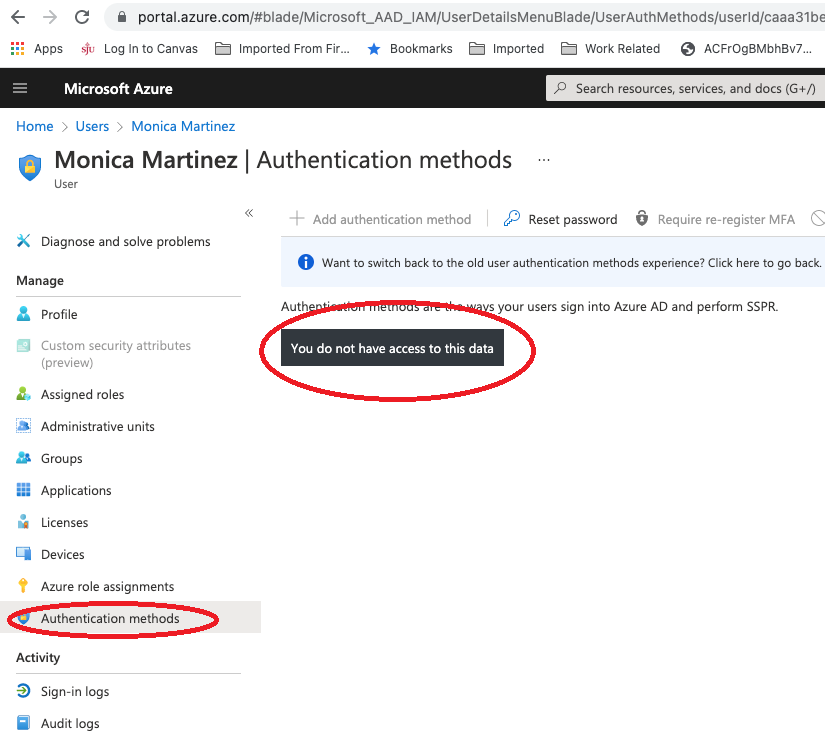

I can see that option correctly with Auth Admin.
Could be this just a caching delay from the group assignment? Is the assignment direct or eligible using PIM?
If you assign the role directly to the user, does it work for them after that?
Hey AndyDavid,
I removed a couple users from the group that's assigned the Authentication Admin and then explicitly assigned them that same role manually. Looks like that works, but it makes no sense. How long could a caching delay affect something like that - it's been in place for a few weeks, so not sure if it would be that.
Thanks,
Matt
Yea, should be relatively quick. I assume the groups are using :
https://learn.microsoft.com/en-us/azure/active-directory/privileged-identity-management/groups-discover-groups
Are the groups assigned directly using PIM or as eligible in PIM?
Does it work if you open a new browser menu and and connect incognito?
Unfortunately, we don't have an E5 license. Only an A3 - so we don't have access to the PIM preview.
I would open a case. Groups are assignable to Azure AD Dir Roles and it should work even though its relatively a new feature

Are you trying to see this data on another admin user? Only Privileged Authentication Admins can do so, "regular" Authentication admins get access to "regular" users' data only.
Thanks Michev, I confirmed that it's regular users and not admins.
Not sure it's an answer, but after opening a ticket with Microsoft, the "fix" was to remove the users from the group, and then add them back in. They provided this article, https://learn.microsoft.com/en-us/azure/active-directory/roles/groups-concept#known-issues, which says the following known issue:
"Azure Information Protection Portal (the classic portal) doesn't recognize role membership via group yet. You can migrate to the unified sensitivity labeling platform and then use the Office 365 Security & Compliance center to use group assignments to manage roles."
Not sure this is really related or if this is some sort of bug, but they weren't able to find out any root cause.
Thank you for the follow-up!