Developer technologies | .NET | Xamarin
A Microsoft framework for building cross-platform mobile apps using .NET and C# with native performance and user interfaces.
This browser is no longer supported.
Upgrade to Microsoft Edge to take advantage of the latest features, security updates, and technical support.
' cx='32' cy='32' r='32' /%3E%3Ctext x='50%25' y='55%25' dominant-baseline='middle' text-anchor='middle' fill='%23FFF' %3EMJ%3C/text%3E%3C/svg%3E)
Visual Studio Version: Visual Studio Community 2019
I'm trying to adjust the "Settings" for a Xamarin WebView, although am experiencing an error 'WebView' does not contain a definition for 'Settings'. Please note that all other accessors, variables, and functionalities work with the WebView, it is only the "Settings" that cannot be found. I need to adjust these settings in order to make adjustments to the WebView display. Please see the screenshot below:
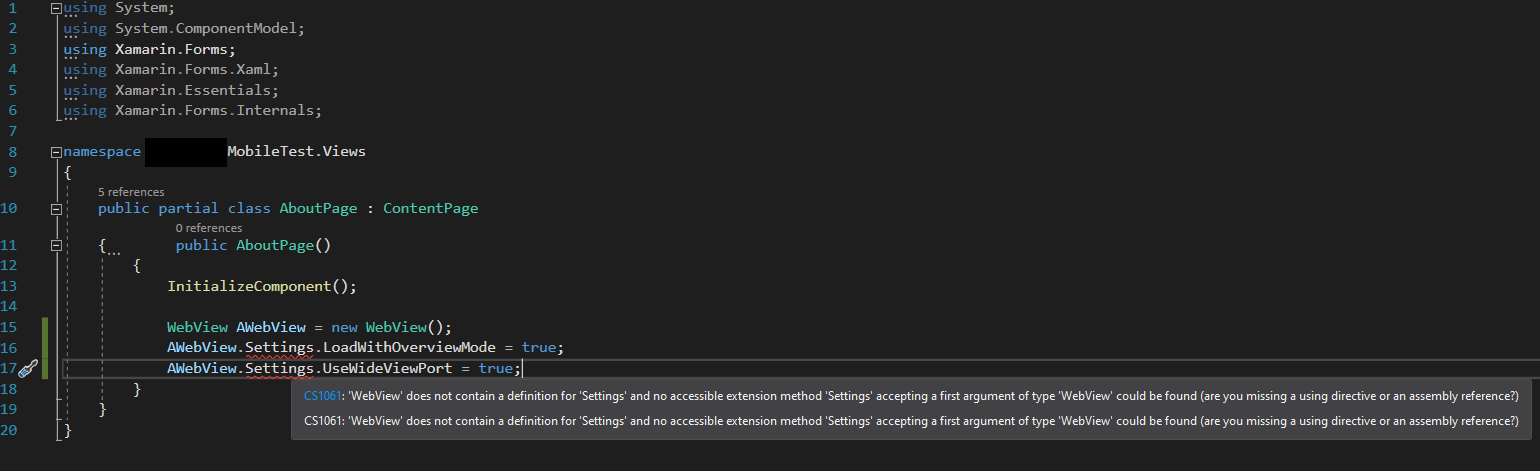
I've searched in many places and have been unable to find an occurrence of this error anywhere. I checked the assembly file (via the definition) for WebView and it also does not have a "Settings" property, variable, or function. Many online guides, videos, and tutorials on Xamarin easily reference and access the WebView "Settings", although it doesn't exist for me.
Additional Notes: I have restarted my computer and also created a new Xamarin Mobile project in Visual Studio Community 2022. The error still persists and "Settings" cannot be found.
I resolved this and am now able to access the "Settings" and properties that I was trying to find. I found there were various versions of the "WebView" component. Apparently there is a "Shared" WebView that is generic, and then there are platform specific "WebViews" that are part of separate sub-projects for each device type (android, iOS, etc). I had to create my own I was able to use a project called "JSWebView" as example for each "WebView" type to create a "CustomWebView" and "CustomWebViewRender", here is the link to the sample project: https://github.com/GuyMicciche/JSWebView
Cheers
' cx='32' cy='32' r='32' /%3E%3Ctext x='50%25' y='55%25' dominant-baseline='middle' text-anchor='middle' fill='%23FFF' %3EJ%3C/text%3E%3C/svg%3E)
Thanks for sharing the solution.