Share via

Get-AzADSpCredential -ObjectId

Monica Manoharan 66 Reputation points
2022-01-17T12:02:58.82+00:00

Hello Team,

I am using the code Get-AzADSpCredential -ObjectId xxxxxx , to get the service principle End date. When the same piece of code run in Azure Cli, it works and I could get the end date. I am trying to write the power shell code in Azure Automation Account and validate the end date of a service principle. So when trying this I am getting the error as "Insufficient Privilege to do this operation". Is this because of some permission that needs to be done in Azure Active Directory.

Thanks,
Monica.M

Windows for business | Windows Server | User experience | PowerShell
Microsoft Security | Microsoft Graph
0 comments No comments

3 answers

Sort by: Most helpful
  1. CarlZhao-MSFT 46,456 Reputation points
    2022-01-18T09:58:57.887+00:00

    Hi @Monica Manoharan

    Replenish:

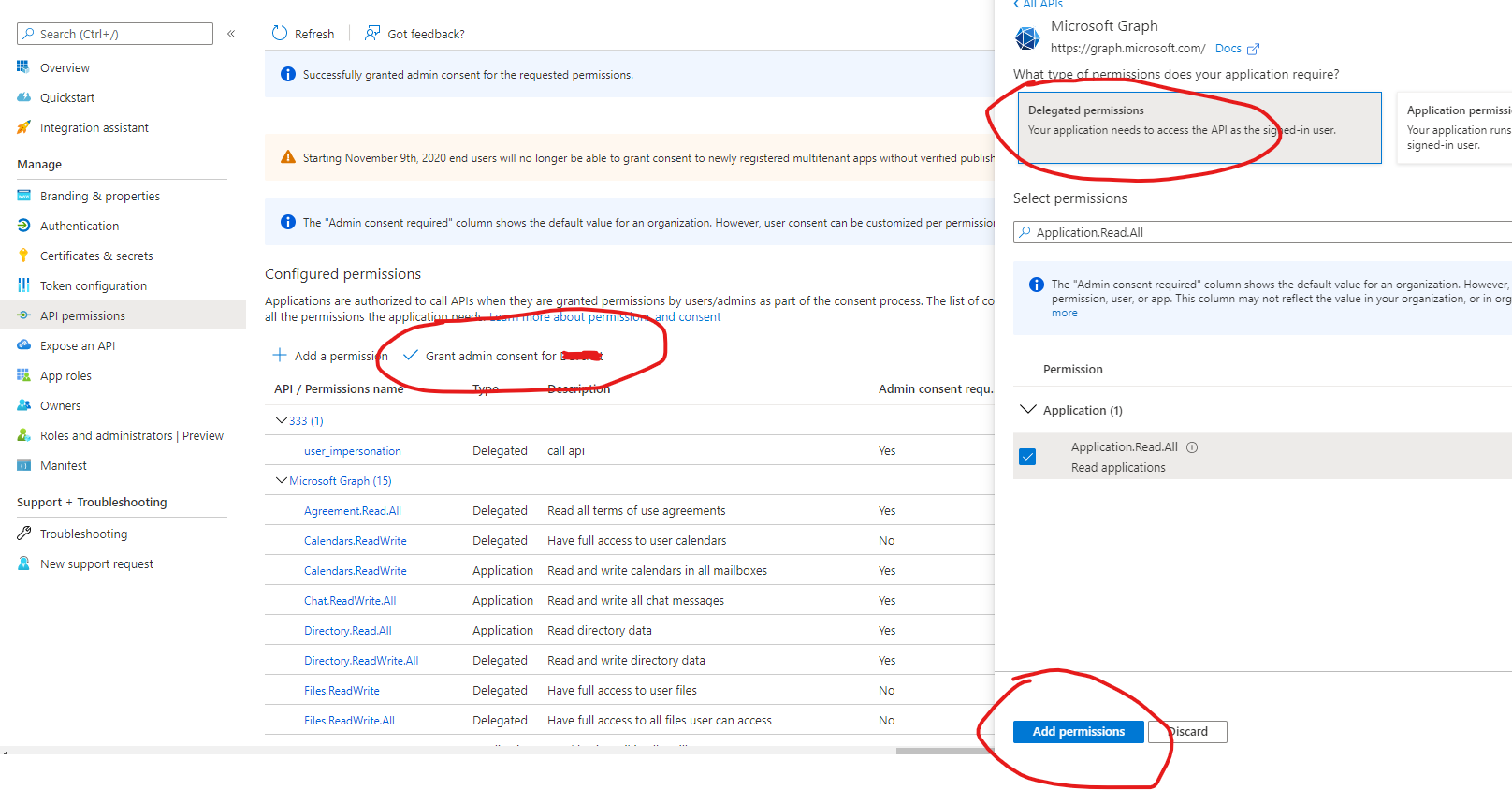
    If you are using Connect-AzAccount to log in users interactively, then you need to grant the Application.Read.All delegated permission and grant admin consent for that permission.
    166024-image.png


    If the answer is helpful, please click "Accept Answer" and kindly upvote it. If you have extra questions about this answer, please click "Comment".
    Note: Please follow the steps in our documentation to enable e-mail notifications if you want to receive the related email notification for this thread.

    Was this answer helpful?


  2. Limitless Technology 40,106 Reputation points
    2022-01-18T08:40:17.723+00:00

    Hello MonicaManoharan,

    You need to use an account that is Owner of the Service Principal: https://learn.microsoft.com/en-us/azure/active-directory/develop/app-objects-and-service-principals#service-principal-object

    ---------------------------------------------------------------------------------------------------------------------------

    --If the reply is helpful, please Upvote and Accept as answer--

    Was this answer helpful?

    0 comments No comments

  3. Manu Philip 20,651 Reputation points MVP Volunteer Moderator
    2022-01-17T14:28:18.017+00:00

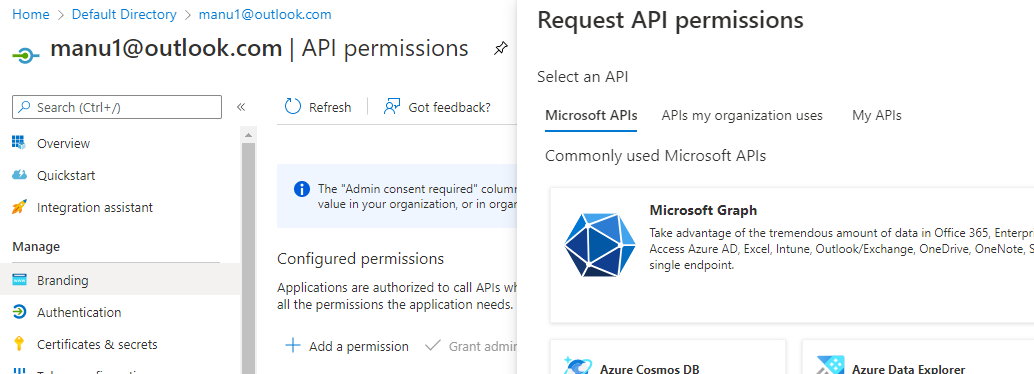
    Azure AD calls from PowerShell cmdlets need Graph API to have necessary permissions to be assigned. So, just give permissions to Graph API and try again.

    • Go to Azure Active Directory > App registrations and select the application used
    • Under the API permissions of the application, add Microsoft Graph
      165742-image.png
    • After adding the necessary permissions, try the PowerShell query again and see, if the issue is able to resolve

    ----------

    If the Answer is helpful, please click "Accept Answer" and upvote it

    Was this answer helpful?


Your answer

Answers can be marked as 'Accepted' by the question author and 'Recommended' by moderators, which helps users know the answer solved the author's problem.