Microsoft 365 and Office | Excel | For business | Windows
A family of Microsoft spreadsheet software with tools for analyzing, charting, and communicating data

This browser is no longer supported.
Upgrade to Microsoft Edge to take advantage of the latest features, security updates, and technical support.
' cx='32' cy='32' r='32' /%3E%3Ctext x='50%25' y='55%25' dominant-baseline='middle' text-anchor='middle' fill='%23FFF' %3EPM%3C/text%3E%3C/svg%3E)
Hi guys,
after fumbling around I need to adress this forum.
I am trying to create a personal dashboard. I created a table from which I then create my pivot tables / chart. I run into the problem with changing the date grouping, which then changes all the other charts (strangely not always, but at certain instances).
I read through various forums, and it seems like that the "Wizard" is the best option to create a different cache for different pivot tables. BUT, when I use the wizard, I never get asked if I want to use the same cache or create a different one...
Is there something I need to select in the base excel settings?
I use Excel 365.
I would highly appreciate some suggestions, as I am starting to rip my hair out ;)
Kind regards,
Peter

Hi @Peter Meraner ,
I am just writing to see if you have obtained the opportunity to test the solution. If anything is unclear with the previous information I've provided to you, please don't hesitate to let me know. I am glad to be of assistance.
If the response is helpful, please click "Accept Answer" and upvote it.
Note: Please follow the steps in our documentation to enable e-mail notifications if you want to receive the related email notification for this thread.
Hi @Peter Meraner ,
The "Wizard" doesn't have the option "Use the different cache". The Wizard feature is to help you create the different Cache for the same data source.
As shown in the following gif, for the different connection, you can create 2 different PivotTables and PivotCharts:
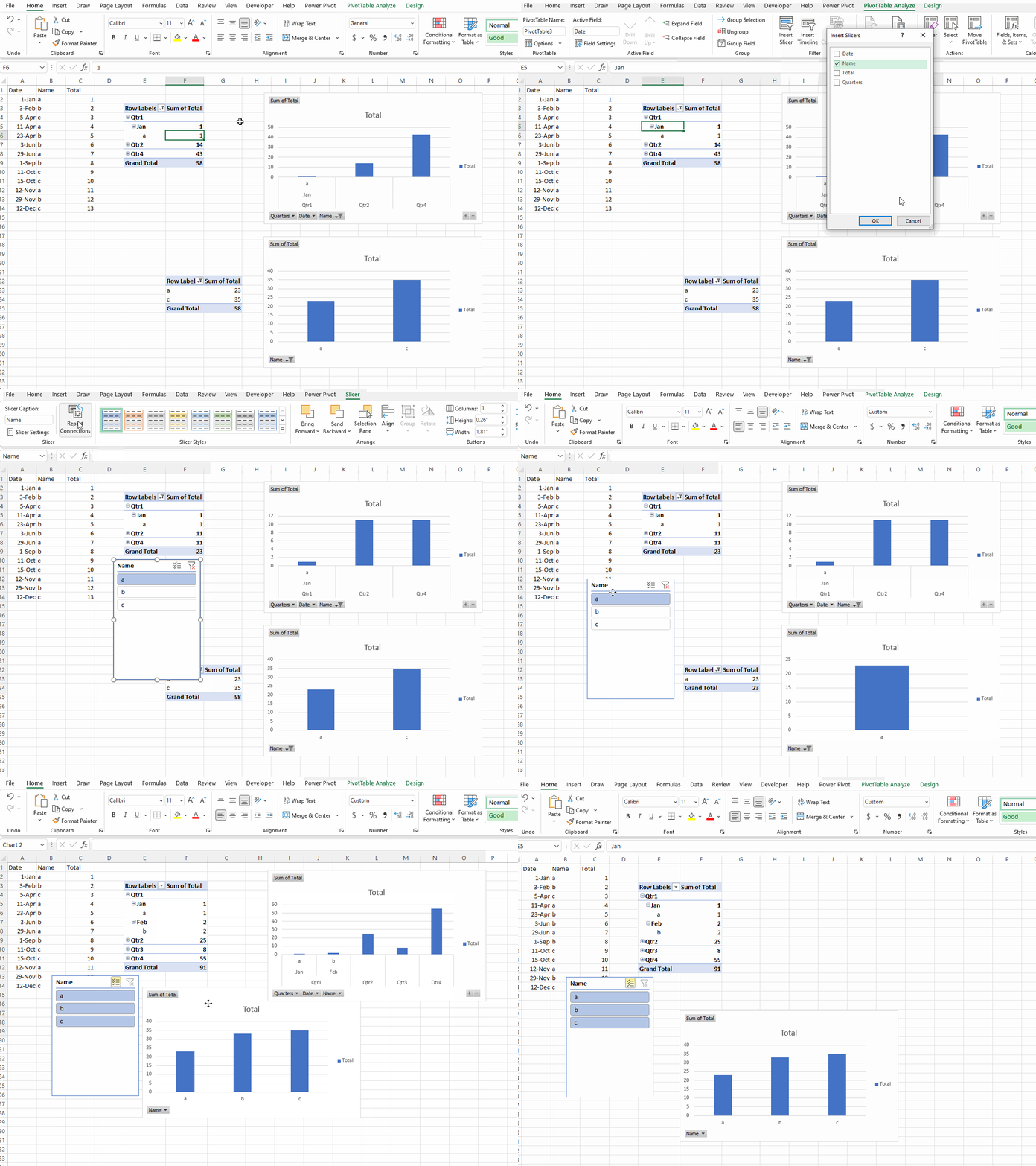
Hope the information is helpful.
If the response is helpful, please click "Accept Answer" and upvote it.
Note: Please follow the steps in our documentation to enable e-mail notifications if you want to receive the related email notification for this thread.
Hi @Peter Meraner ,
Just checking in to see if the information was helpful. Please let us know if you would like further assistance.