Azure Logic Apps
An Azure service that automates the access and use of data across clouds without writing code.
This browser is no longer supported.
Upgrade to Microsoft Edge to take advantage of the latest features, security updates, and technical support.
' cx='32' cy='32' r='32' /%3E%3Ctext x='50%25' y='55%25' dominant-baseline='middle' text-anchor='middle' fill='%23FFF' %3ERZ%3C/text%3E%3C/svg%3E)
Hi All
I have a Logic App which writes to an excel template which is stored in a SharePoint location.
The template has a table which has columns. I had no issues with the app which ran fine for a period of time.
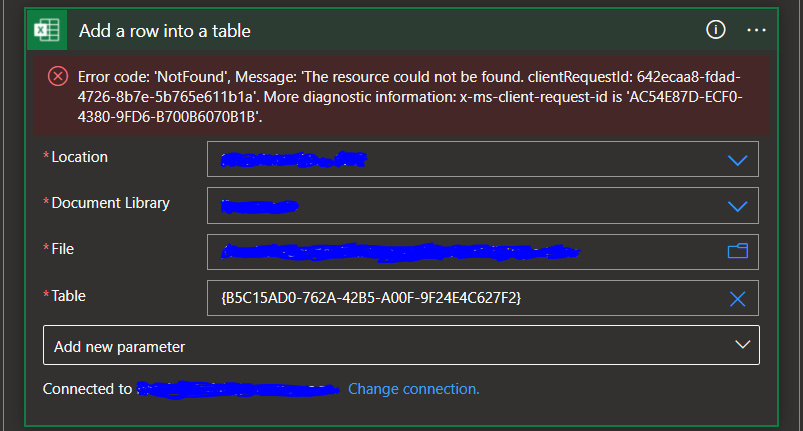
I am now receiving the error below.
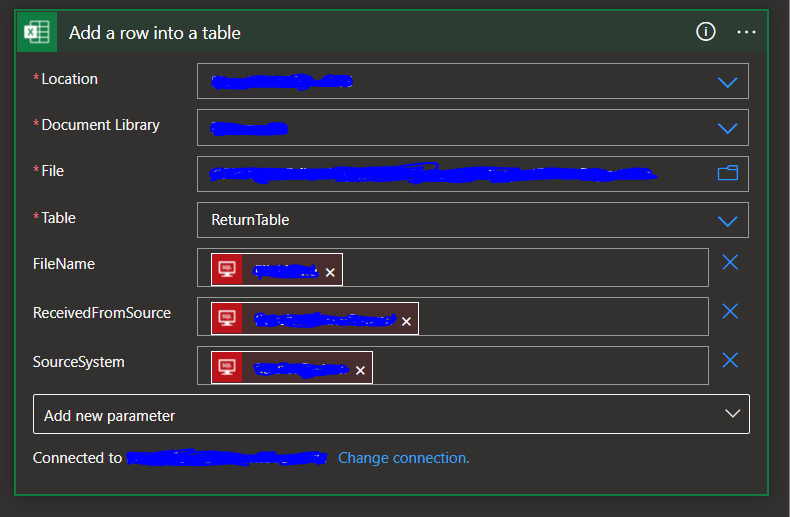
I have tried removing the entire function and adding it back which works but by the next day the error is back and removes all the table parameters which I'm parsing through the function and replaces the table name with the string in the Table name parameter as can be seen in the second screen shot below.
I have also tried creating new connections on the function.
I am not sure why this seems to be happening as I have other Apps performing the same functions without any problem.
Excel Add row Function populated with all parameters
Error received the next day

Welcome to Q&A forum ~
I want to help you, but the tag "office-excel-itpro" focuses more on general issue of Excel client.
Your issue is related to Power Automate, to help you better, I would suggest you post a new thread on following forum.
Microsoft Power Automate Community
Thanks for your understanding.
If the answer is helpful, please click "Accept Answer" and kindly upvote it. If you have extra questions about this answer, please click "Comment".
Note: Please follow the steps in our documentation to enable e-mail notifications if you want to receive the related email notification for this thread.
Noted thank you very much appreciated.
I will do that ,thank you

@Rezah Zakiriah Can you please confirm the second screenshot that you have shared is from the run history when your workflow is executed? As per the error looks like either the file is changed/modified which could have resulted in the exception that you have shared in your screenshot. Please verify if this is not the case and please confirm if any of the value location, document library, or file is dynamically specified in your workflow?