Share via

Drop-down menu appears incorrectly when working on WSL 2

lh brick 21 Reputation points
2022-01-21T07:18:06.197+00:00

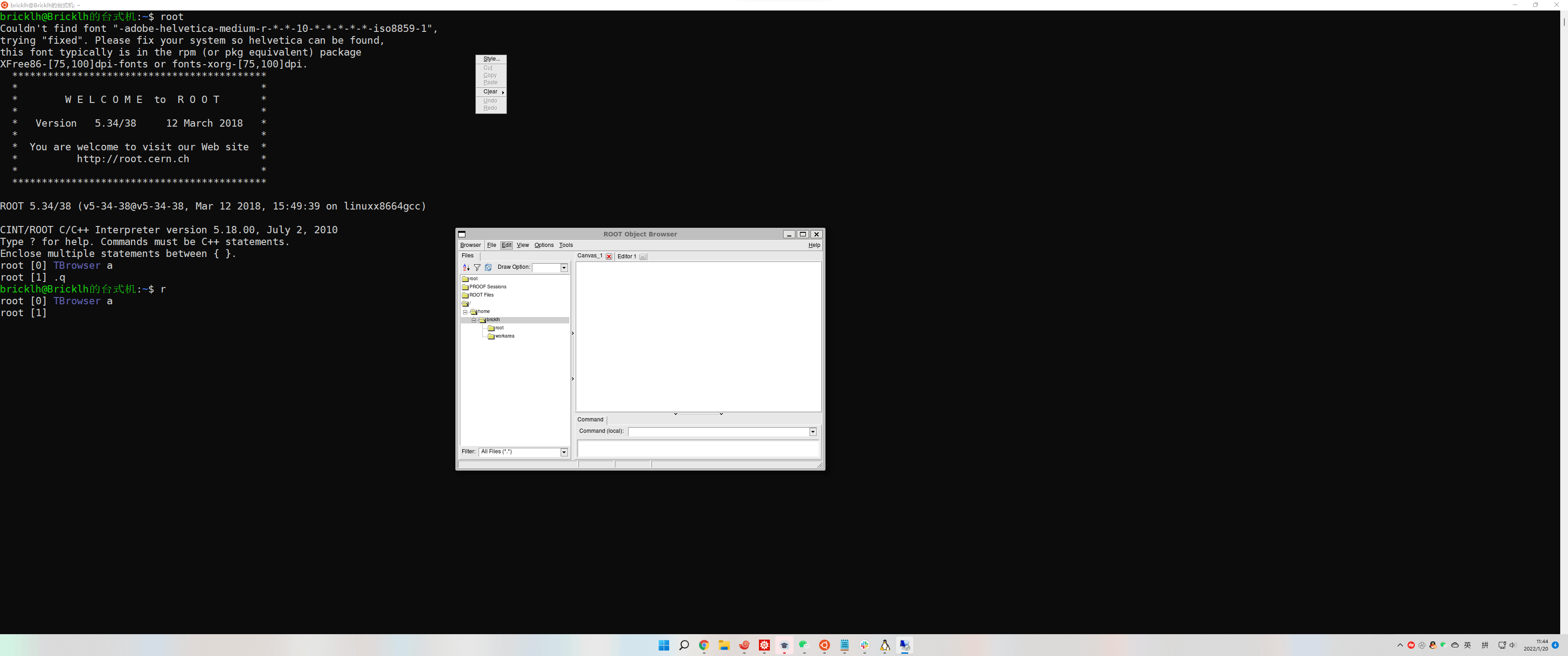
For my work, I need to use Ubuntu via WSL 2 with Windows 11. When I operate some graphic streaming windows transferred from the Ubuntu terminal (e.g., software such as CREN ROOT), the drop-down menu appears randomly in a particular position on the screen (As shown in the figure below). Please help me to solve it.
167064-screenshot.png

Windows for business | Windows Client for IT Pros | User experience | Other
0 comments No comments

Answer accepted by question author

Limitless Technology 40,106 Reputation points
2022-01-24T15:42:24.933+00:00

Hi there,

It might be a Bug with WSL 2, I would suggest you file a bug report and see how it goes as it seems there is no known issue with the drop-down list.

Troubleshooting Windows Subsystem for Linux https://learn.microsoft.com/en-us/windows/wsl/troubleshooting

-------------------------------------------------------------------------------------------------------------------------

--If the reply is helpful, please Upvote and Accept it as an answer--

Was this answer helpful?


0 additional answers

Sort by: Most helpful

Your answer

Answers can be marked as 'Accepted' by the question author and 'Recommended' by moderators, which helps users know the answer solved the author's problem.