Microsoft 365 and Office | SharePoint | For business | Windows
A group of Microsoft Products and technologies used for sharing and managing content, knowledge, and applications.

This browser is no longer supported.
Upgrade to Microsoft Edge to take advantage of the latest features, security updates, and technical support.
' cx='32' cy='32' r='32' /%3E%3Ctext x='50%25' y='55%25' dominant-baseline='middle' text-anchor='middle' fill='%23FFF' %3EMH%3C/text%3E%3C/svg%3E)
I've tried every variation of this but as soon as I add the scope of sites, it gives no results:
(Path:"https://xxx.sharepoint.com/sites/xxx-brand-portal/Designer%20Assets" OR "https://xxx.sharepoint.com/sites/xxx-brand-portal/General%20Assets" OR "https://xxx.sharepoint.com/sites/xxx-brand-portal/VDS%20Reference%20Thumbnails") AND (FileExtension:gif OR FileExtension:png OR FileExtension:jpg OR FileExtension:mp4 OR FileExtension:doc OR FileExtension:docx OR FileExtension:xls OR FileExtension:xlsx OR FileExtension:ppt OR FileExtension:pptx OR FileExtension:pdf) AND (IsDocument:"True" OR contentclass:"STS_ListItem")
Extensions alone work but I need to exclude files outside the 3 libraries.
Wrapping multiple urls in parentheses is working in other applications so not sure why it fails here.

Hi @matt howell ,
As per my test, I cannot reproduce this issue on my end and this query text works on my end. I would suggest new a service request in Microsoft 365 admin center. Check with Microsoft experts if there is something wrong in the backend which is controlled by Microsoft and end users have no access to.
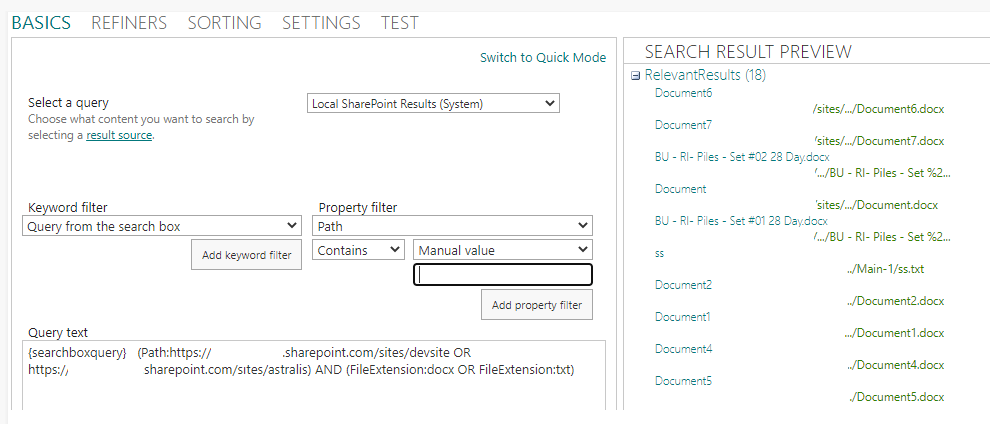
----------
If the answer is helpful, please click "Accept Answer" and kindly upvote it. If you have extra questions about this answer, please click "Comment".
Note: Please follow the steps in our documentation to enable e-mail notifications if you want to receive the related email notification for this thread.
Definitely not working right - it's only returning dotx and pdf files. None of the media files are returned - like jpg's, png's, eps files etc. Only 18 out of 100+ eligible files that meet the criteria.
As i couldn't reproduce this issue on my end. I would suggest opening a ticket with Microsoft to check this issue with professional experts.