Exchange Online
A cloud-based service included in Microsoft 365, delivering scalable messaging and collaboration features with simplified management and automatic updates.
This browser is no longer supported.
Upgrade to Microsoft Edge to take advantage of the latest features, security updates, and technical support.
' cx='32' cy='32' r='32' /%3E%3Ctext x='50%25' y='55%25' dominant-baseline='middle' text-anchor='middle' fill='%23FFF' %3ERR%3C/text%3E%3C/svg%3E)
Hi All
i am using exchange 2016 Hybrid environment. i have 3 mailbox servers. I am trying to upgrade from Exchange Server 2016 CU21 to Exchange Server 2016 CU22. Antivirus is disabled on the servers and windows defender is enabled on the servers.
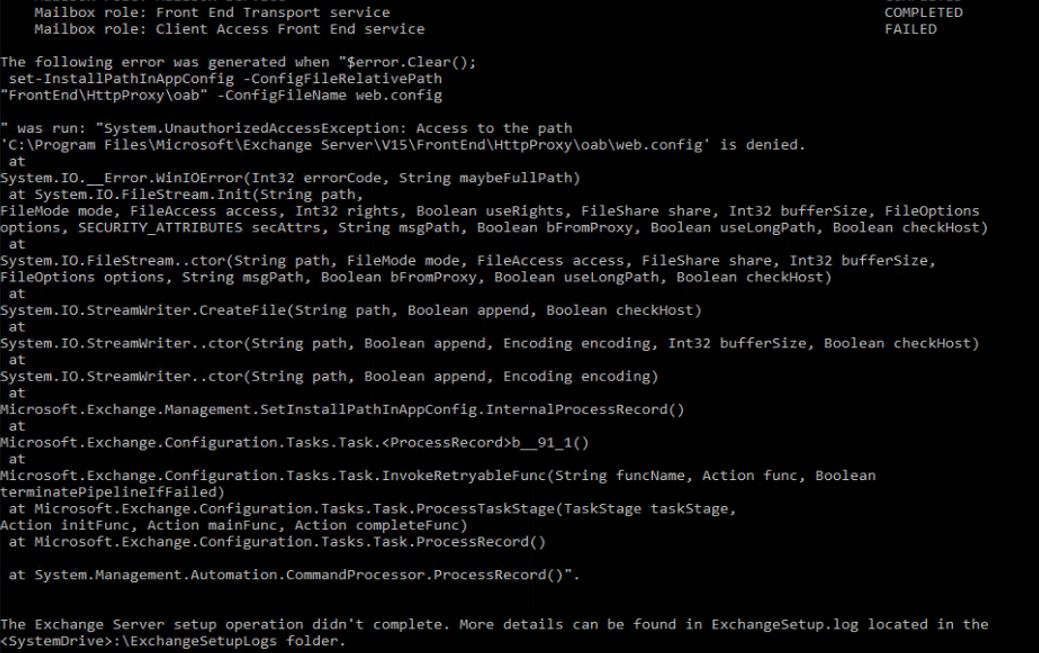
On Server01 i got the below error when upgrading
C:\Program Files\Microsoft\Exchange Server\V15\FrontEnd\HttpProxy\oab\web.config is denied.
i have given full control to everyone on the file web.config and retried the installation and the installation is successful.
On Server02, before starting the installation i have given full control to everyone on the file web.config but still i got the error web.config access is denied.
When i looked into the path C:\Program Files\Microsoft\Exchange Server\V15\FrontEnd\HttpProxy\oab, web.config file is missing but i was able to see another file web.config.bak, i have renamed the file to web.config.bak to web.config and retried the installation and it is successful.
On Server03 i want to perform the upgrade and i dont want to run in the same issue. experts guide me
' cx='32' cy='32' r='32' /%3E%3Ctext x='50%25' y='55%25' dominant-baseline='middle' text-anchor='middle' fill='%23FFF' %3EJS%3C/text%3E%3C/svg%3E)
Hi @Roger Roger
You could temporarily disable windows defender as well, sometimes the defender will prevent the installation.
Please also check if any related error recorded in application log (event viewer) and ExchangeSetup log, you could share the information there for further troubleshooting.
If an Answer is helpful, please click "Accept Answer" and upvote it.
Note: Please follow the steps in our documentation to enable e-mail notifications if you want to receive the related email notification for this thread.
[01/19/2022 09:38:28.0538] [2] Active Directory session settings for 'Set-InstallPathInAppConfig' are: View Entire Forest: 'True', Configuration Domain Controller:
'@mydomain.com', Preferred Global Catalog: '@mydomain.com', Preferred Domain Controllers: '{ ******@mydomain.com }'
[01/19/2022 09:38:28.0538] [2] User specified parameters: -ConfigFileRelativePath:'FrontEnd\HttpProxy\oab' -ConfigFileName:'web.config'
[01/19/2022 09:38:28.0538] [2] Beginning processing set-InstallPathInAppConfig
[01/19/2022 09:38:28.0544] [2] [ERROR] Access to the path 'C:\Program Files\Microsoft\Exchange Server\V15\FrontEnd\HttpProxy\oab\web.config' is denied.
[01/19/2022 09:38:28.0545] [2] [WARNING] An unexpected error has occurred and a Watson dump is being generated: Access to the path 'C:\Program Files\Microsoft\Exchange Server\V15\FrontEnd\HttpProxy\oab\web.config' is denied.
[01/19/2022 09:38:29.0249] [1] The following 1 error(s) occurred during task execution:
[01/19/2022 09:38:29.0249] [1] 0. ErrorRecord: Access to the path 'C:\Program Files\Microsoft\Exchange Server\V15\FrontEnd\HttpProxy\oab\web.config' is denied.
[01/19/2022 09:38:29.0249] [1] 0. ErrorRecord: System.UnauthorizedAccessException: Access to the path 'C:\Program Files\Microsoft\Exchange Server\V15\FrontEnd\HttpProxy\oab\web.config' is denied.
at System.IO.__Error.WinIOError(Int32 errorCode, String maybeFullPath)
at System.IO.FileStream.Init(String path, FileMode mode, FileAccess access, Int32 rights, Boolean useRights, FileShare share, Int32 bufferSize, FileOptions options, SECURITY_ATTRIBUTES secAttrs, String msgPath,
Boolean bFromProxy, Boolean useLongPath, Boolean checkHost)
at System.IO.FileStream..ctor(String path, FileMode mode, FileAccess access, FileShare share, Int32 bufferSize, FileOptions options, String msgPath, Boolean bFromProxy, Boolean useLongPath, Boolean checkHost)
at System.IO.StreamWriter.CreateFile(String path, Boolean append, Boolean checkHost)
at System.IO.StreamWriter..ctor(String path, Boolean append, Encoding encoding, Int32 bufferSize, Boolean checkHost)
at System.IO.StreamWriter..ctor(String path, Boolean append, Encoding encoding)
at Microsoft.Exchange.Management.SetInstallPathInAppConfig.InternalProcessRecord()
at Microsoft.Exchange.Configuration.Tasks.Task.<ProcessRecord>b__91_1()
at Microsoft.Exchange.Configuration.Tasks.Task.InvokeRetryableFunc(String funcName, Action func, Boolean terminatePipelineIfFailed)
at Microsoft.Exchange.Configuration.Tasks.Task.ProcessTaskStage(TaskStage taskStage, Action initFunc, Action mainFunc, Action completeFunc)
at Microsoft.Exchange.Configuration.Tasks.Task.ProcessRecord()
at System.Management.Automation.CommandProcessor.ProcessRecord()
[01/19/2022 09:38:29.0252] [1] [ERROR] The following error was generated when "$error.Clear();
set-InstallPathInAppConfig -ConfigFileRelativePath "FrontEnd\HttpProxy\oab" -ConfigFileName web.config
" was run: "System.UnauthorizedAccessException: Access to the path 'C:\Program Files\Microsoft\Exchange Server\V15\FrontEnd\HttpProxy\oab\web.config' is denied.
at System.IO.__Error.WinIOError(Int32 errorCode, String maybeFullPath)
at System.IO.FileStream.Init(String path, FileMode mode, FileAccess access, Int32 rights, Boolean useRights, FileShare share, Int32 bufferSize, FileOptions options, SECURITY_ATTRIBUTES secAttrs,
String msgPath, Boolean bFromProxy, Boolean useLongPath, Boolean checkHost)
at System.IO.FileStream..ctor(String path, FileMode mode, FileAccess access, FileShare share, Int32 bufferSize, FileOptions options, String msgPath, Boolean bFromProxy, Boolean useLongPath, Boolean checkHost)
at System.IO.StreamWriter.CreateFile(String path, Boolean append, Boolean checkHost)
at System.IO.StreamWriter..ctor(String path, Boolean append, Encoding encoding, Int32 bufferSize, Boolean checkHost)
at System.IO.StreamWriter..ctor(String path, Boolean append, Encoding encoding)
at Microsoft.Exchange.Management.SetInstallPathInAppConfig.InternalProcessRecord()
at Microsoft.Exchange.Configuration.Tasks.Task.<ProcessRecord>b__91_1()
at Microsoft.Exchange.Configuration.Tasks.Task.InvokeRetryableFunc(String funcName, Action func, Boolean terminatePipelineIfFailed)
at Microsoft.Exchange.Configuration.Tasks.Task.ProcessTaskStage(TaskStage taskStage, Action initFunc, Action mainFunc, Action completeFunc)
at Microsoft.Exchange.Configuration.Tasks.Task.ProcessRecord()
at System.Management.Automation.CommandProcessor.ProcessRecord()".
[01/19/2022 09:38:29.0252] [1] [ERROR] Access to the path 'C:\Program Files\Microsoft\Exchange Server\V15\FrontEnd\HttpProxy\oab\web.config' is denied.
[01/19/2022 09:38:29.0253] [1] [ERROR-REFERENCE] Id=CafeComponent___08b9469698c643ebb821ad7e58bccaa5 Component=EXCHANGE14:\Current\Release\Shared\DIY\Recipients&Provisioning\OAB
[01/19/2022 09:38:29.0254] [1] Setup is stopping now because of one or more critical errors.
[01/19/2022 09:38:29.0254] [1] Finished executing component tasks.
[01/19/2022 09:38:29.0263] [1] Ending processing Install-CafeRole
[01/19/2022 09:38:29.0268] [0] CurrentResult console.ProcessRunInternal:198: 1
[01/19/2022 09:38:29.0272] [0] CurrentResult launcherbase.maincore:90: 1
[01/19/2022 09:38:29.0272] [0] CurrentResult console.startmain:52: 1
[01/19/2022 09:38:29.0272] [0] CurrentResult SetupLauncherHelper.loadassembly:452: 1
[01/19/2022 09:38:29.0272] [0] The Exchange Server setup operation didn't complete. More details can be found in ExchangeSetup.log located in the <SystemDrive>:\ExchangeSetupLogs folder.
[01/19/2022 09:38:29.0273] [0] CurrentResult main.run:235: 1
[01/19/2022 09:38:29.0273] [0] CurrentResult setupbase.maincore:396: 1
[01/19/2022 09:38:29.0274] [0] End of Setup
Hi @Roger Roger
Have you tried the suggestion above disable windows defender then perform the upgrade again?
If an Answer is helpful, please click "Accept Answer" and upvote it.
Note: Please follow the steps in our documentation to enable e-mail notifications if you want to receive the related email notification for this thread.