Microsoft 365 and Office | SharePoint | For business | Windows
A group of Microsoft Products and technologies used for sharing and managing content, knowledge, and applications.

This browser is no longer supported.
Upgrade to Microsoft Edge to take advantage of the latest features, security updates, and technical support.
' cx='32' cy='32' r='32' /%3E%3Ctext x='50%25' y='55%25' dominant-baseline='middle' text-anchor='middle' fill='%23FFF' %3ER%3C/text%3E%3C/svg%3E)
Hello,
We have a external SP online facing site, where external user can upload documents into library but We don't want to allow them to edit file in the browser rather they will need to download file locally to edit and then upload again. Is it possible to achieve creating custom permission level or some custom code?
Thanks in advance
A group of Microsoft Products and technologies used for sharing and managing content, knowledge, and applications.

Hi @Raki ,
In your case, It is recommended to set Default open behavior for browser-enabled documents to Open in the client application. Go to Library settings > Advanced Settings, you will find the option under the "Opening Documents in the Browser" section.
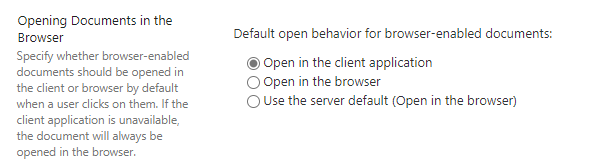
After then, when users click the file in the library, a prompt message which instruct them to open the file in the client application will appear.
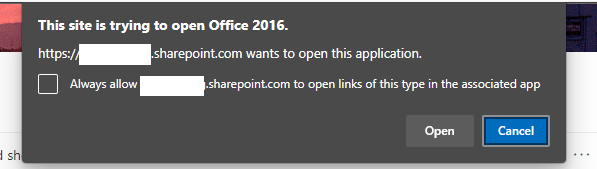
The document will be opened in the client application as read-only mode. They cannot save the file with the same name directly to the SharePoint Online library and have to save the document with a new name or save to local and upload again.
----------
If the answer is helpful, please click "Accept Answer" and kindly upvote it. If you have extra questions about this answer, please click "Comment".
Note: Please follow the steps in our documentation to enable e-mail notifications if you want to receive the related email notification for this thread.
Thanks for your reply. i think the point you mentioned documents will be open read only mode that works only when you are in classic experience not modern. in modern if i click on the document, directly opening with client application and can edit them and automatically saving into SharePoint.
Thanks
If you are using Office Microsoft 365 subscription(I tested based on Office 2016), yes, it is the situation. I'm afraid there is no OOTB way to force to download files instead opening in the browser.
' cx='32' cy='32' r='32' /%3E%3Ctext x='50%25' y='55%25' dominant-baseline='middle' text-anchor='middle' fill='%23FFF' %3ECH%3C/text%3E%3C/svg%3E)
This does not help for me : opening docs in app instead of browser does not open them in read only mode. I can still edit the docs and save them : changes are then saved in sharepoint instead of locally.
' cx='32' cy='32' r='32' /%3E%3Ctext x='50%25' y='55%25' dominant-baseline='middle' text-anchor='middle' fill='%23FFF' %3ENS%3C/text%3E%3C/svg%3E)
I've set this option and it seems to work fine for MS docs like Word but not for PDFs. I have a bunch of PDF forms that I need users to open in their PDF viewer in order to be able to digitally sign them. When they open in the browser it lets them fill them out but they can't digitally sign.