FunctionGivingErrorWhileTryingCall

sns 9,251 Reputation points
2022-01-24T08:50:38.667+00:00

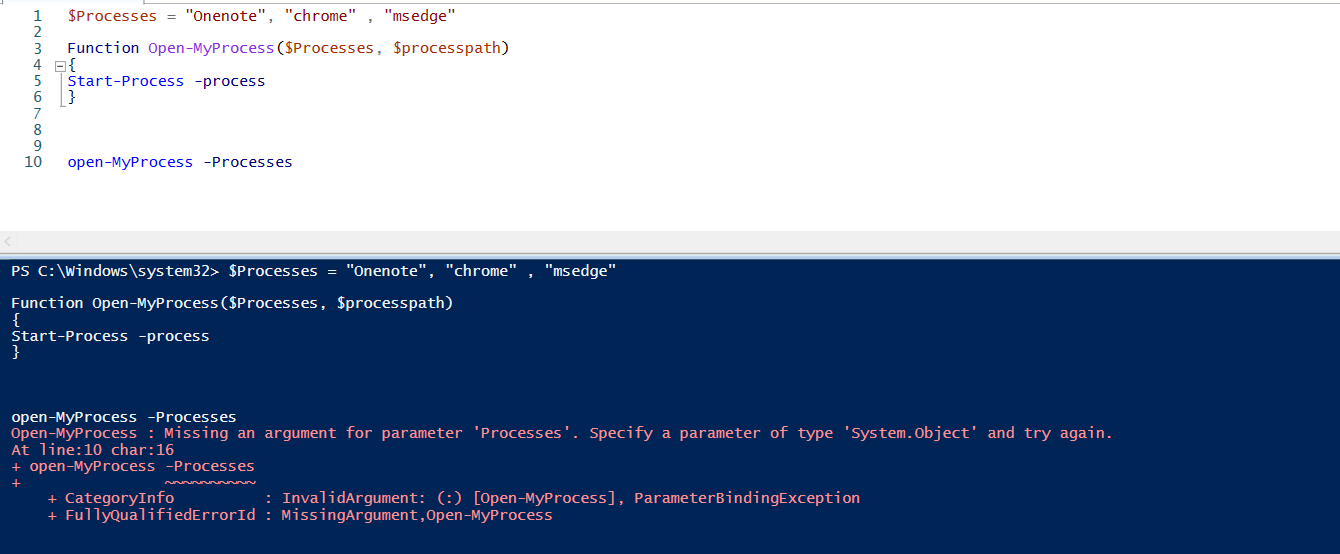
I want to open some of the processes with the help of function, But I saw below warning which I am not quite sure, Please assist
and Also what I should do to use this function every time when I log in ISE ( not only for current session, I need for all sessions )

Please help

167785-wanttocreatefunctionforopeningprocessesalways.png

Windows for business | Windows Server | User experience | PowerShell
0 comments No comments
{count} votes

2 answers

Sort by: Most helpful
  1. MotoX80 37,161 Reputation points
    2022-01-24T14:04:15.873+00:00

    You should start by downloading and reviewing this document.

    https://www.sapien.com/books_training/Windows-PowerShell-4

    Powershell can use positional parameters or named parameters.

    function TestPosition ($ProcessName,$SomethingElse) {
        Write-Host ""
        Write-Host "You asked me to look for $ProcessName." 
        Write-Host "And do something with $SomethingElse." 
        Get-Process $ProcessName
    }
    function TestNamed {param (
            [string]$ProcessName = "",
            [string]$SomethingElse = ""
        )
        Write-Host ""
        Write-Host "You asked me to look for $ProcessName." 
        Write-Host "And do something with $SomethingElse." 
        Get-Process $ProcessName
    
    }
    TestPosition "notepad" "foo"
    TestNamed -SomethingElse "XXXXXX" -ProcessName "Powershell"

    
    0 comments No comments

  2. Limitless Technology 40,081 Reputation points
    2022-01-28T08:51:13.6+00:00

    Hi there,

    There are many ways to handle errors in Windows PowerShell, including:

    $Error.Clear(); Do-Something; If ($Error) {..} Else {..}
    Trap
    $ErrorActionPreference

    Trap blocks generally catch any errors in the scope of the entire script or function. The beauty of Try, Catch, Finally is that it is like a localized Trap for a specific block of commands. This gives you great flexibility in your error handling.

    Here are some links to help you out

    Using Try, Catch, Finally Blocks for PowerShell Error Handling
    https://devblogs.microsoft.com/scripting/weekend-scripter-using-try-catch-finally-blocks-for-powershell-error-handling/

    Handling Errors the PowerShell Way
    https://devblogs.microsoft.com/scripting/handling-errors-the-powershell-way/


    --If the reply is helpful, please Upvote and Accept it as an answer--

    0 comments No comments

Your answer

Answers can be marked as 'Accepted' by the question author and 'Recommended' by moderators, which helps users know the answer solved the author's problem.