Azure Synapse Analytics
An Azure analytics service that brings together data integration, enterprise data warehousing, and big data analytics. Previously known as Azure SQL Data Warehouse.
This browser is no longer supported.
Upgrade to Microsoft Edge to take advantage of the latest features, security updates, and technical support.
' cx='32' cy='32' r='32' /%3E%3Ctext x='50%25' y='55%25' dominant-baseline='middle' text-anchor='middle' fill='%23FFF' %3EA%3C/text%3E%3C/svg%3E)
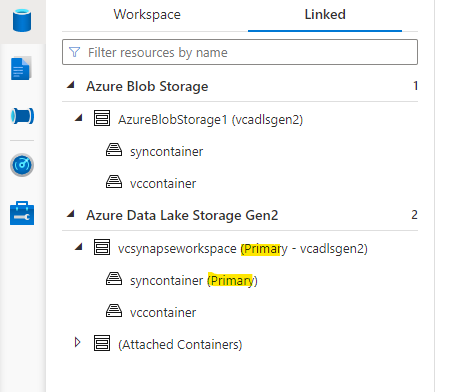
When I add a container inside the storage container, I see the same container in both places as you see below.
Do you know why adls gen2 seems to be replicated as those in blobstorage?
Inside the synapse workspace, Data tab, Linked section, I see:
Azure Blob Storage
LsBlobStorage(DevStorageAccountName)
ContainerA
ContainerB
ContainerC
Azure Data Lake Storage Gen2
DevEndPointName (Primar - DevStorageAccountName)
synapsefs (Primary)
ContainerA
ContainerB
ContainerC

When we create a new Synapse workspace, we should specify the Primary storage account and container to be used.
You have used DevStorageAccount as primary and in addition to that, you might have clicked on + button and added same DevStorage account in Linked tab.
So it is a same DevStorageAccount, but you see 2 duplicate views there like below:
----------
Please don't forget to Accept Answer and Up-vote if the response helped -- Vaibhav