Developer technologies | .NET | Other
Microsoft Technologies based on the .NET software framework. Miscellaneous topics that do not fit into specific categories.
This browser is no longer supported.
Upgrade to Microsoft Edge to take advantage of the latest features, security updates, and technical support.
' cx='32' cy='32' r='32' /%3E%3Ctext x='50%25' y='55%25' dominant-baseline='middle' text-anchor='middle' fill='%23FFF' %3EWA%3C/text%3E%3C/svg%3E)
I have try to download a package on package manager with https://nuget.org as the source but it output a error as feed back. How can I fix that error?
Severity Code Description Project File Line Suppression State
Error [Package source] The V2 feed at 'https://www.nuget.org/Search()?$filter=IsLatestVersion&searchTerm=''&targetFramework='net47'&includePrerelease=false&$skip=0&$top=26&semVerLevel=2.0.0' returned an unexpected status code '404 Not Found'.
' cx='32' cy='32' r='32' /%3E%3Ctext x='50%25' y='55%25' dominant-baseline='middle' text-anchor='middle' fill='%23FFF' %3ETS%3C/text%3E%3C/svg%3E)
Hi @Wilson Au-Yeung ,
Welcome to Microsoft Q&A forum.
Does it work, if you add https://api.nuget.org/v3/index.json as package source(Tools > Options > NuGet Package Manager > Package Sources)?
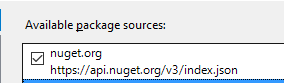
If the package source was set to https://api.nuget.org/v3/index.json by default, then can other NuGet packages successfully be downloaded?
Best Regards,
Tianyu
Hi Tianyu,
It's work after I add the link as package source. Thanks for your help.
Hi @Wilson Au-Yeung , no problem, happy to hear that, have a great day:)
' cx='32' cy='32' r='32' /%3E%3Ctext x='50%25' y='55%25' dominant-baseline='middle' text-anchor='middle' fill='%23FFF' %3ERM%3C/text%3E%3C/svg%3E)
You answer solve my problem, thank you!
' cx='32' cy='32' r='32' /%3E%3Ctext x='50%25' y='55%25' dominant-baseline='middle' text-anchor='middle' fill='%23FFF' %3EPE%3C/text%3E%3C/svg%3E)
I have the same issue too and the solution just working well. Thank you.
' cx='32' cy='32' r='32' /%3E%3Ctext x='50%25' y='55%25' dominant-baseline='middle' text-anchor='middle' fill='%23FFF' %3EHV%3C/text%3E%3C/svg%3E)
YES ! it resolved my issue! thank you
' cx='32' cy='32' r='32' /%3E%3Ctext x='50%25' y='55%25' dominant-baseline='middle' text-anchor='middle' fill='%23FFF' %3ERA%3C/text%3E%3C/svg%3E)
Gracias se resolvio el problema
' cx='32' cy='32' r='32' /%3E%3Ctext x='50%25' y='55%25' dominant-baseline='middle' text-anchor='middle' fill='%23FFF' %3EST%3C/text%3E%3C/svg%3E)
This solution has worked for me as well. Thanks 💪
' cx='32' cy='32' r='32' /%3E%3Ctext x='50%25' y='55%25' dominant-baseline='middle' text-anchor='middle' fill='%23FFF' %3EAB%3C/text%3E%3C/svg%3E)
Amazing!
It's resolved my issue as well, thanks!
' cx='32' cy='32' r='32' /%3E%3Ctext x='50%25' y='55%25' dominant-baseline='middle' text-anchor='middle' fill='%23FFF' %3ESN%3C/text%3E%3C/svg%3E)