Microsoft 365 and Office | Excel | For business | Windows
A family of Microsoft spreadsheet software with tools for analyzing, charting, and communicating data

This browser is no longer supported.
Upgrade to Microsoft Edge to take advantage of the latest features, security updates, and technical support.
' cx='32' cy='32' r='32' /%3E%3Ctext x='50%25' y='55%25' dominant-baseline='middle' text-anchor='middle' fill='%23FFF' %3EBM%3C/text%3E%3C/svg%3E)
Hi,
I have a pivot table that shows the value of orders and when the orders where dispatched.
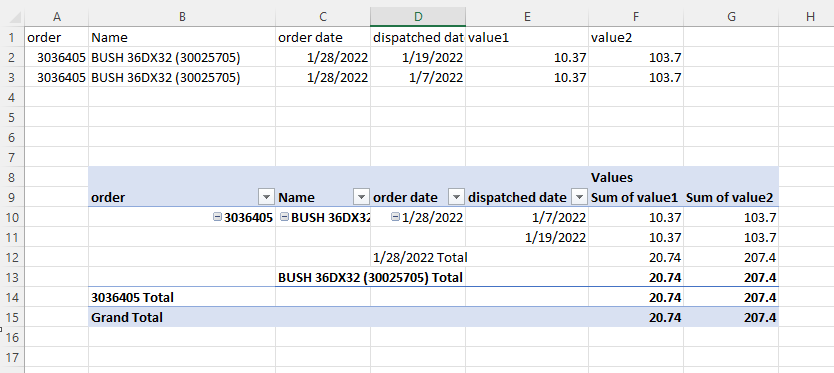
The problem is if the order was dispatched at different dates it add the order twice see below. This throws of the total

Because the part was part dispatched on the 19th and the seventh this is coming up at 20.74 instead of 10.37
Any help to make one of these numbers disappear would be great thanks

Hi,
In the Pivot Table, change the function to MIN.
' cx='32' cy='32' r='32' /%3E%3Ctext x='50%25' y='55%25' dominant-baseline='middle' text-anchor='middle' fill='%23FFF' %3ERS%3C/text%3E%3C/svg%3E)
I was having so much trouble with this problem. Everything was great until I had 2 entries on the same date. My running balance went crazy. Setting to min worked. Thank you.
You are welcome.

Hi @Breandan McCann ,
I created the sample about the PivotTable, as you can see the 10.37 is the SUM value for dispatched date, the 20.74 is the total SUM of all dispatched date for order date:
I'm not very understanding your problem, try to provide the data source and detail requirement, you can upload a screenshot so that I can get more accurate solutions to this problem. I’m glad to help and follow up your reply.
If the response is helpful, please click "Accept Answer" and upvote it.
Note: Please follow the steps in our documentation to enable e-mail notifications if you want to receive the related email notification for this thread.
Hi @Breandan McCann ,
Just checking in to see if the information was helpful. Please let us know if you would like further assistance.
If the response is helpful, please click "Accept Answer" and upvote it.
Note: Please follow the steps in our documentation to enable e-mail notifications if you want to receive the related email notification for this thread.
