Developer technologies | Windows Presentation Foundation
A part of the .NET Framework that provides a unified programming model for building line-of-business desktop applications on Windows.
This browser is no longer supported.
Upgrade to Microsoft Edge to take advantage of the latest features, security updates, and technical support.

First and foremost, I apologize for my grammatical errors; my first language is Persian (Iran).
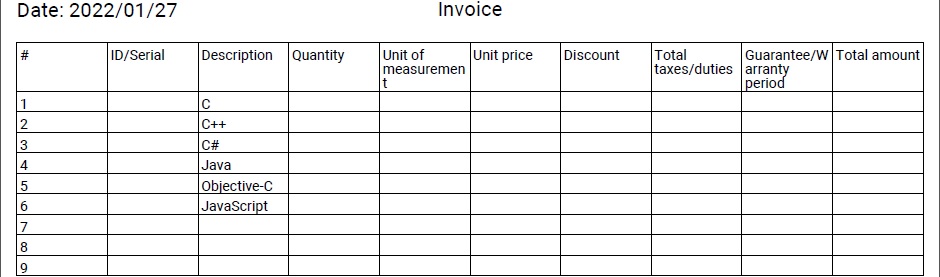
I want to display DataGrid as a table in PDF through the following codes and DataGrid has 10 columns, there is no problem when I add 8 rows but when I add 10 rows or more I get the following error:
System.NullReferenceException: 'Object reference not set to an instance of an object.' (Line 106 in C# codes)
XAML codes:
<Window x:Class="Library.BillWindow"
    xmlns="http://schemas.microsoft.com/winfx/2006/xaml/presentation"
    xmlns:x="http://schemas.microsoft.com/winfx/2006/xaml"
    xmlns:d="http://schemas.microsoft.com/expression/blend/2008"
    xmlns:mc="http://schemas.openxmlformats.org/markup-compatibility/2006"
    xmlns:i="clr-namespace:System.Windows.Interactivity;assembly=System.Windows.Interactivity"
    xmlns:local="clr-namespace:Library"
    mc:Ignorable="d"
    Title="Bill" Loaded="Window_Loaded" Height="600" Width="800" Background="Transparent" FontSize="13" WindowStyle="None" AllowsTransparency="True">
<Window.DataContext>
    <local:ViewModel/>
</Window.DataContext>
<Grid>
    <GroupBox x:Name="Products_Services_GroupBox" Header="Products/Services" Height="246" Width="772" Background="Transparent" HorizontalAlignment="Left" VerticalAlignment="Top" Visibility="Visible" Margin="14,292,0,0">
        <GroupBox.Style>
            <Style TargetType="{x:Type GroupBox}">
                <Setter Property="BorderBrush" Value="DarkGray"/>
                <Setter Property="BorderThickness" Value="1"/>
                <Setter Property="Template">
                    <Setter.Value>
                        <ControlTemplate TargetType="{x:Type GroupBox}">
                            <Grid SnapsToDevicePixels="true">
                                <Grid.ColumnDefinitions>
                                    <ColumnDefinition Width="*"/>
                                    <ColumnDefinition Width="*"/>
                                    <ColumnDefinition Width="*"/>
                                    <ColumnDefinition Width="*"/>
                                </Grid.ColumnDefinitions>
                                <Grid.RowDefinitions>
                                    <RowDefinition Height="*"/>
                                    <RowDefinition Height="*"/>
                                    <RowDefinition Height="*"/>
                                    <RowDefinition Height="*"/>
                                </Grid.RowDefinitions>
                                <Border BorderBrush="DarkGray"
                                BorderThickness="1"
                                CornerRadius="9"
                                Grid.ColumnSpan="4"
                                Grid.RowSpan="4">
                                    <Border.OpacityMask>
                                        <MultiBinding ConverterParameter="9">
                                            <MultiBinding.Converter>
                                                <BorderGapMaskConverter/>
                                            </MultiBinding.Converter>
                                            <Binding ElementName="Header" Path="ActualWidth"/>
                                            <Binding Path="ActualWidth" RelativeSource="{RelativeSource Self}"/>
                                            <Binding Path="ActualHeight" RelativeSource="{RelativeSource Self}"/>
                                        </MultiBinding>
                                    </Border.OpacityMask>
                                </Border>
                                <Border x:Name="Header" Grid.RowSpan="1" Grid.ColumnSpan="4"  Margin="9,-9.5,0,0" HorizontalAlignment="Left" VerticalAlignment="Top">
                                    <ContentPresenter  ContentSource="Header"
                                              RecognizesAccessKey="True"
                                              SnapsToDevicePixels="{TemplateBinding SnapsToDevicePixels}"/>
                                </Border>
                                <ContentPresenter  Grid.ColumnSpan="2" Grid.Column="1" Grid.Row="1"
                                          Margin="{TemplateBinding Padding}"
                                          SnapsToDevicePixels="{TemplateBinding SnapsToDevicePixels}"/>
                            </Grid>
                        </ControlTemplate>
                    </Setter.Value>
                </Setter>
            </Style>
        </GroupBox.Style>
        <ItemsControl x:Name="BillItemsControl" Width="772" Margin="-193,-61,-193,-121">
            <Grid Height="244">
                <DataGrid x:Name="BillDataGrid" HeadersVisibility="Column" CanUserAddRows="False" CanUserDeleteRows="False" EnableRowVirtualization="True" AutoGenerateColumns="False" HorizontalAlignment="Left" VerticalAlignment="Top" Height="190" Width="758" Margin="7,12,0,0">
                    <i:Interaction.Behaviors>
                        <local:DataGridBehavior/>
                    </i:Interaction.Behaviors>
                    <DataGrid.Columns>
                        <DataGridTextColumn x:Name="NO" Binding="{Binding NO}" Width="SizeToHeader"/>
                        <DataGridTextColumn x:Name="ID_Serial" Binding="{Binding ID_Serial}" Width="SizeToHeader"/>
                        <DataGridTextColumn x:Name="ProductsOrServicesDescription" Binding="{Binding ProductsOrServicesDescription}" Width="115"/>
                        <DataGridTextColumn x:Name="Quantity" Binding="{Binding Quantity}" Width="SizeToHeader"/>
                        <DataGridTextColumn x:Name="UnitOfMeasurement" Binding="{Binding UnitOfMeasurement}" Width="SizeToHeader"/>
                        <DataGridTextColumn x:Name="UnitPrice" Binding="{Binding UnitPrice}" Width="SizeToHeader"/>
                        <DataGridTextColumn x:Name="Discount" Binding="{Binding Discount}" Width="SizeToHeader"/>
                        <DataGridTextColumn x:Name="TaxDutyVat" Binding="{Binding TaxDutyVat}" Width="SizeToHeader"/>
                        <DataGridTextColumn x:Name="GuaranteeOrWarrantyPeriod" Binding="{Binding GuaranteeOrWarrantyPeriod}" Width="SizeToHeader"/>
                        <DataGridTextColumn x:Name="TotalAmount" Binding="{Binding TotalAmount}" Width="SizeToHeader"/>
                    </DataGrid.Columns>
                </DataGrid>
                <Button Name="AddNewRow_Button" Command="{Binding}" CommandParameter="AddNewRow" MouseEnter="AddNewRow_Button_MouseEnter" GotFocus="AddNewRow_Button_GotFocus" HorizontalAlignment="Left" VerticalAlignment="Top" Height="30" Width="160" Cursor="Hand" Margin="7,208,0,0"/>
                <Button Name="DeleteSelectedRows_Button" Command="{Binding}" CommandParameter="DeleteSelectedRows" MouseEnter="DeleteSelectedRows_Button_MouseEnter" GotFocus="DeleteSelectedRows_Button_GotFocus" HorizontalAlignment="Left" VerticalAlignment="Top" Height="30" Width="160" Cursor="Hand" Margin="174,208,0,0"/>
                <Button Name="CalculateTotalAmount_Button" PreviewMouseLeftButtonDown="CalculateTotalAmount_Button_PreviewMouseLeftButtonDown" MouseEnter="CalculateTotalAmount_Button_MouseEnter" GotFocus="CalculateTotalAmount_Button_GotFocus" HorizontalAlignment="Left" VerticalAlignment="Top" Height="30" Width="160" Cursor="Hand" Margin="341,208,0,0"/>
            </Grid>
        </ItemsControl>
    </GroupBox>
</Grid>
</Window>
C# codes:
I can add a blank row to DataGrid and also delete one or more rows via the ViewModel class:
using iTextSharp.text;
using iTextSharp.text.pdf;
using System.Runtime.InteropServices;
using System.Windows.Interactivity;
public class ViewModel : ICommand
{
    public DataGrid BillDataGrid { get; set; }
    int NO;
    private struct DefaultRow
    {
        public string NO { get; set; }
        public string ID_Serial { get; set; }
        public string ProductsOrServicesDescription { get; set; }
        public string Quantity { get; set; }
        public string UnitOfMeasurement { get; set; }
        public string UnitPrice { get; set; }
        public string Discount { get; set; }
        public string TaxDutyVat { get; set; }
        public string GuaranteeOrWarrantyPeriod { get; set; }
        public string TotalAmount { get; set; }
    }
    private void AddBlankRow()
    {
        List<object> DefaultRow = new List<object>();
        DefaultRow DR = new DefaultRow();
        DR.NO = (++NO).ToString();
        DR.ID_Serial = "";
        DR.ProductsOrServicesDescription = "";
        DR.Quantity = "";
        DR.UnitOfMeasurement = "";
        DR.UnitPrice = "";
        DR.Discount = "";
        DR.TaxDutyVat = "";
        DR.GuaranteeOrWarrantyPeriod = "";
        DR.TotalAmount = "";
        for (int i = 0; i < BillDataGrid.Items.Count; i++)
        {
            DefaultRow.Add(BillDataGrid.Items[i]);
        }
        DefaultRow.Add(DR);
        BillDataGrid.ItemsSource = DefaultRow;
    }
    private void DeleteSelectedRows()
    {
        switch (BillDataGrid.SelectedItems.Count > 0)
        {
            case true:
                List<object> DefaultRow = new List<object>();
                for (int i = 0; i < BillDataGrid.Items.Count; i++)
                {
                    DefaultRow.Add(BillDataGrid.Items[i]);
                }
                foreach (DefaultRow Item in BillDataGrid.SelectedItems)
                {
                    DefaultRow.Remove(Item);
                }
                BillDataGrid.ItemsSource = DefaultRow;
                break;
        }
    }
    public event EventHandler CanExecuteChanged;
    public bool CanExecute(object parameter) => true;
    public void Execute(object parameter)
    {
        switch (parameter.ToString())
        {
            case "AddNewRow":
                AddBlankRow();
                break;
            case "DeleteSelectedRows":
                DeleteSelectedRows();
                break;
        }
    }
}
public class DataGridBehavior : Behavior<DataGrid>
{
    protected override void OnAttached() =>
      AssociatedObject.Loaded += (s, e) =>
      ((ViewModel)AssociatedObject.DataContext).BillDataGrid = AssociatedObject;
}
public partial class BillWindow : Window
{
    public void ExportLTR(DataGrid dataGrid)
    {
        Document Doc = new Document(PageSize.A4, 10f, 10f, 27f, 14f);
        PdfWriter PDF_Writer = PdfWriter.GetInstance(Doc, new FileStream((Path + @"\Invoice.pdf"), FileMode.Create));
        Doc.Open();
        PDF_Writer.RunDirection = PdfWriter.RUN_DIRECTION_LTR;
        BaseFont Base_Font = BaseFont.CreateFont(System.Windows.Forms.Application.StartupPath + @"\Font Collection\Roboto.ttf", BaseFont.IDENTITY_H, BaseFont.EMBEDDED);
        Font DT_Font = new Font(Base_Font, 8);
        PdfPTable PDF_Table = new PdfPTable(dataGrid.Columns.Count);
        PDF_Table.RunDirection = PdfWriter.RUN_DIRECTION_LTR;
        PDF_Table.WidthPercentage = 100;
        PdfPCell Cell = new PdfPCell();
        for (byte i = 0; i < dataGrid.Columns.Count; i++)
        {
            Cell.Colspan = dataGrid.Columns[i].Header.ToString().Count();
            PDF_Table.AddCell(new Phrase(dataGrid.Columns[i].Header.ToString(), DT_Font));
        }
        DT_Font.Size = 9;
        for (int i = 0; i < dataGrid.Items.Count; i++)
        {
            for (byte j = 0; j <= dataGrid.Columns.Count - 1; j++)
            {
                PDF_Table.AddCell(new Phrase((dataGrid.Columns[j].GetCellContent(dataGrid.Items[i]) as TextBlock).Text, DT_Font));
            }
        }
        Doc.Add(PDF_Table);
        Doc.Close();
    }
    private void Reporting_Button_PreviewMouseLeftButtonDown(object sender, MouseButtonEventArgs e)
    {
        ExportLTR(BillDataGrid);
    }
}
Thanks
' cx='32' cy='32' r='32' /%3E%3Ctext x='50%25' y='55%25' dominant-baseline='middle' text-anchor='middle' fill='%23FFF' %3EHL%3C/text%3E%3C/svg%3E)
Hi,@RezaJafery.Could you show the names of all Nuget packages used in the project? What is the Target framework for your project? What are the Platform target for your project?
Hi, HuiLiu-MSFT
Platform: Windows desktop app (WPF)
Framework: .Net Framework 4.5.2

References and nuget packages:



Hi Reza,
your code read only the showed TextBlocks (Visual Tree). I recommend you to use binded collection and read values from this collection.
Try following code:
       var itemSource = dataGrid.ItemsSource as List<object>;
       for (int i = 0; i < dataGrid.Items.Count; i++)
       {
         var data = (DefaultRow)itemSource[i];
         for (int j = 0; j < dataGrid.Columns.Count; j++)
         {
           string value="";
           switch (j)
           {
             case 0: value = data.NO; break;
 ....
             case 9: value = data.ID_Serial; break;
             default:
               break;
           }
           PDF_Table.AddCell(new Phrase(value, DT_Font));
         }
       }
Peter's full answer was written at the bottom of this page.
I voted for the following answers and kept my promise:
1: systemnullreferenceexception-in-datagriditems-in-w.html
2: using-the-parallelforeach-to-speedup-the-execution.html
3: how-can-i-change-image-visibility-which-is-in-main.html
Thanks

The System.NullReferenceException is the most common exception is programming. It means the code tries to access members of a type but the type was never created. It's null. Or really, referencing the null type.
The best way to fix a null exception is to use the Visual Studio debugger to find the null type. Once you find the null type then it is usually pretty easy to figure out why the type is null.
https://learn.microsoft.com/en-us/visualstudio/debugger/debugger-feature-tour?view=vs-2022
Line 106 is...
PDF_Table.AddCell(new Phrase((dataGrid.Columns[j].GetCellContent(dataGrid.Items[i]) as TextBlock).Text, DT_Font));
If the results of GetCellContent() is null then the code is essentially doing this...
null.Text
The null reference does not have a Text member.
Hi, AgaveJoe
Do you think I am a beginner? I can work with the debugging tool and I know that line 106 returns a null result, but my question is how do I fix this problem?
If someone solves my problem, I will give her/his two points (in this question and other questions that he/she has recently answered correctly).
Since you are not a beginner and have run the code through the debugger what object is null? Is GetCellContent() returning null?
As you can see, the Debug variable is null and dataGrid.Items.Count is 10, no problem if dataGrid.Items.Count <= 9.
Note: I defined the Debug variable for testing.
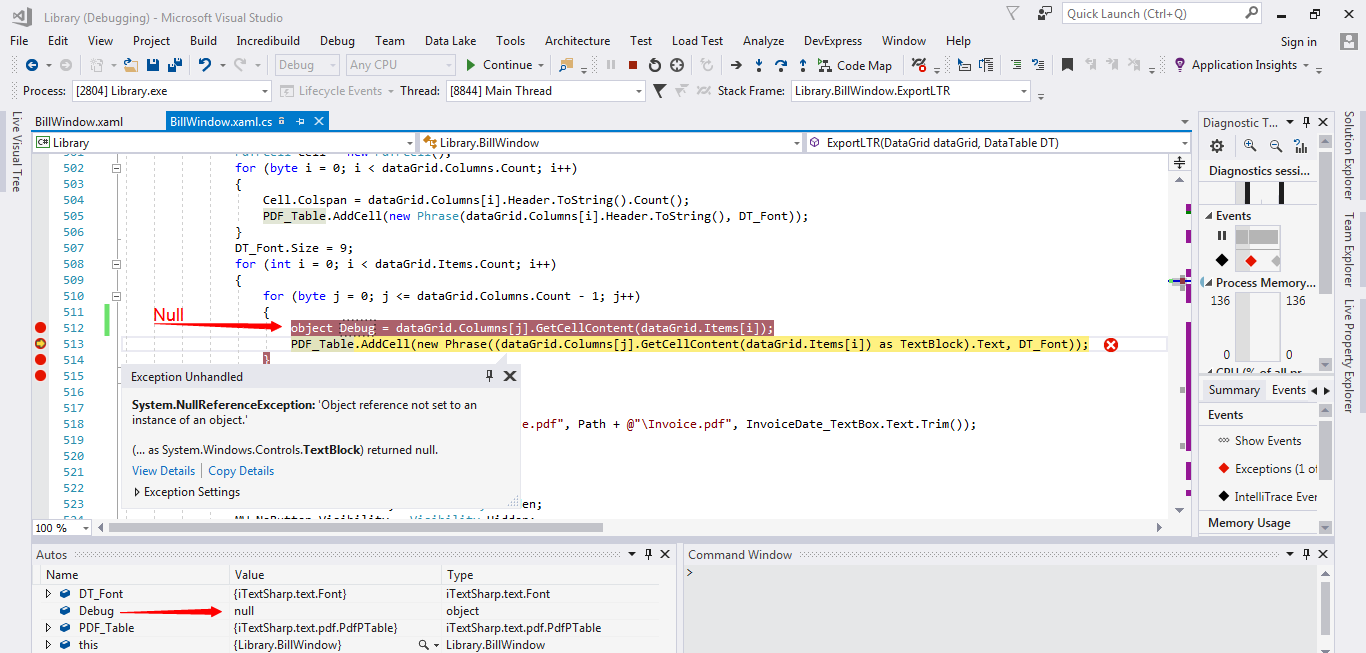
The error message is very clear. The results of GetCellContent() is null.
As stated above, use the debugger to find what's going on in our code. The Visual Studio debugger allows you to drill into object on the right side of the equal sign. There are serval way to do this.
You want to check the value of i and j, the values of dataGrid.Items[i], and the values of dataGrid.Columns[j]. You have to understand that you are the only one that can run this code so it is up to you to troubleshoot.
Hi Reza,
change your code (to try null):
     for (int i = 0; i < dataGrid.Items.Count; i++)
     {
         for (byte j = 0; j <= dataGrid.Columns.Count - 1; j++)
         {
             var tb = dataGrid.Columns[j].GetCellContent(dataGrid.Items[i]) as TextBlock;
             PDF_Table.AddCell(new Phrase((tb == null)?"":tb.Text, DT_Font));
         }
     }
Hi, PeterFleischer
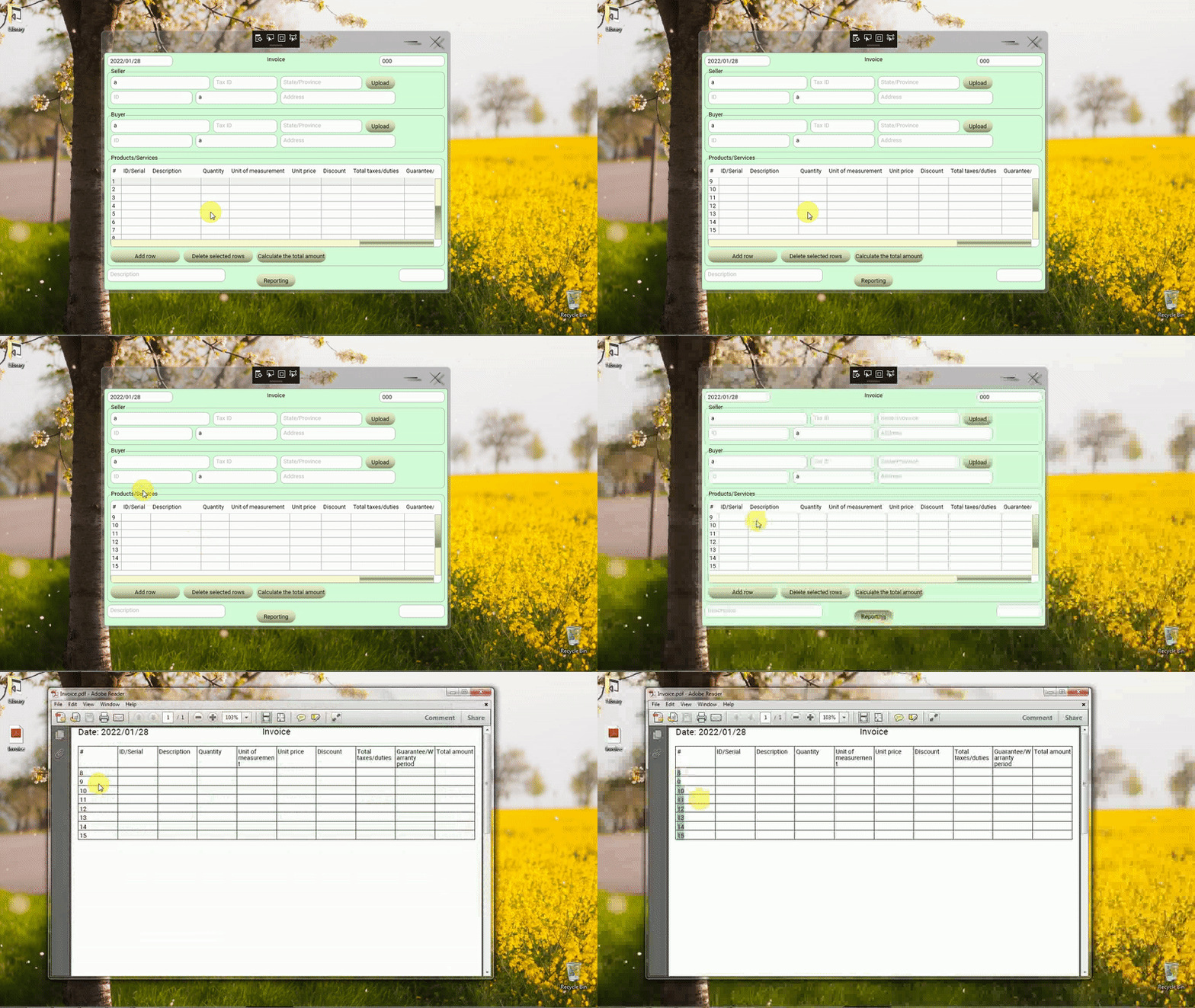
Your solution does not give an error, but it does not solve the problem. For example, if 15 rows are added to the DataGrid, only rows 8 to 15 will be converted to PDF.
Hi Reza,
your code read only the showed TextBlocks (Visual Tree). I recommend you to use binded collection and read values from this collection.
Try following code:
      var itemSource = dataGrid.ItemsSource as List<object>;
      for (int i = 0; i < dataGrid.Items.Count; i++)
      {
        var data = (DefaultRow)itemSource[i];
        for (int j = 0; j < dataGrid.Columns.Count; j++)
        {
          string value="";
          switch (j)
          {
            case 0: value = data.NO; break;
...
            case 9: value = data.ID_Serial; break;
            default:
              break;
          }
          PDF_Table.AddCell(new Phrase(value, DT_Font));
        }
      }
Hi, PeterFleischer
Thank you very much,
Your solution works properly, we must use the dataGrid.ItemsSource property. 
Please post this solution as an answer (not as a comment) so that I can rate it (I will rate your other correct answers as well).
Peter Fleischer's completed codes:
            var ItemsSource = dataGrid.ItemsSource as List<object>;
            string Value = "";
            for (int i = 0; i < dataGrid.Items.Count; i++)
            {
                var Data = (ViewModel.DefaultRow)ItemsSource[i];
                for (byte j = 0; j < dataGrid.Columns.Count; j++)
                {
                    switch(j)
                    {
                        case 0:
                            Value = Data.NO;
                            break;
                        case 1:
                            Value = Data.ID_Serial;
                            break;
                        case 2:
                            Value = Data.ProductsOrServicesDescription;
                            break;
                        case 3:
                            Value = Data.Quantity;
                            break;
                        case 4:
                            Value = Data.UnitOfMeasurement;
                            break;
                        case 5:
                            Value = Data.UnitPrice;
                            break;
                        case 6:
                            Value = Data.Discount;
                            break;
                        case 7:
                            Value = Data.TaxDutyVat;
                            break;
                        case 8:
                            Value = Data.GuaranteeOrWarrantyPeriod;
                            break;
                        case 9:
                            Value = Data.TotalAmount;
                            break;
                    }
                    PDF_Table.AddCell(new Phrase(Value, DT_Font));
                }
            }
Output:
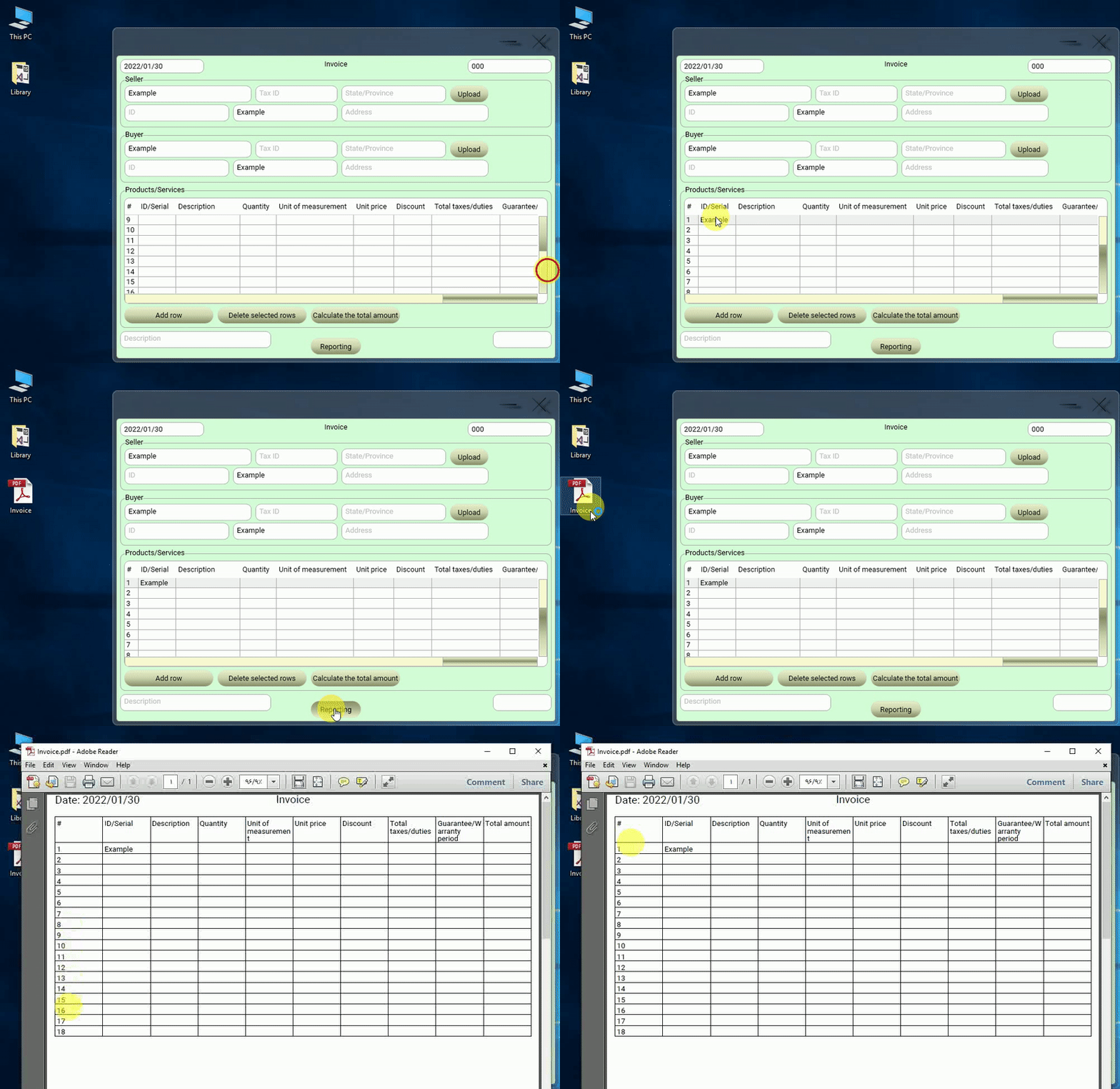
Thank you very much Peter