Microsoft 365 and Office | SharePoint Server | For business
A family of Microsoft on-premises document management and storage systems.

This browser is no longer supported.
Upgrade to Microsoft Edge to take advantage of the latest features, security updates, and technical support.
' cx='32' cy='32' r='32' /%3E%3Ctext x='50%25' y='55%25' dominant-baseline='middle' text-anchor='middle' fill='%23FFF' %3EKA%3C/text%3E%3C/svg%3E)
I have a news site for public users and I need to configure search to only show pages and specific documents , not document library, lists, list items and all items. Aspx and other system pages... Etc
Please provide me the propsed list of search rules for anything should not be appearing in the search else pages and specific documents!
Thanks
A family of Microsoft on-premises document management and storage systems.

Hi @Karen Arul ,
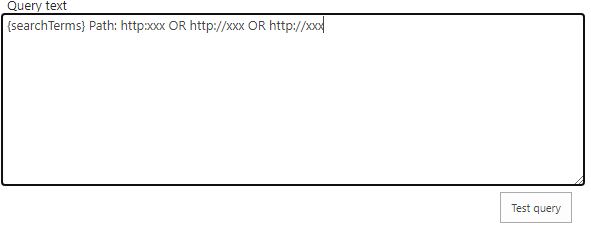
Go to site settings > Result Source > New Result Source > Scroll down to Query Transform section > Type in Query text the URL of you wanted pages and documents like below > Save.
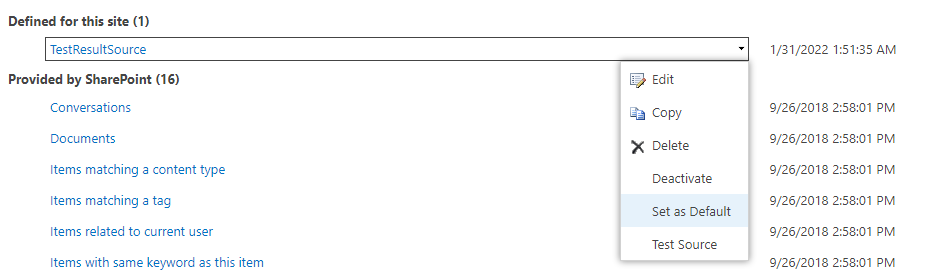
Back to Result Source page and set the result source created above as default.
----------
If the answer is helpful, please click "Accept Answer" and kindly upvote it. If you have extra questions about this answer, please click "Comment".
Note: Please follow the steps in our documentation to enable e-mail notifications if you want to receive the related email notification for this thread.

@Karen Arul Have you tried Allen's suggestion? If you have any unclear, please feel free to reply.
I know how I can do that, I need the list of all system urls that should be excluded, can you help me to do that!