Azure Synapse Analytics
An Azure analytics service that brings together data integration, enterprise data warehousing, and big data analytics. Previously known as Azure SQL Data Warehouse.
This browser is no longer supported.
Upgrade to Microsoft Edge to take advantage of the latest features, security updates, and technical support.
' cx='32' cy='32' r='32' /%3E%3Ctext x='50%25' y='55%25' dominant-baseline='middle' text-anchor='middle' fill='%23FFF' %3ECS%3C/text%3E%3C/svg%3E)
I am trying to create a parameterized dataset in Synapse Analytics using the Azure SDK. If I remove line 22 below ( delimitedDataset.Parameters = myParms;), the dataset is successfully created.
Line 22 fails as the property 'Dataset.Parameters' is read only.
How can I set the parameters property on a Dataset with the Azure SDK?
    string dataSetName = "MyDatasetName";
    DatasetClient dsClient = new DatasetClient(endpoint: workspaceDevelopmentEndpoint, credential: new DefaultAzureCredential());
    LinkedServiceReferenceType lsRefType = new("LinkedServiceReference");
    LinkedServiceReference lsRef = new(lsRefType, landingAreaLinkedServiceName);

    DelimitedTextDataset delimitedDataset = new(lsRef);
    delimitedDataset.ColumnDelimiter = ",";
    delimitedDataset.EscapeChar = "\\";
    delimitedDataset.QuoteChar = "\"";
    delimitedDataset.FirstRowAsHeader = true;
    delimitedDataset.Location = new AzureBlobFSLocation();
    AzureBlobFSLocation tmpLocation = new();
    tmpLocation.FileSystem = "data";
    delimitedDataset.Location = tmpLocation;

    var myParms = new Dictionary<string, ParameterSpecification>
    {
        { "folderPath", new ParameterSpecification(ParameterType.String) },
        { "fileName", new ParameterSpecification(ParameterType.String) },
    };

    delimitedDataset.Parameters = myParms;

    DatasetResource dsr = new(delimitedDataset);
    DatasetCreateOrUpdateDatasetOperation dsOperation = dsClient.StartCreateOrUpdateDataset(dataSetName, dsr);
    Azure.Response<DatasetResource> createdDataset = await dsOperation.WaitForCompletionAsync();
' cx='32' cy='32' r='32' /%3E%3Ctext x='50%25' y='55%25' dominant-baseline='middle' text-anchor='middle' fill='%23FFF' %3ESS%3C/text%3E%3C/svg%3E)
Hi @charlieschafer-2122,
Thanks for using Microsoft Q&A!!
It looks like Parameters is a read-only property in Synapse dataset and thus you are not able to assign values to it after dataset creation.

I am checking internally for any other way to add parameters to the dataset and get back to you if this is possible through SDK.
Thanks
Saurabh
Saurabh - Thanks for the update!
I did indeed see that the Parameters property was read-only, and I was unable to find any constructor that sets this Property on dataset creation. Strange.
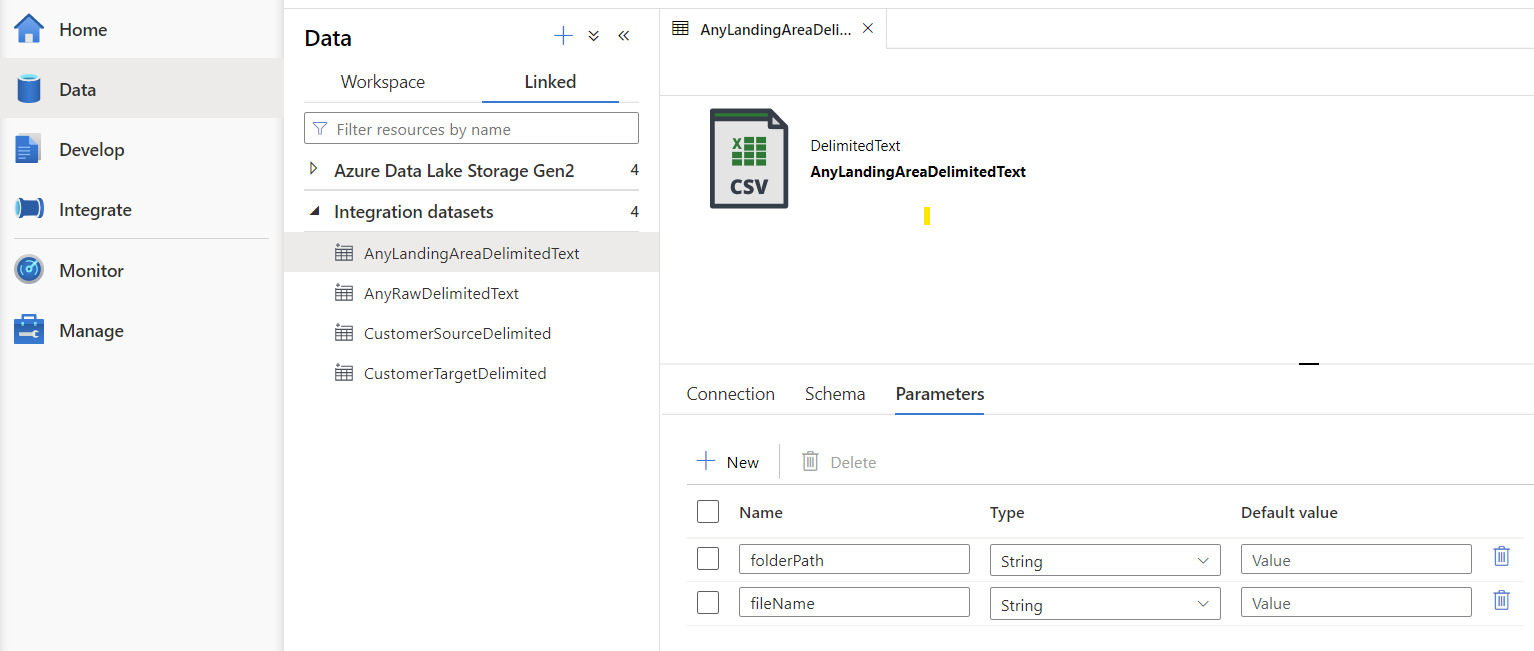
Perhaps understanding what API/SDK function is called via Synapse Studio would be helpful. For example, what code is called when I click the New button in the screen shot below.
Thanks again for your help. I appreciate it.
Hi @CharlieSchafer-2122,
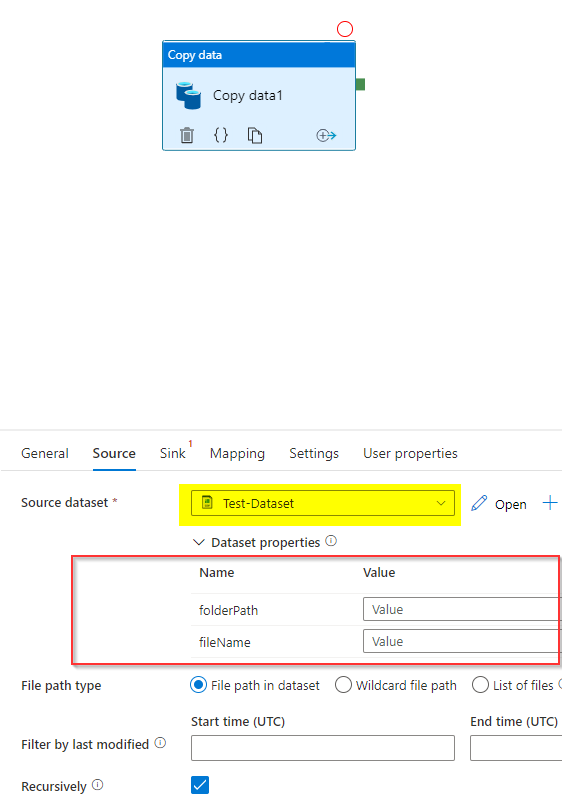
You were not able to set the parameters of a DelimitedTextDataSet using the property 'Dataset.Parameters' as this property is read-only. So, in order to add parameters to your dataset either you need to pass the parameters in the constructor as described here or you need to use delimitedDataset.Parameters.Add function in your code. For example - below code adds folderPath and fileName property to a dataset using .Add function.
DelimitedTextDataset delimitedDataset = new(lsRef);
delimitedDataset.Parameters.Add("folderPath", new ParameterSpecification(ParameterType.String));
delimitedDataset.Parameters.Add("fileName", new ParameterSpecification(ParameterType.String));

DatasetResource dsr = new(delimitedDataset);
DatasetCreateOrUpdateDatasetOperation dsOperation = dsClient.StartCreateOrUpdateDataset(dataSetName, dsr);
Azure.Response<DatasetResource> createdDataset = await dsOperation.WaitForCompletionAsync();
Result:
Hope this helps.
Please let me know if you have any questions.
Thanks
Saurabh
----------
Please do not forget to "Accept the answer" wherever the information provided helps you to help others in the community.
' cx='32' cy='32' r='32' /%3E%3Ctext x='50%25' y='55%25' dominant-baseline='middle' text-anchor='middle' fill='%23FFF' %3ECS%3C/text%3E%3C/svg%3E)
Saurabh - Perfect! Thanks for the assistance!
No problem @Charlie Schafer .
Please let me know if you find above reply useful. If yes, please 'Accept the answer' for the above reply. This will help other community members facing similar query to refer to this solution.
Thanks
Saurabh