Azure Monitor
An Azure service that is used to collect, analyze, and act on telemetry data from Azure and on-premises environments.
This browser is no longer supported.
Upgrade to Microsoft Edge to take advantage of the latest features, security updates, and technical support.
' cx='32' cy='32' r='32' /%3E%3Ctext x='50%25' y='55%25' dominant-baseline='middle' text-anchor='middle' fill='%23FFF' %3EC%3C/text%3E%3C/svg%3E)
I am using Azure Application Insights for logging and tracking event flows for my Azure Function. I was wondering if there's a way to group Custom Events and manually-logged Exceptions (via TrackException()) in the end-to-end transaction details of a particular request in the Transaction Search.
I'm using the following sample code:
   using (var operation = telemetryClient.StartOperation<RequestTelemetry>("operationName"))
   {
       telemetryClient.TrackEvent("test event");
       telemetryClient.TrackException(new Exception("test exception"));
   }
And getting the following logs (newest first):

And the end-to-end transaction detail for the request looks like this (no child event nor exception)

I would just like to confirm if there's a way to get something similar to this:
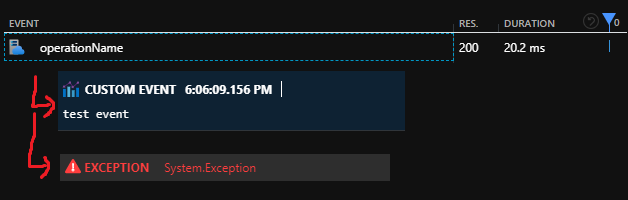
Thanks in advance!
' cx='32' cy='32' r='32' /%3E%3Ctext x='50%25' y='55%25' dominant-baseline='middle' text-anchor='middle' fill='%23FFF' %3EAM%3C/text%3E%3C/svg%3E)
Hi @CudoXY ,
Welcome to Microsoft Q&A! Thanks for posting the question.
There are certain limitations when calling the AppInsight's TelemetryClient from Azure Function App. For example, "You should not call TrackRequest or StartOperation<RequestTelemetry>, because you'll see duplicate requests for a function invocation. The Functions runtime automatically tracks requests."
The details for using TelemetryClient and custom DependencyTelemetry is available at this link: Log custom telemetry in Azure Functions
In this example, the DependencyTelemetry is used to record the success or failure of any operation.
Also, for tracking the Exception, you can use the initialized telemetryClient object as given in this example as below:
this.telemetryClient.TrackException(new Exception("test exception"));
This code snippet when added after the this.telemetryClient.TrackDependency() call looks like below in End-to-end transaction details
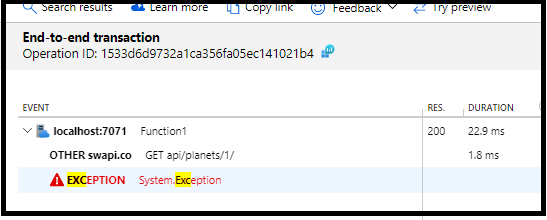
Please let me know if you have any questions.
---
Please 'Accept as answer' and ‘Upvote’ if it helped so that it can help others in the community looking for help on similar topics.
Thanks for the response! Not sure if I missed something, but I wasn't able to get a similar end-to-end transaction output using the sample provided in Log custom telemetry in Azure Functions
I'm using the following code:
   var start = DateTime.UtcNow;
                   var environmentVariable = Environment.GetEnvironmentVariable("APPINSIGHTS_INSTRUMENTATIONKEY", EnvironmentVariableTarget.Process);
                   var telemetryClient = new TelemetryClient(new TelemetryConfiguration(environmentVariable));

                   telemetryClient.TrackException(new Exception("test exception"));

                   var dependency = new DependencyTelemetry
                   {
                       Name = "GET api/planets/1/",
                       Target = "swapi.co",
                       Data = "https://swapi.co/api/planets/1/",
                       Timestamp = start,
                       Duration = DateTime.UtcNow - start,
                       Success = true
                   };
                   dependency.Context.User.Id = "TEST_ID";
                   telemetryClient.TrackDependency(dependency);
And the end-to-end transaction of the request has only itself as the entry:

The dependency and the exception weren't included.
Thanks!
@CudoXY , thank you for the reply. You should not instantiate the TelemetryClient in your code. The FunctionApp will supply it via dependency injection. This allows for proper trace correlation and avoids duplication. Here is the complete sample that I tested:

After this, also ensure that you have the respective ApplicationInsights instrumentation key set in local.settings.json file (if you are testing it locally) as below:
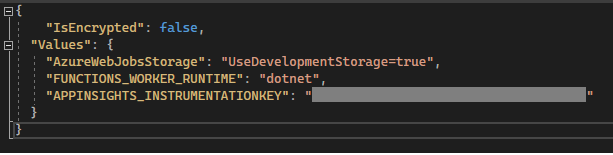
Please let me know if you have any questons.
---
Please 'Accept as answer' if it helped so that it can help others in the community looking for help on similar topics.
@CudoXY , I wanted to check if you had a chance to review my reply above. Please let me know if you have any queries or concerns.
Please 'Accept as answer' if it helped so that it can help others in the community looking for help on similar topics.
Using the dependency injected TelemetryConfiguration fixed my issue. Thank you very much!
@CudoXY , thank you for the update. I am glad that I was able to help you.