Microsoft Security | Microsoft Graph
An API that connects multiple Microsoft services, enabling data access and automation across platforms

This browser is no longer supported.
Upgrade to Microsoft Edge to take advantage of the latest features, security updates, and technical support.
' cx='32' cy='32' r='32' /%3E%3Ctext x='50%25' y='55%25' dominant-baseline='middle' text-anchor='middle' fill='%23FFF' %3EDB%3C/text%3E%3C/svg%3E)
Hi,
another day, another question ;-)
How can i handle the JSON Response of e.g. a calendar Request like this:
$termine = $graph->createRequest("GET", "/users/my@tiedtlaw email .de/calendarView?startdatetime=2022-01-28T08:00:00&enddatetime=2022-01-28T20:00:00")
->setReturnType(Model\Calendar::class)
->execute();
How can i return for eaxample the subject or the body?
This was my try, i commented, what works and what not:
foreach ($termine as $termin) {
//$subject=$termin->subject; // Does not work
//$subject=$termin->getSubject(); // Does not work
//$subject=$termin["subject"]; // Does not work
echo "ID:".$termin->getId(); //Works
}
Is there a documentation of how to access the JSON-Array?
Best wishes
Daniel

Hi @Daniel Bäuerlein ,
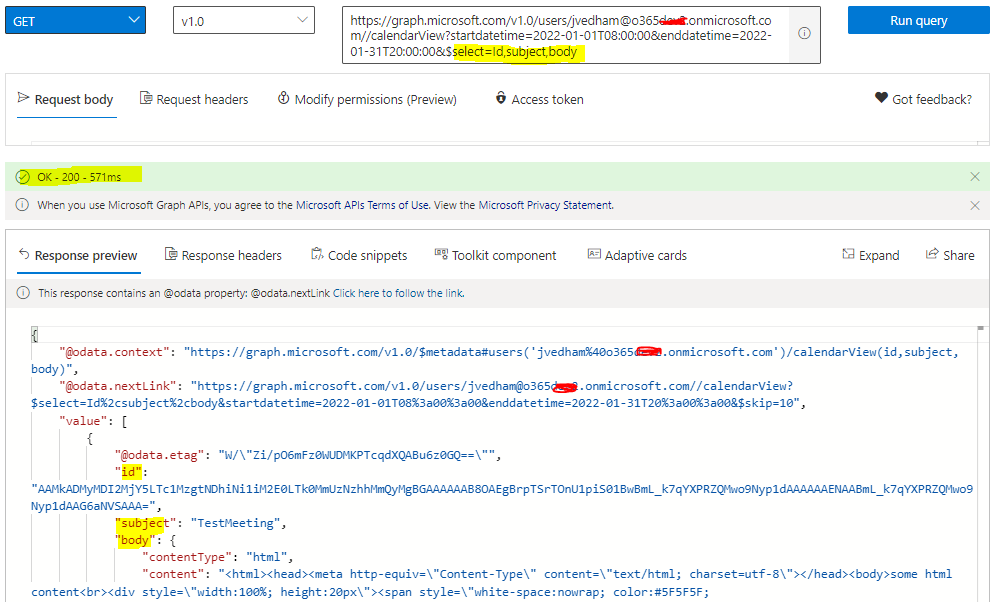
You can directly use $select OData Query Parameter to fetch the required event properies with Microsoft Graph List calendarView API.
Note : The createdDateTime and lastModifiedDateTime properties of event do not support $select. To get their values, simply query on calendarView without applying $select.
GET https://graph.microsoft.com/v1.0/users/{id | userPrincipalName}/calendarView?startdatetime=2022-01-01T08:00:00&enddatetime=2022-01-31T20:00:00&$select=Id,subject,body
Example :
https://graph.microsoft.com/v1.0/users/******@o365XXX.onmicrosoft.com/calendarView?startdatetime=2022-01-01T08:00:00&enddatetime=2022-01-31T20:00:00&$select=Id,subject,body
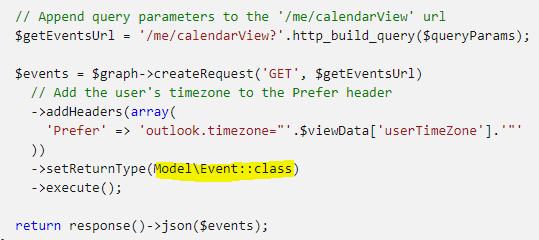
Also, you can try to use "Model\Event::class" parameter in setReturnType() function as mentioned in this calender view PHP SDK example.
Display of the event data in the UI :

Addtional References (please refer the below documentation for more information on event properies & resource :
https://learn.microsoft.com/en-us/graph/api/user-list-calendarview?view=graph-rest-1.0&tabs=http#query-parameters
https://learn.microsoft.com/en-us/graph/api/resources/event?view=graph-rest-1.0#properties
https://learn.microsoft.com/en-us/graph/api/resources/event?view=graph-rest-1.0
Hope this helps.
If the answer is helpful, please click "Accept Answer" and kindly upvote it. If you have any further questions about this answer, please click "Comment".
' cx='32' cy='32' r='32' /%3E%3Ctext x='50%25' y='55%25' dominant-baseline='middle' text-anchor='middle' fill='%23FFF' %3EDB%3C/text%3E%3C/svg%3E)
Hello,
thank you so much for your answer.
But I am clear how to generate the JSON response.
I just don't know how to grab a single value of the response with PHP to write it to a PHP variable for example.
For example, how can I parse the subject from the JSON response?
Daniel
And why is my username now suddenly "DanielBurlein-4684"? I used exactly the same login data (email-adress, password) on the same windows machine.
Problem is: as the username has changed, i am not able to accept an answer as solution which is really sad.
Hi @Daniel Bäuerlein , @Daniel Bäuerlein ,
can you try to use "Model\Event::class" parameter in setReturnType() function as mentioned in this calender view PHP Graph SDK example and see if it's resolved the issue?.
I have also revised the answer. If the answer is helpful, please click "Accept Answer" and kindly upvote it. If you have any further questions about this answer, please click "Comment".
' cx='32' cy='32' r='32' /%3E%3Ctext x='50%25' y='55%25' dominant-baseline='middle' text-anchor='middle' fill='%23FFF' %3EDB%3C/text%3E%3C/svg%3E)
Hi,
Answer is definitely helpful, thanks a lot.
But as mentioned, i am not able to accept it as solution because i can not log in as @Daniel Bäuerlein .
I don't understand, why i get another username if i
Its the second time that this happened and i don't know how to fix this.
Why yo you get another username when loggin in with exactly the same email and password?
Is it a bug or a feature?
Hi @Daniel Bäuerlein , @Daniel Bäuerlein , @Daniel Baeuerlein ,
Nice to know that provided answere is helpful for us but you could n't accept it due to some techincal issue with your user ID. I am also not sure why this issue is happening with your user ID. I will try to reachout to Q&A community point of contact to look into this issue.
Hi @Daniel Bäuerlein , @Daniel Bäuerlein , @Daniel Baeuerlein ,
Shared the feedback with Q&A support team and below post is generated. Hoping to hear back from Q&A support team.
Hi,
thath would be nice.
As you see, again i have a new user ID, this time DanielBaeuerlein-5192.
Ang again i logged in with the same username (my email-adress) and the same password that i used for the original question.
This is so strange and annoying ;-(
Best wishes and have a nice day.
Hi @Daniel Bäuerlein , @Daniel Bäuerlein , @Daniel Baeuerlein ,
Shared the feedback with Q&A support team and below post is generated. Hoping to hear back from Q&A support team.