' cx='32' cy='32' r='32' /%3E%3Ctext x='50%25' y='55%25' dominant-baseline='middle' text-anchor='middle' fill='%23FFF' %3EA%3C/text%3E%3C/svg%3E)

' cx='32' cy='32' r='32' /%3E%3Ctext x='50%25' y='55%25' dominant-baseline='middle' text-anchor='middle' fill='%23FFF' %3ERA%3C/text%3E%3C/svg%3E)

Hi there,
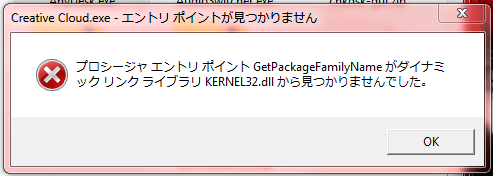
I cannot understand the error message but you can try some basic troubleshooting messages. You can try disabling Anti-Virus and Firewall temporarily. You can also try contacting the Adobe support team to sort this out.
You can try using the SFC & DISM command to check for any corrupted registries and try running Adobe again.
Here is the link for the scan commands
https://support.microsoft.com/en-us/topic/use-the-system-file-checker-tool-to-repair-missing-or-corrupted-system-files-79aa86cb-ca52-166a-92a3-966e85d4094e
Here is a thread as well that discusses the same issue and you can try out some troubleshooting steps from this and see if that helps you to sort the Issue.
Adobe Creative Cloud
https://answers.microsoft.com/en-us/windows/forum/windows_10-networking/adobe-creative-cloud/09d1f2e5-4dac-4f05-a5a1-28811596e3cc
Hope this resolves your Query!!
--If the reply is helpful, please Upvote and Accept it as an answer --
' cx='32' cy='32' r='32' /%3E%3Ctext x='50%25' y='55%25' dominant-baseline='middle' text-anchor='middle' fill='%23FFF' %3ESS%3C/text%3E%3C/svg%3E)