Developer technologies | C#
An object-oriented and type-safe programming language that has its roots in the C family of languages and includes support for component-oriented programming.
This browser is no longer supported.
Upgrade to Microsoft Edge to take advantage of the latest features, security updates, and technical support.
' cx='32' cy='32' r='32' /%3E%3Ctext x='50%25' y='55%25' dominant-baseline='middle' text-anchor='middle' fill='%23FFF' %3EJB%3C/text%3E%3C/svg%3E)
Hello.
I'm trying to use .Net 6.0 with Visual Studio Code. I've installed the C# extension in Visual Studio Code. I also installed the .Net 6.0 64x SDK for windows. I get a common error "The term 'dotnet' is not recognized as the name of a cmdlet." The problem is, I can't solve it. I check environment variables in control panel, but it didn't add anything new. I've tried creating a variable called donet and setting the value to C:\Program Files\dontnet and also C:\Program File\dotnet.exe. It didn't change the error. I'm new with system variables and doing this outside a working version of Visual Studio, so I need so easy to follow information. Is there an easy way to fix this error? What does the environment variable need to be called and what should the value be?
Thanks for any help,
Jeremy.
' cx='32' cy='32' r='32' /%3E%3Ctext x='50%25' y='55%25' dominant-baseline='middle' text-anchor='middle' fill='%23FFF' %3EA%3C/text%3E%3C/svg%3E)
Hi JeremyBenson-4307,Since your problem is related to vs code, I suggest that you could ask the question in GitHub.
Good idea. Thank you. I do have this working from CMD. All the files are in place and I can edit them fine. I had to do the same thing with Electron, pre-install the startup project. It could just be internal bugs with VScode. Maybe in a couple of years they'll have their terminal working as well as CMD.
' cx='32' cy='32' r='32' /%3E%3Ctext x='50%25' y='55%25' dominant-baseline='middle' text-anchor='middle' fill='%23FFF' %3EPA%3C/text%3E%3C/svg%3E)
Rather than creating a new environment variable try adding the folder that contains your dotnet.exe (e.g. C:\Program Files\dotnet) in the existing Path variable. Once you've added it make sure you restart VS Code and then it should be usable.
I see. I never clicked in there. Path has a C:\Program Files\dotnet\ do I have to add dotnet.exe on the end of that, or maybe add a variable for Program Files (86x)?
Are you able to run dotnet from a Command Prompt/Powershell?
Yes. dotnet --info works in cmd. I just uninstalled c+ 2015 redistributables 64x 86x and dotnet 6.0 sdk. Reinstalled them both. Environment variable C:\Program Files\dotnet\ is there. Still not working in Visual Studio Code. If there is no easy solution, would an install of Visual Studio 2022 help? Maybe the software has an intelligent data update for windows, that would help Visual Code?

Under Environment Variables, see if you have DOTNET_HOST_PATH
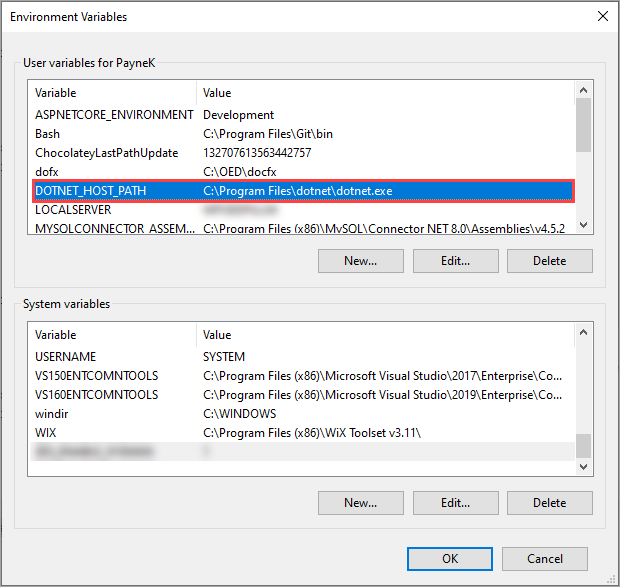
Added, but doesn't change the error: The term 'dotnet' is not recognized as the name of a cmdlet