Developer technologies | C#
An object-oriented and type-safe programming language that has its roots in the C family of languages and includes support for component-oriented programming.
This browser is no longer supported.
Upgrade to Microsoft Edge to take advantage of the latest features, security updates, and technical support.
' cx='32' cy='32' r='32' /%3E%3Ctext x='50%25' y='55%25' dominant-baseline='middle' text-anchor='middle' fill='%23FFF' %3EM%3C/text%3E%3C/svg%3E)
Hi All ,
Test to find 2 digit. Number in file Notepad.
8182,2114,9871,3335,5653,1812,5503,5310,9234,8864,0841,6947,0275,5765,0869,5877,0160,5120,0107,3023,8970,6360,4241
0251,1292,8111,7166,6149,5676,6301,5207,3242,2205,0765,9177,9988,4080,6972,5337,9173,4805,4720,8152,8805,5028,8625
example ;
81,88,82,18,12,82 ......
Then count how many in every line.
Test with this method if can.
using System;
using System.Collections.Generic;
using System.ComponentModel;
using System.Data;
using System.Drawing;
using System.IO;
using System.Linq;
using System.Text;
using System.Threading.Tasks;
using System.Windows.Forms;

namespace TestFor_12
{
    public partial class Form1 : Form
    {
        List<string> Data1 = new List<string>();
        List<string> Data2 = new List<string>();

        public Form1()
        {
            InitializeComponent();
            foreach (var s in File.ReadLines(@"C:\Users\family\Documents\Tool_Ori.txt").Skip(1).Select(s => s.Split(new[] { ',' }, 3)[2]))
            {
                listBox1.Items.Add(s);
                Data1.Add(s);
            }

        }
        private void Form1_Load(object sender, EventArgs e)
        {

        }

        private void button1_Click(object sender, EventArgs e)
        {
            for (int i = 0; i <= Data1.Count - 1; i++)
            {
                String StringToCheck = Data1[i].Replace(",", "");
                String StringsToCheck_ = StringToCheck.Replace(" ", "/r/n");

                // 7 9 1 6
                // 0 1 2 3

                foreach (string S in StringsToCheck_)
                {
                    string[] StringsToFind = new[] { S[0] + S[1], S[1] + S[0], S[0] + S[2], S[2] + S[0], S[0] + S[3], S[3] + S[0], S[1] + S[2], S[2] + S[1], S[1] + S[3], S[3] + S[1], S[2] + S[3], S[3] + S[2] };


                    foreach (string Find in StringsToFind)
                    {
                        int Count = 0;
                        foreach (string Check in StringsToCheck)
                        {
                            if (Check.Contains(Find[0]) && Check.Contains(Find[1]))
                                Count += 1;
                        }
                        listBox2.Items.Add("Occurances (" + S + ", " + Find + ")= " + Count.ToString());
                    }
                }
            }
        }


    }
}
An object-oriented and type-safe programming language that has its roots in the C family of languages and includes support for component-oriented programming.
Answer accepted by question author

Unless I'm missing something, this is basically no different from count characters in a string. So
We need a container
public class NumberItem
{
    public string Item { get; set; }
    public int Occurrences { get; set; }
}
A method
public static List<NumberItem> GetAllNumbers(string[] values)
{
    IOrderedEnumerable<NumberItem> itemsGroup = (
            from chr in values
            group chr by chr into grp
            select new NumberItem
            {
                Item = grp.Key,
                Occurrences = grp.Count()
            })
        .ToList()
        .OrderBy(item => item.Item.ToString());

    return (from item in itemsGroup select item).ToList();

}
Usage
var values = "81,0,88,82,7,18,12,82,7,88,0".Split(',');
var result = Operations.GetAllNumbers(values);
Get a specific value
var specificFind = result.FirstOrDefault(numberItem => numberItem.Item == "82");
if (specificFind != null)
{
    MessageBox.Show($"{specificFind.Occurrences}");
}
Or we can convert all string items to int
public static class Extensions
{
    public static int[] ToIntegerArray(this string[] sender)
    {

        var intArray = Array
            .ConvertAll(sender,
                (input) => new
                {
                    IsInteger = int.TryParse(input, out var integerValue),
                    Value = integerValue
                })
            .Where(result => result.IsInteger)
            .Select(result => result.Value)
            .ToArray();

        return intArray;

    }

}
Change the container
public class NumberItem
{
    public int Item { get; set; }
    public int Occurrences { get; set; }
}
Call it
var values = "81,0,88,82,7,18,12,82,7,88,0".Split(',');
var result = Operations.GetAllNumbers(values.ToIntegerArray());
Check a specific number
var specificFind = result.FirstOrDefault(numberItem => numberItem.Item == 82);
if (specificFind != null)
{
    MessageBox.Show($"{specificFind.Occurrences}");
}
Class
public class Item
{
    public char Character { get; set; }
    public int Occurrences { get; set; }
    public int Code { get; set; }
    public override string ToString() => $"{Character} - {Occurrences}";
}
In the following code, lines array represents lines from a file, didn't see a reason to do an actual read as mocked or read it's all the same. Once done iterate the Dictionary.
string[] lines = {
    "8182,2114,9871,3335,5653,1812,5503,5310,9234,8864,0841,6947,0275,5765,0869,5877,0160,5120,0107,3023,8970,6360,4241",
    "0251,1292,8111,7166,6149,5676,6301,5207,3242,2205,0765,9177,9988,4080,6972,5337,9173,4805,4720,8152,8805,5028,8625"
};


Dictionary<int, List<Item>> dictionary = new Dictionary<int, List<Item>>();
for (int index = 0; index < lines.Length; index++)
{
    dictionary.Add(index, Operations.GetNumbersOnly(lines[index]));
}
In the Operations class
public static List<Item> GetNumbersOnly(string values)
    => GetAllItems(values).Where(item => item.Code.Between(48, 57)).ToList();
And
public static List<Item> GetAllItems(string values)
{
    var itemsGroup = (
            from chr in values.ToCharArray()
            group chr by chr into grp
            select new Item
            {
                Character = grp.Key,
                Occurrences = grp.Count(),
                Code = Convert.ToInt32((int)grp.Key)
            })
        .ToList()
        .OrderBy(item => item.Character.ToString());

    return (from item in itemsGroup select item).ToList();

}
Thank karen,code working good.But I want count separately Line and Line2.
How ?
8182,2114,9871,3335,5653,1812,5503,5310,9234,8864,0841,6947,0275,5765,0869,5877,0160,5120,0107,3023,8970,6360,4241
0251,1292,8111,7166,6149,5676,6301,5207,3242,2205,0765,9177,9988,4080,6972,5337,9173,4805,4720,8152,8805,5028,8625
See For individual lines in my last reply.

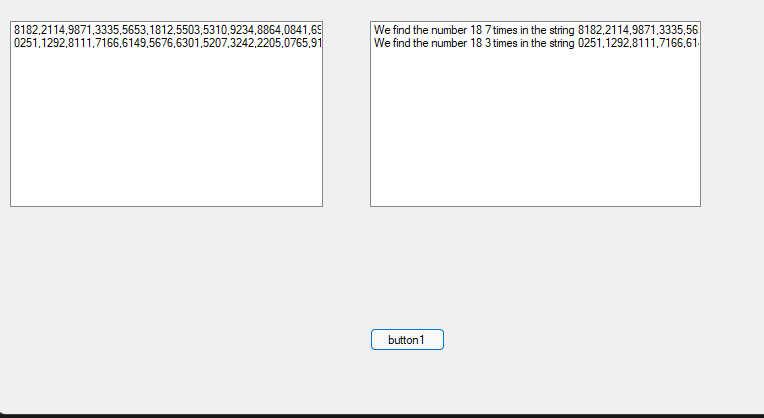
@MiPakTeh , you could try the following code to find 2 digit. Number in file Notepad.
private void button1_Click(object sender, EventArgs e)
        {
            int findnum= 18;
            for (int i = 0; i <= Data1.Count - 1; i++)
            {
                var StringToCheck = Data1[i].Split(',');
                int count = 0;
                var last = StringToCheck.Last();
                foreach (var S in StringToCheck)
                {
                    char []arr=S.ToCharArray();
                    Console.WriteLine(arr[0].ToString());
                    string[] find= new[] { arr[0].ToString() + arr[1].ToString(), arr[1].ToString() + arr[0].ToString(), arr[0].ToString() + arr[2].ToString(), arr[2].ToString() + arr[1].ToString(), arr[0].ToString() + arr[3].ToString(), arr[3].ToString() + arr[0].ToString(), arr[1].ToString() + arr[2].ToString(), arr[2].ToString() + arr[1].ToString(), arr[1].ToString() + arr[3].ToString(), arr[3].ToString() + arr[1].ToString(), arr[2].ToString() + arr[3].ToString(), arr[3].ToString() + arr[2].ToString(), };
                    count = count + find.Count(s => s == findnum.ToString());
                    if(S==last)
                    {
                        listBox2.Items.Add("We find the number " + findnum + " " + count + " times" + " in the string " + Data1[i]);

                    }
                }

            }
        }
Result:
Best Regards,
Jack
If the answer is the right solution, please click "Accept Answer" and kindly upvote it. If you have extra questions about this answer, please click "Comment".
Note: Please follow the steps in our documentation to enable e-mail notifications if you want to receive the related email notification for this thread.