Microsoft Security | Intune | Other
Other Intune-related topics, including unsupported scenarios and platform-specific behaviors

This browser is no longer supported.
Upgrade to Microsoft Edge to take advantage of the latest features, security updates, and technical support.
' cx='32' cy='32' r='32' /%3E%3Ctext x='50%25' y='55%25' dominant-baseline='middle' text-anchor='middle' fill='%23FFF' %3ESM%3C/text%3E%3C/svg%3E)
Hi guy's,
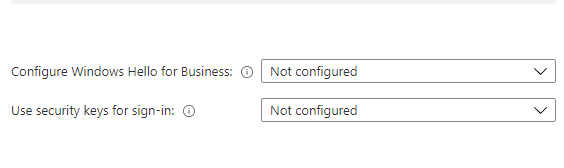
We are in process of testing Endpoint manager and added some laptops to only Azure AD, now when our test users login to these laptop they must configure a Pin for Windows Hello for Business. I did check the Endpoint manager dashboard and this option is set to not configured! if this option for all users is not configured why we must still configure a Pin?
Or should we disable these both options?
Other Intune-related topics, including unsupported scenarios and platform-specific behaviors

Not configured = default behavior = Windows Hello for Business enabled.
Why do you want to disable it? Windows Hello for Business is a great step to enabling passwordless in your environment and thus increasing your security posture.
' cx='32' cy='32' r='32' /%3E%3Ctext x='50%25' y='55%25' dominant-baseline='middle' text-anchor='middle' fill='%23FFF' %3EJS%3C/text%3E%3C/svg%3E)
@Shahin Mortazave Thanks for posting in our Q&A forum.
Intune integrates with Hello for Business in two ways:
To meet our requirements,
For the option 1, If you don't want to enable Windows Hello for Business during device enrollment, select Disable option.
For option 2, Under Configuration Settings->Account Protection-> Block Windows Hello for Business, select Enabled.
Hope this can help.
If the response is helpful, please click "Accept Answer" and upvote it.
Note: Please follow the steps in our documentation to enable e-mail notifications if you want to receive the related email notification for this thread.
' cx='32' cy='32' r='32' /%3E%3Ctext x='50%25' y='55%25' dominant-baseline='middle' text-anchor='middle' fill='%23FFF' %3ERJ%3C/text%3E%3C/svg%3E)
This should help.how-to-block-windows-hello-for-business.html