How to edit customsettings.ini with TaskSequenceID

Upinit 1 Reputation point
2022-02-04T00:56:33.27+00:00

I've done a bunch of reading on this but can't understand how to properly designate a specific Task Sequence be used with customsettings.ini. I'm trying to set up the "Sysprep and Capture" Task Sequence but it doesn't work as it's not giving me the menu option to specify where to save the image. I configured the customsettings.ini file with the TaskSequenceID set in Priority, and then added the section with my designated TS number. I did some research and found articles that say to replace a line of code in the ZTIUtility.vbs script but my script already has the proper line of code. I then read someone say they fixed theirs by removing the JoinDomain option in the customsettings.ini file. My Default section has that option configured, so as a test I removed it and the "Sysprep and Capture" TS started working which tells me my customsettings.ini file is not working properly to parse using Task Sequences. Could someone please advise me how I'm supposed to properly format it?

Here is my Priority line:

Priority=TaskSequenceID, Default

Here is my Task Sequence section:

[44]
OSInstall=Y
SkipCapture=NO
SkipAdminPassword=NO
SkipProductKey=YES

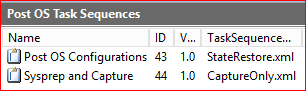
I have tried [44], [044], and [TaskSequenceID_44] to no avail.

Here is my "Sysprep and Capture" TS:

171138-image.png

Thanks for the assistance!

Windows for business | Windows Client for IT Pros | Devices and deployment | Set up, install, or upgrade
0 comments No comments
{count} votes

1 answer

Sort by: Most helpful
  1. AllenLiu-MSFT 49,436 Reputation points Microsoft External Staff
    2022-02-07T08:09:32.91+00:00

    Hi, @Upinit

    Thank you for posting in Microsoft Q&A forum.

    The customsettings.ini is processed BEFORE we choose our tasksequence. So we can't just get our settings in it.

    What we can do is create another one, like customsettings-44.ini file and add 1 more step in our tasksequence to process customsettings-%TASKSEQUENCEID%.ini file.

    You may check Anton Romanyuk's reply in below thread to see if it helps:
    https://social.technet.microsoft.com/Forums/en-US/d5ee588f-4e8d-4412-8f3e-77d39518c757/mdt-2013-6384431-tasksequence-by-tasksequenceid-is-not-working?forum=mdt


    If the answer is the right solution, please click "Accept Answer" and kindly upvote it. If you have extra questions about this answer, please click "Comment".
    Note: Please follow the steps in our documentation to enable e-mail notifications if you want to receive the related email notification for this thread.

    0 comments No comments

Your answer

Answers can be marked as 'Accepted' by the question author and 'Recommended' by moderators, which helps users know the answer solved the author's problem.