Azure Functions
An Azure service that provides an event-driven serverless compute platform.
This browser is no longer supported.
Upgrade to Microsoft Edge to take advantage of the latest features, security updates, and technical support.
' cx='32' cy='32' r='32' /%3E%3Ctext x='50%25' y='55%25' dominant-baseline='middle' text-anchor='middle' fill='%23FFF' %3EZZ%3C/text%3E%3C/svg%3E)
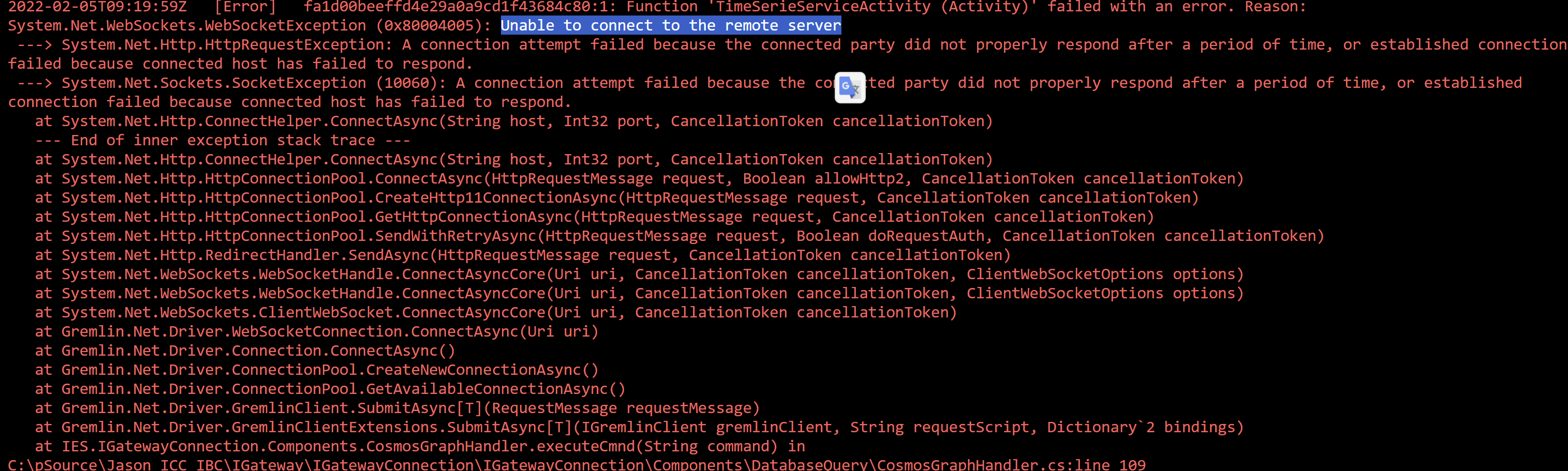
Function app throw "cannot connect remote server" exception sometimes while send gremlin query to cosmosDB
Following are code where throw exception, anyone knows why this happen?
/// <summary>
            ///    Execute CosmosDB graph command
            /// </summary>
            public virtual async Task<dynamic> executeCmnd(string command)
            {

                var gremlinServer = new GremlinServer(_dbConfig.HostName, _dbConfig.Port, enableSsl: true, username: "/dbs/" + _dbConfig.Database + "/colls/" + _dbConfig.Collection, password: _dbConfig.AuthKey);
                using (var gremlinClient = new GremlinClient(gremlinServer, new GraphSON2Reader(), new GraphSON2Writer(), GremlinClient.GraphSON2MimeType))
                {
                    return await gremlinClient.SubmitAsync<dynamic>(command);
                }
            }
An Azure service that provides an event-driven serverless compute platform.
An Azure NoSQL database service for app development.
An object-oriented and type-safe programming language that has its roots in the C family of languages and includes support for component-oriented programming.
Answer accepted by question author

@Zehou Zhang As per the error, it looks like the socket exception and the reason for this error is that you reached the limit of the maximum available socket at your function app and sandbox disabled access for new sockets.
As per your code, I am not sure if you are calling executeCmnd method on every invocation. If this is the case then the suggestion is not to create a new connection to the Cosmo DB for every request coming to your function. You should only create the connection once and reuse it.
I will suggest you to review managing cosmo DB clients as mentioned in this document and define the static client object while creating the connection.
You can define the below line of code as static and outside your function app invocation but within the class.
var gremlinServer = new GremlinServer(_dbConfig.HostName, _dbConfig.Port, enableSsl: true, username: "/dbs/" + _dbConfig.Database + "/colls/" + _dbConfig.Collection, password: _dbConfig.AuthKey);
Feel free to get back to me if you need any assistance.
This is great answer. but Is there anyway to capture this?
I was trying to look into variety matrix:
TcpEstablished(Count): ~110
SocketOutBoundAll(Count): 200-220
SocketOutBoundEstablished(Count): 110
@Zehou Zhang You can get the TCP connection metrics from Diagnose and solve problems --> Availability and Performance --> TCP Connections for your function app. You can refer to Deep Dive into TCP Connections in App Service Diagnostics. Alternatively, we do have different metrics listed here and connections might help.
I tried to capture connection rejections from Diagnose and solve problems, however nothing found during the period of problem happens,
then I start testing function app locally with restricted to 1 CPU core and 1.75GB memory limits (vs instance, vs debugger console application resource and scriptsandbox64) as my app service plan, then I can replicate the issue once, after I try to run a few more sessions to verify it, problem disappeared again. any ideas?
Today is the first time I see it happens on my local machine, never see it before
@Zehou Zhang If you are still getting the socket exception then looks like your code is still creating multiple sockets for outbound calls. Can you confirm if the issue is observed when you try to increase the load after some time. If this is the case it might need the code review to verify whether your application is using new socket for each request.
Reusable gremlin client indeed fix the issue, Many thanks
' cx='32' cy='32' r='32' /%3E%3Ctext x='50%25' y='55%25' dominant-baseline='middle' text-anchor='middle' fill='%23FFF' %3EBS%3C/text%3E%3C/svg%3E)
The connection error could be
You have the invalid host name
Firewall rules block connection