Azure Blob Storage
An Azure service that stores unstructured data in the cloud as blobs.
This browser is no longer supported.
Upgrade to Microsoft Edge to take advantage of the latest features, security updates, and technical support.
' cx='32' cy='32' r='32' /%3E%3Ctext x='50%25' y='55%25' dominant-baseline='middle' text-anchor='middle' fill='%23FFF' %3ESG%3C/text%3E%3C/svg%3E)
Hello,
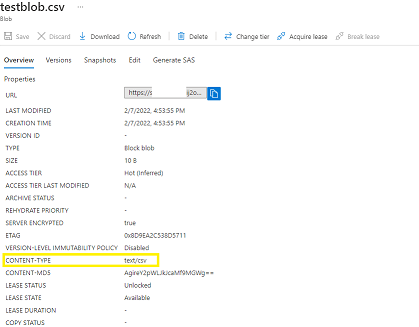
I have a "Create Blob" step in my Logic App and I'm trying to create a csv file. I have added the "Blob Content" as the comma separated header value ("assetPath,biddingAgency,campaignType,market") and it works fine but when I check the blob in Azure storage, the blob's content-type is set to text/plain whereas I need it to be text/csv as another action is dependent on this content-type.
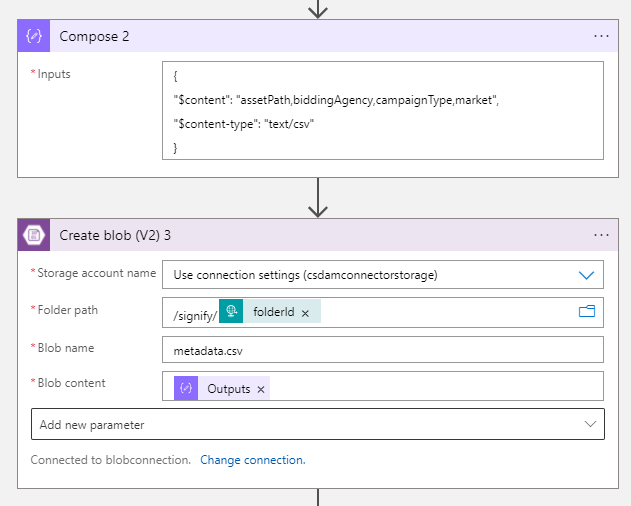
I also tried passing below in the blob content but it doesn't help as mentioned here (https://theazureguy.wordpress.com/2020/02/13/setting-blob-content-type-in-logic-apps/comment-page-1/?unapproved=456&moderation-hash=388291d38fa9ea8bf026d0c77c362b4e#comment-456)
{
"$content": "assetPath,biddingAgency,campaignType,market",
"$content-type": "text/csv"
}
When I add "Compose" step with "Content-Type" in it, I get below error on execution


@Shelly Goel The Create blob does accept the Content-Type parameter which you can set it to text/csv as per your requirement.
The Blob content parameter should only have the content of the blob.

' cx='32' cy='32' r='32' /%3E%3Ctext x='50%25' y='55%25' dominant-baseline='middle' text-anchor='middle' fill='%23FFF' %3EWN%3C/text%3E%3C/svg%3E)
I am using a similar setup, except regardless of what value I put in the Content-Type field in the Create Blob Block V2 step, the blob block content is always set to application/octet-stream. I initially tried using the MediaType value to set the content type based on what is uploaded to SharePoint, but I also tried entering image/jpeg directly. Both options result in the block added to Azure as application/octet-stream.
This only became an issue after 7/1/24. This worked prior to that date without issue.

Hi,
(1) Please provide the code you use and not only the error. You can the entire code of the logic apps or image of the flow when all configuration of all operators and trigger are displayed.
(2) In the following thread I added a full example of how to create csv files, so check if this help in any way please:
(3) According to the screenshot and the description, your issue is not in the CREATE BLOB but with the Compose action.
Remove the next action and first fixt this part. Run the app and check that you are getting the right output from the Compose action first.
By the way, why do you use Compose action !?? What is the input to the Compose action?
Compose action construct a single output such as a JSON object from multiple inputs. Why do you need JSON in order to CREATE BLOB ?!?
Take a look at the document: https://learn.microsoft.com/en-us/azure/logic-apps/logic-apps-perform-data-operations#compose-action
I see that you mark the answer which mean that it solved your need. Glad to see this :-)
Have a great day