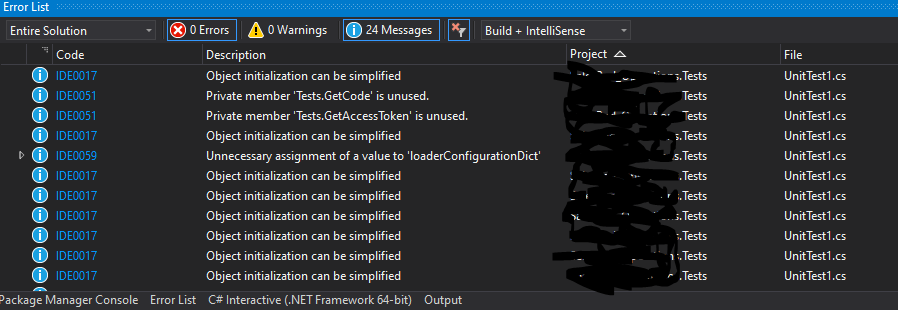
How do I prevent Code analysis from running on test projects?

WILLIAM BEHNING 41 Reputation points
2020-08-20T14:32:54.597+00:00

I have a Dot Net Core 3.1 Solution with several test projects. How do I prevent Code analysis from running on test projects?

VS info:
Microsoft Visual Studio Professional 2019
Version 16.7.2

The instructions here disable-code-analysis

do not work as I continue to get results for my test projects in the Code Metrics Results window.

How do I prevent this?

Developer technologies | Visual Studio | Other
A family of Microsoft suites of integrated development tools for building applications for Windows, the web, mobile devices and many other platforms. Miscellaneous topics that do not fit into specific categories.
{count} votes

2 answers

Sort by: Most helpful
  1. Dylan Zhu-MSFT 6,431 Reputation points
    2020-08-21T07:27:36.177+00:00

    Hi WILLIAMBEHNING-8606 ,

    The Code Analysis and Code metrics were two functions in VS IDE.

    For example, we could use the code analyze under the project property during we build project in solution explorer window or run it click “Run Code Analysis” under Analyze menu manually.

    But we get the code metrics results window with this function like the following link with “Calculate Code Metrics” option under Analyze menu:

    https://learn.microsoft.com/en-us/visualstudio/code-quality/working-with-code-metrics-data?view=vs-2019
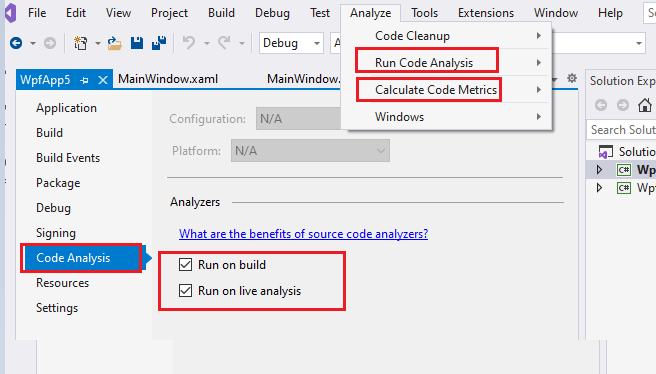
    19432-aaa.png

    If you didn’t want to run the Code Analysis under build certain projects, you could disable it under the project property. If I misunderstand anything, feel free to let me know.

    Best Regards,
    Dylan

    0 comments No comments

  2. WILLIAM BEHNING 41 Reputation points
    2021-02-25T15:13:15.157+00:00

    I know it's been a while - I lost track of this post.

    To add some more info, I am setting Run on build and Run on live analysys to false.

    I still get messages for these projects:

    72165-image.png


Your answer

Answers can be marked as 'Accepted' by the question author and 'Recommended' by moderators, which helps users know the answer solved the author's problem.