Microsoft Security | Microsoft Graph
An API that connects multiple Microsoft services, enabling data access and automation across platforms

This browser is no longer supported.
Upgrade to Microsoft Edge to take advantage of the latest features, security updates, and technical support.
' cx='32' cy='32' r='32' /%3E%3Ctext x='50%25' y='55%25' dominant-baseline='middle' text-anchor='middle' fill='%23FFF' %3EA%3C/text%3E%3C/svg%3E)
Hello Team,
I have worked on Microsoft Graph API (v 1.0) objects (Users, Administrative Units, Organization, Domains, Groups & Devices). For GET Method API call of Users, Administrative Units & Groups , I have come across errors message as "Request_UnsupportedQuery" on filters along some properties which were said as supported in properties description.
Here are the objects which didn't work along filters:
Administrative units: description
Property & Supported filters: https://learn.microsoft.com/en-us/graph/api/resources/administrativeunit?view=graph-rest-1.0
Users: companyName,employeeHireDate,employeeType,faxNumber,mobilePhone,officeLocation,postalCode ,preferredLanguage ,showInAddressList ,streetAddress
Property & Supported filters: https://learn.microsoft.com/en-us/graph/api/resources/user?view=graph-rest-1.0
Groups: description
Property & Supported filters: https://learn.microsoft.com/en-us/graph/api/resources/group?view=graph-rest-1.0
Filters Supported List: https://learn.microsoft.com/en-us/graph/aad-advanced-queries#device-properties
Response Screenshot:

Can you please help me running the properties along filters for above?
Thankyou.

Such filters require the "consistencyLevel"="eventual" header and the user of $count=true operator:
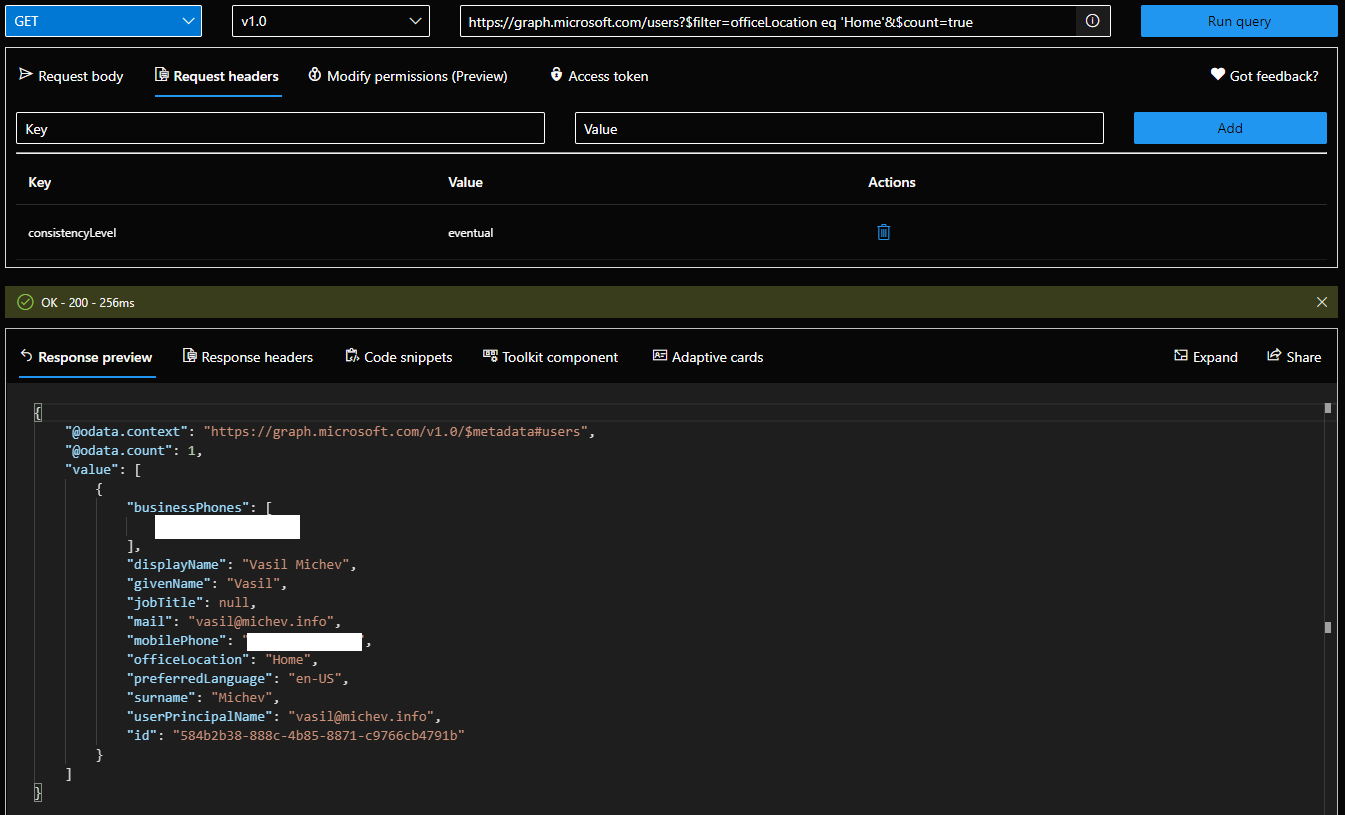
Refer to the documentation articles you linked above for more details.
' cx='32' cy='32' r='32' /%3E%3Ctext x='50%25' y='55%25' dominant-baseline='middle' text-anchor='middle' fill='%23FFF' %3EZY%3C/text%3E%3C/svg%3E)
Administrative units: description
https://graph.microsoft.com/v1.0/directory/administrativeUnits?$select=description
User: companyName,employeeHireDate,employeeType,faxNumber,mobilePhone,officeLocation,postalCode ,preferredLanguage ,showInAddressList ,streetAddress
https://graph.microsoft.com/v1.0/users?$select=companyName,employeeHireDate,employeeType,faxNumber,mobilePhone,officeLocation,postalCode ,preferredLanguage ,showInAddressList ,streetAddress
Groups: description
https://graph.microsoft.com/v1.0/groups?$select=description
Response Screenshot:
https://graph.microsoft.com/v1.0/users?$count=true&ConsistencyLevel=eventual&$filter=officeLocation eq 'Brisbane'
If the answer is helpful, please click "Accept Answer" and kindly upvote it. If you have extra questions about this answer, please click "Comment".
Note: Please follow the steps in our documentation to enable e-mail notifications if you want to receive the related email notification for this thread.
Hi @Anonymous , Did the above answers solve your problem? Would you mind providing me any update on the status of your issue?