Microsoft 365 and Office | Development | Other
Building custom solutions that extend, automate, and integrate Microsoft 365 apps.

This browser is no longer supported.
Upgrade to Microsoft Edge to take advantage of the latest features, security updates, and technical support.
' cx='32' cy='32' r='32' /%3E%3Ctext x='50%25' y='55%25' dominant-baseline='middle' text-anchor='middle' fill='%23FFF' %3EFR%3C/text%3E%3C/svg%3E)
Hello,
I have an Excel sheet that I am using for a pivot table and chart. In some cases there are duplicate Order No's (9000785592) as shown in the following...

When this occurs, I receive errors for the sum Totals (i.e., Total results as 8204.34 (3 x 2734.78) versus the total for Order No 9000785592 should equal 2734.78.
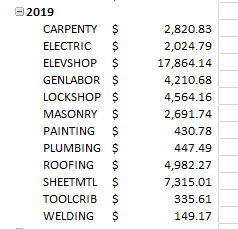
What is the best way to resolve this issue? can duplicates be removed in the pivot table creation process?

Hi @Flinn, Randal J ,
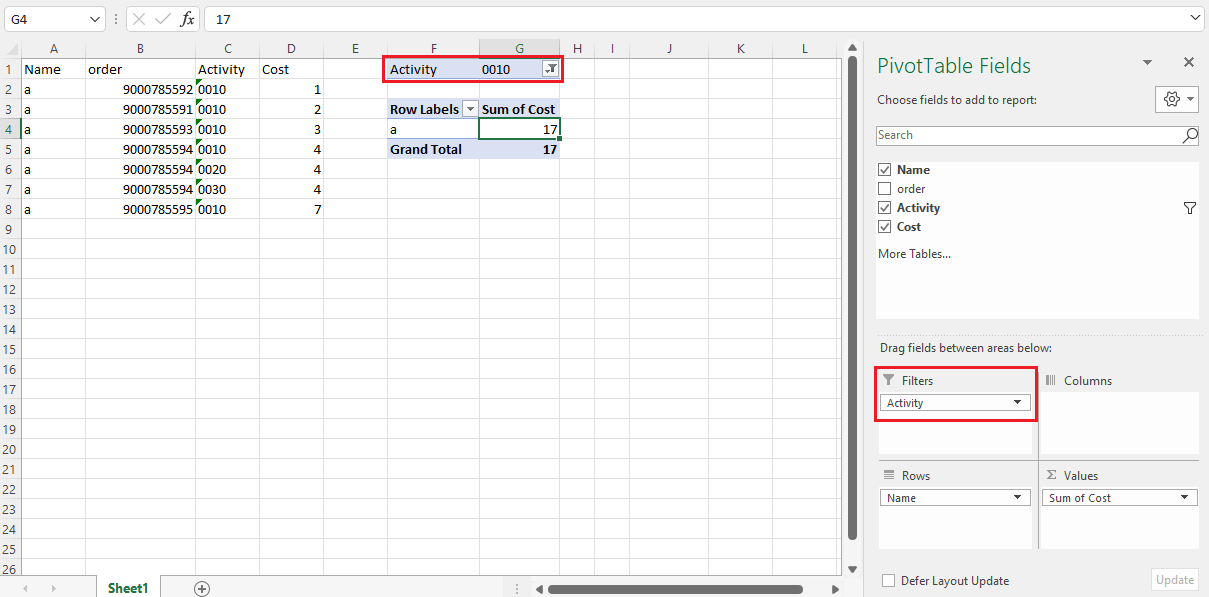
Based on the first picture, the 9000785592 with different values in Activity title column. If you only need unique Order in the table, you can try to filter Activity = 0010.
If you want to display the result in PivotTable, you can add the Activity field to the Filter area, I created a sample and you can check if this method is helpful:
If the response is helpful, please click "Accept Answer" and upvote it.
Note: Please follow the steps in our documentation to enable e-mail notifications if you want to receive the related email notification for this thread.
Hi @Flinn, Randal J ,
Just checking in to see if the information was helpful. Please let us know if you would like further assistance.