Exchange Online
A cloud-based service included in Microsoft 365, delivering scalable messaging and collaboration features with simplified management and automatic updates.
This browser is no longer supported.
Upgrade to Microsoft Edge to take advantage of the latest features, security updates, and technical support.
' cx='32' cy='32' r='32' /%3E%3Ctext x='50%25' y='55%25' dominant-baseline='middle' text-anchor='middle' fill='%23FFF' %3ERF%3C/text%3E%3C/svg%3E)
Hi i am using the below syntax to delete an email from 3 user mailboxes with subject Test've Test-abcdef msggg, i have csv file in the below format. i am getting syntax error.
Name
user1@Company portal .com
user2@Company portal .com
user3@Company portal .com
$mailboxes = Import-Csv C:/temp/mailboxes.csv
ForEach ($mailbox in $mailboxes){
New-ComplianceSearch -Name $mailbox.name -ExchangeLocation $mailbox.name -ContentMatchQuery '(Received:08/18/2020 00:00..08/20/2020 23:59) AND (Subject:"Test've Test-abcdef msggg") AND (From:"anon@USER ")'
Start-ComplianceSearch -Identity $mailbox.name
}
New-ComplianceSearch -Name $mailbox.name, is it possible to give any name for compliance search, if i use $mailbox.name will the name of compliancesearch be user1@Company portal .comuser2@Company portal .comuser3@Company portal .com

>Missing closing '}' in statement block
As it said, there missing a "}" for ForEach function.
If the response is helpful, please click "Accept Answer" and upvote it.
My csv file is in below format, i have tried modifying the syntax i am getting other errors not sure what is wrong
Name,SearchName
user1@Company portal .com,user1_search
$mailboxes = Import-Csv C:/temp/mailboxes.csv
ForEach ($Mailbox in $Mailboxes){
New-ComplianceSearch -Name $mailbox.SearchName -ExchangeLocation $mailbox.Name -ContentMatchQuery '(Received:08/18/2020 00:00..08/20/2020 23:59) AND (Subject:"Test've Test-abcdef msggg") AND (From:"anon@USER ")'
Start-ComplianceSearch -Identity $mailbox.name
}
I think I have told you about this question many times, the using of "ContentMatchQuery" is incorrect. The way that you used is for search-mailbox rather than New-ComplianceSearch.
If you doesn't know how to use it, you can create it from Office 365 Security & Compliance, then check how to use it from PowerShell:


I want to know why you ask the same question for months and never have a test?
I will try the below syntax and see if it works but i doubt
New-ComplianceSearch -Name "user1_search" -ExchangeLocation user1@Company portal .com -ContentMatchQuery '"Received:08/18/2020 00:00..08/20/2020 23:59" AND from:"anon@USER " AND Subject:"Test've Test-abcdef msggg"'
start-compliancesearch " user1_search "
The way that you used "ContentMatchQuery" is incorrect. The way that you used is for search-mailbox rather than New-ComplianceSearch. So, you will get an error about it.
' cx='32' cy='32' r='32' /%3E%3Ctext x='50%25' y='55%25' dominant-baseline='middle' text-anchor='middle' fill='%23FFF' %3EEV%3C/text%3E%3C/svg%3E)
Hi
Maybe instead of Import-Csv C:/temp/mailboxes.csv, change the / with \ :
Import-Csv "C:\temp\mailboxes.csv"
>is it possible to give any name for compliance search
You need to modify the source file as below:
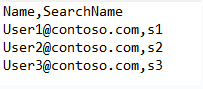
Then modify this part in that script:

Before running script each time, you also need to modify the SearchName(such as from S1,2,3 to a1,2,3), otherwise, it will still conflict(error like: this Compliance Search name exists)
If the response is helpful, please click "Accept Answer" and upvote it.
i am getting below error
At C:\script.ps1:3 char:233
Any update about this thread now?
If the those suggestion helps, please be free to mark it as an answer for helping more people.