
Hello AllenLiu,
I received an email yesterday that said a new comment had been added to this question, but did not see anything when I logged in. Did you have any new advice that might help me concerning this error?
Thank you.
This browser is no longer supported.
Upgrade to Microsoft Edge to take advantage of the latest features, security updates, and technical support.
' cx='32' cy='32' r='32' /%3E%3Ctext x='50%25' y='55%25' dominant-baseline='middle' text-anchor='middle' fill='%23FFF' %3EJ%3C/text%3E%3C/svg%3E)
Hello,
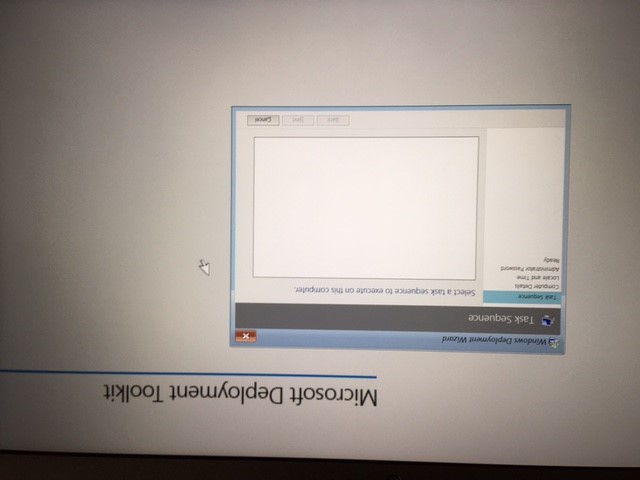
I have created an MDT server and I am attempting to create a test USB image with Windows 10 as well as Adobe Reader only to test. When I boot the computer to the flash drive there is no task sequence to run? When I updated the Media I received error pertaining to "Invalid Top Level Folder?" See attachments. Can anyone assist me to get on the right path here? Let me know if I need to provide additional information.
Thank you.
Hello AllenLiu,
I received an email yesterday that said a new comment had been added to this question, but did not see anything when I logged in. Did you have any new advice that might help me concerning this error?
Thank you.
Hello AllenLiu-MSFT,
I think I have my email notifications right now. I saw a reply on the above link that said when they moved the Media Path folder out of the root of the drive, they did not receive this error anymore. This is the structure of my present Deployment Share which is on an external drive:
Elements (D:) > MDT Production > FirstMDT (which was created to choose when creating Media)
I tried to upload a file that shows this structure using .gif and .jpg of less than 20 kb and it failed?
Thank you,

You may use the Snipping Tool to captutre a picture and upload it here.
Hello, allenliu-msft
The one reply I saw in the link did not apply to my situation. There were links that said I should be in the MDT forum and that took me back to where I started. Am I not in the right place? I did not know you replied. Is there a place I can enter my email so I know when someone responds?
Thank you.
You are in the right place, you may follow the documentation to enable e-mail notifications if you want to receive the related email notification:
https://learn.microsoft.com/en-us/answers/articles/67444/email-notifications.html
Hi, @jbooze
Thank you for posting in Microsoft Q&A forum.
For the issue Invalid Top Level Folder Specified, you may check gschreiner's reply in below thread to see if it helps:
https://social.technet.microsoft.com/forums/windowsserver/en-US/ae4bf417-1250-4905-99a6-c5ca343d308a/errors-when-generating-image-for-portable-deployment-media
If the answer is the right solution, please click "Accept Answer" and kindly upvote it. If you have extra questions about this answer, please click "Comment".
Note: Please follow the steps in our documentation to enable e-mail notifications if you want to receive the related email notification for this thread.