Microsoft 365 and Office | Access | Development
The creation and customization of database applications using Microsoft Access

This browser is no longer supported.
Upgrade to Microsoft Edge to take advantage of the latest features, security updates, and technical support.
' cx='32' cy='32' r='32' /%3E%3Ctext x='50%25' y='55%25' dominant-baseline='middle' text-anchor='middle' fill='%23FFF' %3ESZ%3C/text%3E%3C/svg%3E)
I am attempting to print PDFs from a report per each of my customers, but I'm having an issue whereby, rather than filtering to the specific customer I need, it is printing the entire record into each customer PDF.
As shown in the image below, I've managed to make it iterate over the file names so that each one is unique, but the filter won't iterate to only print the records for the customer that's on the file name.
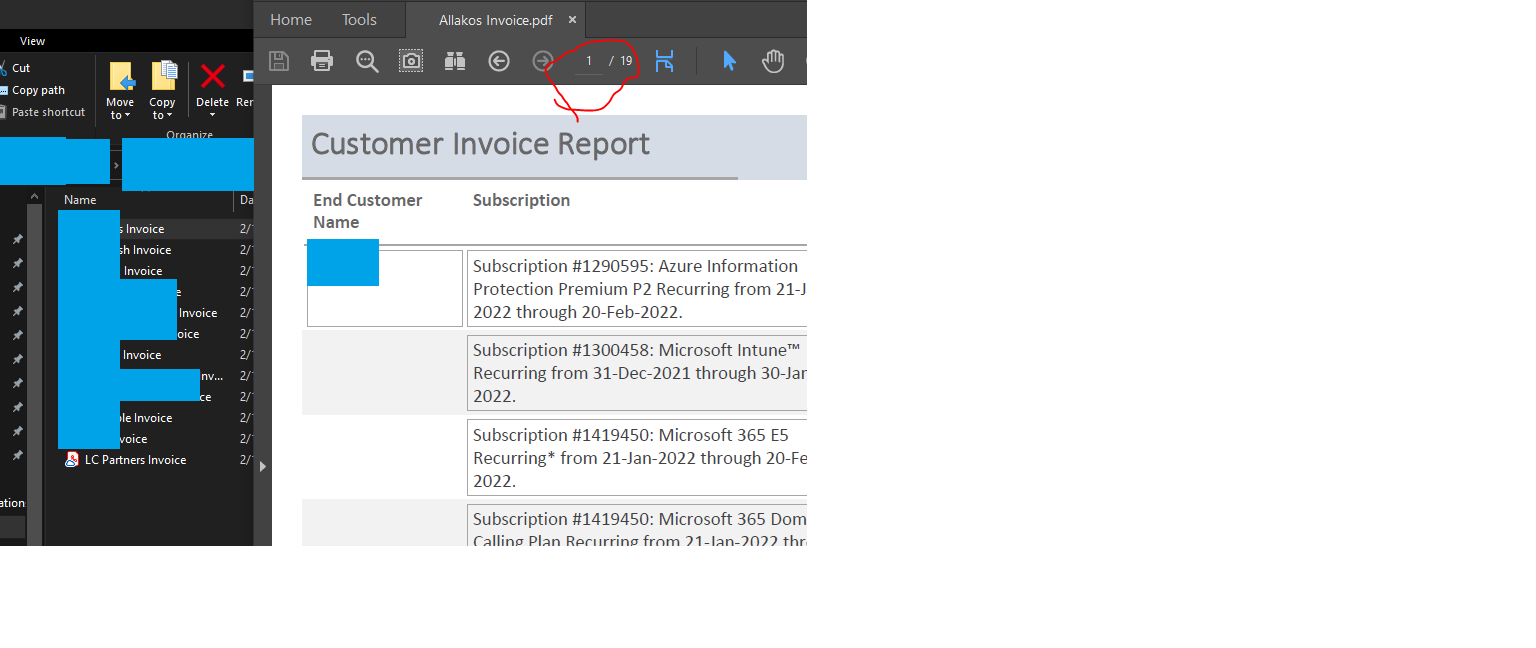
Here is the code I'm using (NOTE: destination file path for sFolder has been lightly obscured intentionally):
Private Sub buttonPrint_Click()
    Dim rs                    As DAO.Recordset
    Dim rpt                   As Access.Report
    Dim sFolder               As String
    Dim sFile                 As String
    Const sReportName = "Customer Invoicing Export"    'Name of the report

    On Error GoTo Error_Handler

    sFolder = "\Output\"

    Set rs = CurrentDb.OpenRecordset("SELECT [End Customer Name], [Subscription], [Quantity], [Duration], [Unit Price], [Total] FROM [000C - Customer Invoicing Export]", dbOpenSnapshot)
    With rs
        If .RecordCount <> 0 Then    'Make sure we have record to generate PDF with
            'Open the Report
            DoCmd.OpenReport sReportName, acViewPreview, , , acHidden
            'Define a report object so we can manipulate it below
            Set rpt = Reports(sReportName).Report
            .MoveFirst
            Do While Not .EOF
                'Build the PDF filename we are going to use to save the PDF with
                sFile = Nz(![End Customer Name], "") & " Invoice" & ".pdf"
                sFile = sFolder & sFile
                'filter the report to the specific record or criteria we want
                rpt.Filter = "'[End Customer Name]=" & ![End Customer Name] & "'"
                rpt.FilterOn = True
                DoEvents    'This is critical!!!!
                DoCmd.OutputTo acOutputReport, sReportName, acFormatPDF, sFile, , , , acExportQualityPrint
                .MoveNext
            Loop
            DoCmd.Close acReport, sReportName
        End If
    End With

Error_Handler_Exit:
    On Error Resume Next
    If Not rpt Is Nothing Then Set rpt = Nothing
    If Not rs Is Nothing Then
        rs.Close
        Set rs = Nothing
    End If
    Exit Sub

Error_Handler:
    If Err.Number <> 2501 Then
        MsgBox "The following error has occured" & vbCrLf & vbCrLf & _
               "Error Number: " & Err.Number & vbCrLf & _
               "Error Source: cmd_GenPDFs_Click" & vbCrLf & _
               "Error Description: " & Err.Description & _
               Switch(Erl = 0, "", Erl <> 0, vbCrLf & "Line No: " & Erl) _
               , vbOKOnly + vbCritical, "An Error has Occured!"
    End If
    Resume Error_Handler_Exit

End Sub
----------
If I could get some assistance in finding out what is going wrong and fixing it, it would be much appreciated.

Hi,
2 methods to filter the PDFs:
Servus
Karl
Access News
Access DevCon