Share via

Failed to update window10

Terence Lo 1 Reputation point
2022-02-12T18:00:42.34+00:00

Failed to update the window10, due to version2004 end of servicing period?
how to continue the update function?

Windows for business | Windows Client for IT Pros | Devices and deployment | Configure application groups
Windows for business | Windows Server | User experience | Other
0 comments No comments

4 answers

Sort by: Most helpful
  1. Limitless Technology 45,241 Reputation points
    2022-02-18T15:33:02.38+00:00

    Hello @Terence Lo

    You can try to reset the Windows update component and search for Windows Update in the Settings.

    How to: Reset Windows update components in Windows
    https://answers.microsoft.com/en-us/windows/forum/all/how-toreset-windows-update-components-in-windows/14b86efd-1420-***************5b1e8a3

    If this doesn't fetch the update you can always try the in-place update to update to the latest version of windows.

    How to perform an In-place Upgrade with Windows Step-by-Step *****
    https://answers.microsoft.com/en-us/windows/forum/all/how-to-perform-an-in-place-upgrade-with-windows-10/7f0b236e-3c6c-4913-9691-c4baa2a6190a

    Hope this resolves your Query!!

    --
    --If the reply is helpful, please Upvote and Accept it as an answer--

    Was this answer helpful?

    0 comments No comments

  2. Rita Hu -MSFT 9,666 Reputation points
    2022-02-18T02:35:05.837+00:00

    @Terence Lo
    We could get the Feature Update through Windows 10, version 20H2 Enablement Package to do in-place upgrade.

    Reference link: https://support.microsoft.com/en-us/topic/feature-update-through-windows-10-version-20h2-enablement-package-02d91e04-931e-f00d-090c-015467c49f6c

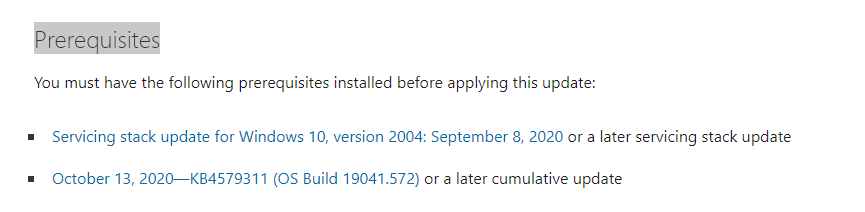
    Note that we have to install the Prerequisites before checking for updates to get the Enablement Package.
    175588-7.png

    Hope the above will be helpful. Don't hesitate to inform me if there are any questions or updates of the case. Looking forward to your response.

    Regards,
    Rita


    If the answer is the right solution, please click "Accept Answer" and kindly upvote it. If you have extra questions about this answer, please click "Comment".
    Note: Please follow the steps in our documentation to enable e-mail notifications if you want to receive the related email notification for this thread.

    Was this answer helpful?

    0 comments No comments

  3. Docs 16,851 Reputation points
    2022-02-13T15:54:45.483+00:00

    Whatever you prefer.

    When available post results from the steps in the prior post.

    This is setupdiag: https://learn.microsoft.com/en-us/windows/deployment/upgrade/setupdiag

    List any of these installed or recently uninstalled non-Microsoft software:
    a) antivirus
    b) firewall
    c) drive encryption

    Which Windows version do you want to install?

    Run the V2 log collector and post a share link into this thread using one drive, drop box, or google drive:

    https://www.tenforums.com/bsod-crashes-debugging/2198-bsod-posting-instructions.html
    https://www.elevenforum.com/t/bsod-posting-instructions.103/

    .
    .
    .
    .
    .

    Please remember to vote and to mark the replies as answers if they help.

    On the bottom of each post there is:

    Propose as answer = answered the question

    On the left side of each post there is /\ with a number: click = a helpful post
    .
    .
    .
    .
    .

    Was this answer helpful?

    0 comments No comments

  4. Docs 16,851 Reputation points
    2022-02-13T00:16:15.377+00:00

    Run setupdiag > post a share link into this thread

    List any of these installed or recently uninstalled non-Microsoft software:
    a) antivirus
    b) firewall
    c) drive encryption

    Which Windows version do you want to install?

    Run the V2 log collector and post a share link into this thread using one drive, drop box, or google drive:

    https://www.tenforums.com/bsod-crashes-debugging/2198-bsod-posting-instructions.html
    https://www.elevenforum.com/t/bsod-posting-instructions.103/

    .
    .
    .
    .
    .

    Please remember to vote and to mark the replies as answers if they help.

    On the bottom of each post there is:

    Propose as answer = answered the question

    On the left side of each post there is /\ with a number: click = a helpful post
    .
    .
    .
    .
    .

    Was this answer helpful?


Your answer

Answers can be marked as 'Accepted' by the question author and 'Recommended' by moderators, which helps users know the answer solved the author's problem.