Developer technologies | Windows Presentation Foundation
A part of the .NET Framework that provides a unified programming model for building line-of-business desktop applications on Windows.
This browser is no longer supported.
Upgrade to Microsoft Edge to take advantage of the latest features, security updates, and technical support.
' cx='32' cy='32' r='32' /%3E%3Ctext x='50%25' y='55%25' dominant-baseline='middle' text-anchor='middle' fill='%23FFF' %3EI%3C/text%3E%3C/svg%3E)
I want to calculate the sum of a column in my list(ObservableCollection displayed in ListView) and display it in TextBox.
<ListView x:Name="ProductListView" ItemsSource="{Binding ViewModel}">
<TextBlock Text="{Binding ???, StringFormat={}{0:N2}}" />
I have written a method in my ViewModel for this. But now I don't know how to bind the variable res to TextBox (The TextBox should always be updated when the ListView is changed).
public void CalcTotal()
{
    decimal res = 0;
    for (var i = 0; i < ProductsList.Count; i++)
    {
        res += ProductsList[i].Amount;
    }
}
Thanks!
' cx='32' cy='32' r='32' /%3E%3Ctext x='50%25' y='55%25' dominant-baseline='middle' text-anchor='middle' fill='%23FFF' %3EHL%3C/text%3E%3C/svg%3E)
Hi,@Imilio . Did the answer of peter solve your problem? If so, you can accept it as the answer. It's helpful for community members with similar questions.

Hi Imilio,
instead of method use property binding with your code in getter:
<ListView x:Name="ProductListView" ItemsSource="{Binding ViewModel}">
<TextBlock Text="{Binding CalcTotal, StringFormat={}{0:N2}}" />
...
 public decimal CalcTotal()
 get
   {
     decimal res = 0;
     for (var i = 0; i < ProductsList.Count; i++) res += ProductsList[i].Amount;
     return res;
  }
 }
Hi @Peter Fleischer (former MVP) , Thanks for your answer. It works but only when the app is started. When I add an item in ListView, the TextBox is not updated.
There was something wrong in my question. The ListView is bound to View(ICollectionView) and not ViewModel.
<ListView x:Name="ProductListView" ItemsSource="{Binding View}">
Maybe that's why it didn't work?
Another information: The TextBox is outside the ListView!
Hi Imilio,
you must inform UI to update showed value. You can use INotifyPropertyChanged for this.
Hi @Peter Fleischer (former MVP) , As i sad it works but only when the app is started. When I add an item in ListView, the TextBox is not updated. Here is the relevant code:
public class ProductViewModel : BaseViewModell
{
   //code

	public decimal CalcTotal
	{
		get
		{
			decimal res = 0;
			for (var i = 0; i < ProductsList.Count; i++)
			{
				res += ProductsList[i].Amount;
			}
			return res;
		}
	}
}

public class BaseViewModell : INotifyPropertyChanged
{
	public event PropertyChangedEventHandler PropertyChanged;

	protected virtual void RaisePropertyChanged([CallerMemberName] string propertyName = "")
	{
		if (!string.IsNullOrEmpty(propertyName))
			this.PropertyChanged?.Invoke(this, new PropertyChangedEventArgs(propertyName));
	}
}

<ListView x:Name="ProductListView" ItemsSource="{Binding View}" />

<TextBlock Text="{Binding CalcTotal, StringFormat={}{0:N2}, UpdateSourceTrigger=PropertyChanged}" />
Hi,
if you change View (ItemsSource of ListView) you must call RaisePropertyChanched(nameof(CalcTotal)):
Hi, Where and how should I call RaisePropertyChanched(nameof(CalcTotal))? RaisePropertyChanched ist a part of class BaseViewModell . Can you show that in the code?
Hi,
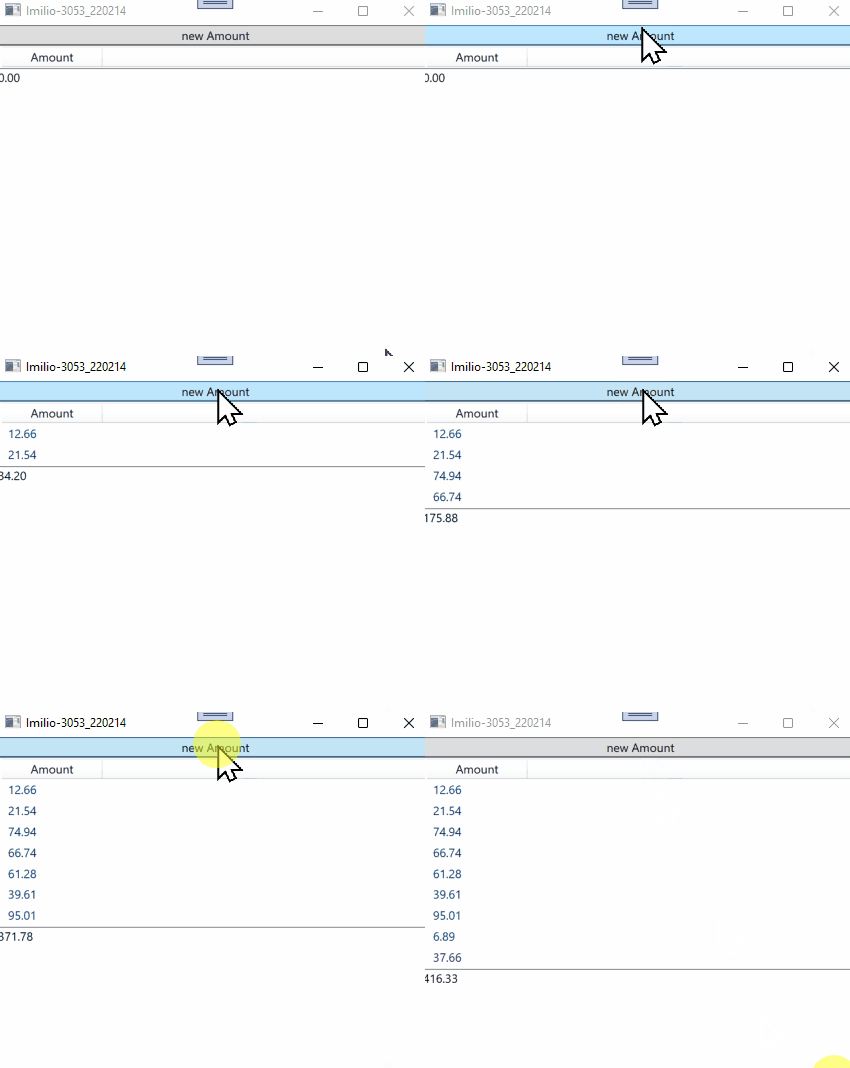
try following demo:
XAML:
<Window x:Class="WpfApp1.Window105"
        xmlns="http://schemas.microsoft.com/winfx/2006/xaml/presentation"
        xmlns:x="http://schemas.microsoft.com/winfx/2006/xaml"
        xmlns:d="http://schemas.microsoft.com/expression/blend/2008"
        xmlns:mc="http://schemas.openxmlformats.org/markup-compatibility/2006"
        xmlns:local="clr-namespace:WpfApp105"
        mc:Ignorable="d"
        Title="Imilio-3053_220214" Height="450" Width="800">
  <Window.DataContext>
    <local:ProductViewModel/>
  </Window.DataContext>
  <StackPanel>
    <Button Content="new Amount" Command="{Binding}"/>
    <ListView ItemsSource="{Binding View}">
      <ListView.View>
        <GridView>
        <GridViewColumn Header="Amount" Width="100" DisplayMemberBinding="{Binding Amount}"/>
      </GridView>
        </ListView.View>
    </ListView>
    <TextBlock Text="{Binding CalcTotal, StringFormat={}{0:N2}, Mode=OneWay}"/>
  </StackPanel>
</Window>
ViewModels:
using System;
using System.Collections.ObjectModel;
using System.ComponentModel;
using System.Runtime.CompilerServices;
using System.Windows;
using System.Windows.Data;
using System.Windows.Input;

namespace WpfApp105
{
  public class ProductViewModel : BaseViewModell, ICommand
  {
    public ProductViewModel() => cvs.Source = ProductsList;
    private CollectionViewSource cvs = new CollectionViewSource();
    private ObservableCollection<Data> ProductsList = new ObservableCollection<Data>();
    private Random rnd = new Random();

    public ICollectionView View { get => cvs.View; }

    public decimal CalcTotal
    {
      get
      {
        decimal res = 0;
        for (var i = 0; i < ProductsList.Count; i++)
        {
          res += ProductsList[i].Amount;
        }
        return res;
      }
    }

    public event EventHandler CanExecuteChanged;
    public void Execute(object parameter)
    {
      ProductsList.Add(new Data() { Amount = (decimal)(Math.Round(rnd.NextDouble() * 100,2))});
      RaisePropertyChanged(nameof(CalcTotal));
    }
    public bool CanExecute(object parameter) => true;
  }

  public class Data
  {
    public decimal Amount { get; set; }
  }

  public class BaseViewModell : INotifyPropertyChanged
  {
    public event PropertyChangedEventHandler PropertyChanged;
    protected virtual void RaisePropertyChanged([CallerMemberName] string propertyName = "") =>
      this.PropertyChanged?.Invoke(this, new PropertyChangedEventArgs(propertyName));
  }
}
How will your demo help me with my problem? Show me that it works? I know that it must work.
Hi Imilio,
see: