Developer technologies | ASP.NET | Other
A set of technologies in .NET for building web applications and web services. Miscellaneous topics that do not fit into specific categories.
This browser is no longer supported.
Upgrade to Microsoft Edge to take advantage of the latest features, security updates, and technical support.
' cx='32' cy='32' r='32' /%3E%3Ctext x='50%25' y='55%25' dominant-baseline='middle' text-anchor='middle' fill='%23FFF' %3EM%3C/text%3E%3C/svg%3E)
Hi, I don't know if it's correct but how is it an MVC project.
I have a jquery that performs an account when entering a value.
$(document).on("change keyup blur", "#startValue", function () {
            var main = @ViewBag.sumMin;
            var disc = $('#startValue').val();
            var mult = (main * disc).toFixed(2);
            $('#result').val(mult);
        });
the previous code working

my structure
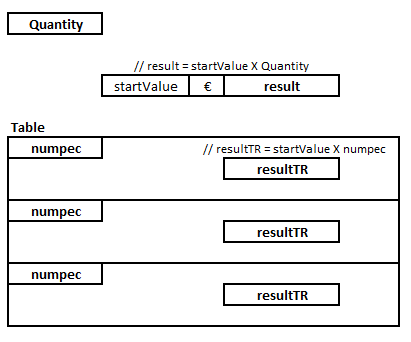
I also intended to do this account with a value in each row of a table
i try this:
UPDATE (for some reason I can't insert the code in format (permission error any help?)
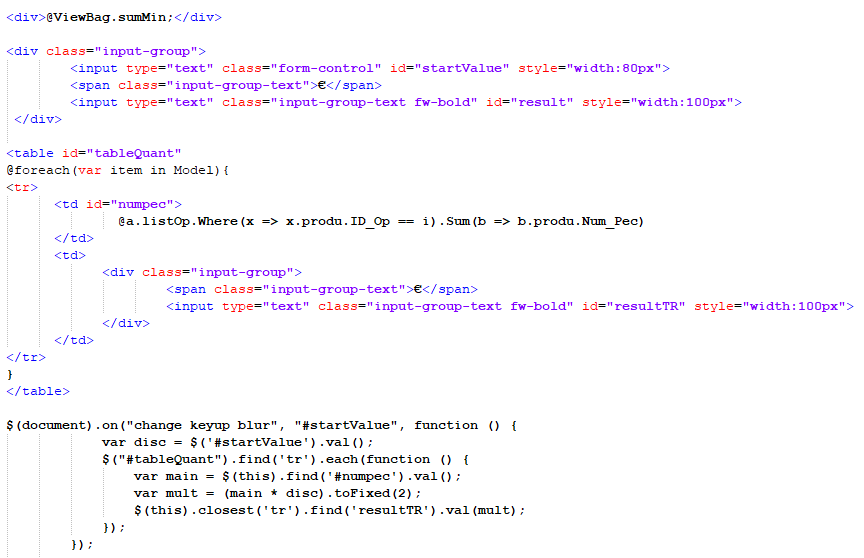
I tried closing the rows but without success, does it work through a cycle going through the IDs.
Thanks for all help.

if you do the keyup event on document, the "this" object refer to the document. so if you want this to be for each table row or cell, do the event on corresponding element.
$(".your table row class").on("change keyup blur", "#startValue", function () {
var disc = $('#startValue').val();
var numpec = $(this).closest('tr').find("#numpec").val();
var multi = (numpec * disc).toFixed(2);
$(this).closest('tr').find("#resultTR").val(multi);
});
' cx='32' cy='32' r='32' /%3E%3Ctext x='50%25' y='55%25' dominant-baseline='middle' text-anchor='middle' fill='%23FFF' %3ELH%3C/text%3E%3C/svg%3E)
Hi @MiguelBT ,
I think it should be the problem written in $(this).closest('tr').find, maybe you can provide more detailed code.
<td >
  <input type="text"" />
</td>
Replace
$(this).closest('tr').find("#resultTR").val(multi);
Should be
$(this).closest('tr').find('input[type="text"]').val(multi);
Best regards,
Lan Huang
If the answer is the right solution, please click "Accept Answer" and kindly upvote it. If you have extra questions about this answer, please click "Comment".
Note: Please follow the steps in our documentation to enable e-mail notifications if you want to receive the related email notification for this thread.