Microsoft 365 and Office | SharePoint Server | For business
A family of Microsoft on-premises document management and storage systems.

This browser is no longer supported.
Upgrade to Microsoft Edge to take advantage of the latest features, security updates, and technical support.
' cx='32' cy='32' r='32' /%3E%3Ctext x='50%25' y='55%25' dominant-baseline='middle' text-anchor='middle' fill='%23FFF' %3EDH%3C/text%3E%3C/svg%3E)
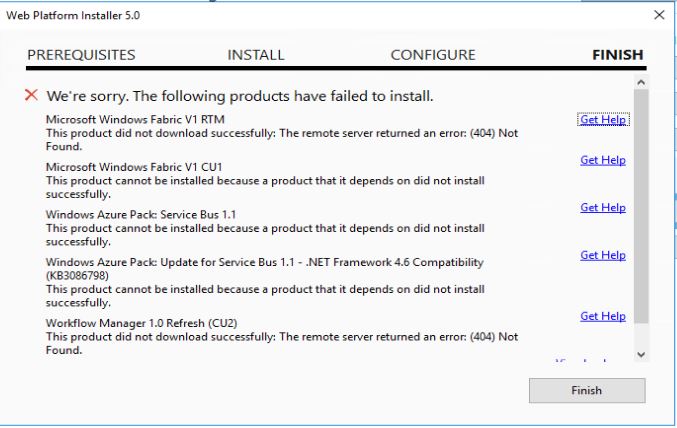
When i tried to install workflow manager 1.0 Refresh (CU2) on Windows Server 2016 Datacenter VM, i am facing below error.
"Microsoft Windows Fabric V1 RTM"
"This product did not download successfully. The remote server returned an error: (404) Not Found."
I was already go through some blogs which recommended to install Microsoft Visual C++ 2012 which i already did, but no luck.
A family of Microsoft on-premises document management and storage systems.
' cx='32' cy='32' r='32' /%3E%3Ctext x='50%25' y='55%25' dominant-baseline='middle' text-anchor='middle' fill='%23FFF' %3EJY%3C/text%3E%3C/svg%3E)
Hi,
Thanks for your posting.
Per your description, I have added the tag sharepoint-server-itpro for experts there to provide you some advice on this Workflow Manager 1.0 Installtion error.
Thanks for your patience.
Best Regards,
Jenny

@Desai, Himish Thank you for posting in Q&A forum.
We can reproduce this issue from our end.
We are currently looking into this issue and will get back to you as soon as possible. Thank you for your patience.
' cx='32' cy='32' r='32' /%3E%3Ctext x='50%25' y='55%25' dominant-baseline='middle' text-anchor='middle' fill='%23FFF' %3EGB%3C/text%3E%3C/svg%3E)
Hi,
Any update on this issue? We are in the middle of an upgrade process where we have to install WF Manager in the new environment. Is there any temprary download link for the missing prerequisite?
Thanks,
Gabor
Hi @Gábor Kiss , thank you for posting in Q&A forum.
Unfortunately, there is no temporary download link for the related products for the time being. We will have to wait until Microsoft team provide a resolution for this issue.
Sorry for the inconvenience.
Hi all, sorry for the inconvenience caused by this issue.
We have reported this issue internally to the Workflow Manager and Service Bus teams and they are continuing to look into this.
This issue is caused by a new policy of the Microsoft Download Center that blocks teams from offering files with SHA1 digital signatures out of security consideration, which most/all of these (Workflow Manager related) files have been codesigned with.
As a result, the Microsoft Download Center is automatically unpublishing files that do not meet the new digital signature requirement.
The teams are looking at potential mitigations for this so they can get their files permanently republished, but we cannot guarantee you when it will be fixed at this time.
We highly appreciate your patience and will keep updating progress of this issue.
Thank you very much for your understanding.
' cx='32' cy='32' r='32' /%3E%3Ctext x='50%25' y='55%25' dominant-baseline='middle' text-anchor='middle' fill='%23FFF' %3ENA%3C/text%3E%3C/svg%3E)
@Chelsea Wu
Thank you For update..
Is there any offline or any other trick to install it
Hi @Anonymous , I'm afraid not.
I will provide the alternative download links or solution in this thread soon as the teams come up with an update.
@Desai, Himish , @Gábor , @Anonymous
Hi all,
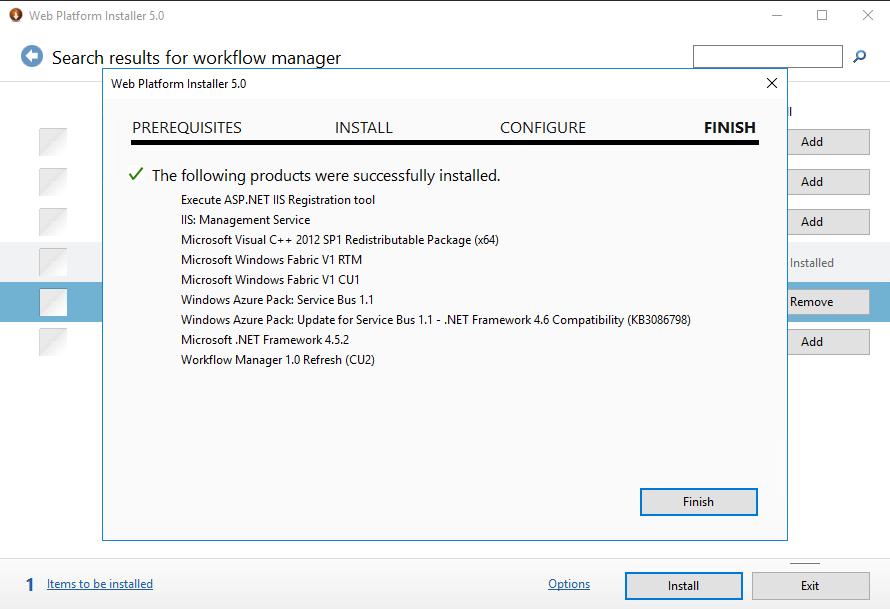
Per my test, this issue has been fixed in Web Platform Installer (Windows Server 2016 Datacenter). The Workflow Manager 1.0 Refresh (CU2) is ready for download and installation.
Please confirm in your SharePoint environments and see if it works as expected.
If an Answer is helpful, please click "Accept Answer" and upvote it.
**Note: Please follow the steps in our documentation to enable e-mail notifications if you want to receive the related email notification for this thread. **
' cx='32' cy='32' r='32' /%3E%3Ctext x='50%25' y='55%25' dominant-baseline='middle' text-anchor='middle' fill='%23FFF' %3EBJ%3C/text%3E%3C/svg%3E)
I am having this issue in Window 2016 datacenter by WPI 5.0 https://www.microsoft.com/web/downloads/platform.aspx, please help me.