Microsoft Security | Microsoft Entra | Microsoft Entra ID
A cloud-based identity and access management service for securing user authentication and resource access

This browser is no longer supported.
Upgrade to Microsoft Edge to take advantage of the latest features, security updates, and technical support.
' cx='32' cy='32' r='32' /%3E%3Ctext x='50%25' y='55%25' dominant-baseline='middle' text-anchor='middle' fill='%23FFF' %3EHG%3C/text%3E%3C/svg%3E)
Hi we have 2 on premise MFA servers.
When i login to Microsoft azure , go to MFA then providers I can see my 2 servers and i select one of them.
Normally there is a list of options including user activity reports - this has disappeared in the last couple of weeks
The only option i now have is to unblock users, but i need to view user activity
I use the azure free version.
I don't need to view azure AD reports which there is information for, as i only see me logging into Azure , its MFA provider reports where all my staff are
thanks
A cloud-based identity and access management service for securing user authentication and resource access

anonymous userGREGORY-0787
Are you able to provide some screenshots of what you're seeing/where you used to find the list of user activity reports?
Please let me know if you have any other questions.
Thank you for your time!
Additional Links:
Gather data from MFA Server
Gather data for Azure MFA
Hi please see attached screenshot. The top part is where i select the provider, the bottom is the 3 options i now have available.
In this list there used to be other options including user activity report
Thanks 
Answer accepted by question author
anonymous userGREGORY-0787
Thank you for the details!
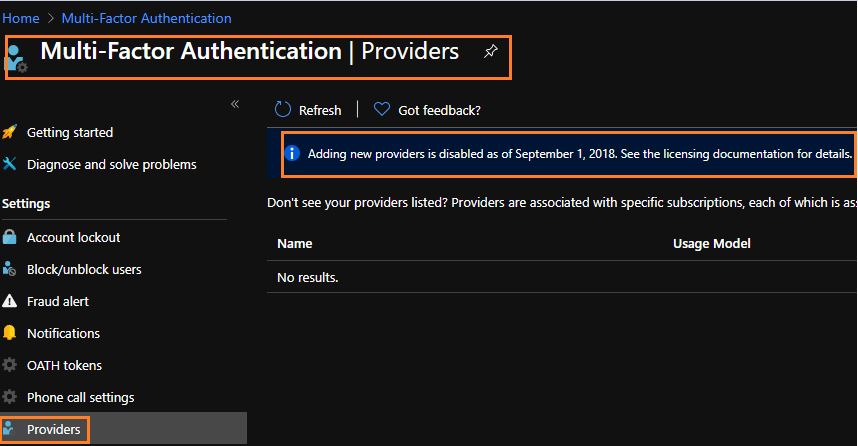
This looks to be a limitation since you're using the free version of AzureAD. Within your screenshot, you should be able to click on the link at the top of the Providers screen, which takes you to the Features and licenses for Azure Multi-Factor Authentication documentation. Within that doc, there's a comparison chart that shows MFA reports only being an AzureAD P1/P2 feature and not an AzureAD Free feature.
Please let me know if you have any other questions.
Thank you again for your time and patience!
Hi thanks for your response , i have looked at the licencing comparison page and yes it does look like we have to upgrade to premium for these reports now.
thanks for your help
regards Helen