Azure Functions
An Azure service that provides an event-driven serverless compute platform.
This browser is no longer supported.
Upgrade to Microsoft Edge to take advantage of the latest features, security updates, and technical support.
' cx='32' cy='32' r='32' /%3E%3Ctext x='50%25' y='55%25' dominant-baseline='middle' text-anchor='middle' fill='%23FFF' %3EAD%3C/text%3E%3C/svg%3E)
hello, i'm new to azure and i've been trying to upload file (from local or using url ) to azure blob storage using Function App, i defined out binding to blob storage and i wrote some code to upload the file but when i test it from Postman i get "500 internal server Error"
can you help me , please.
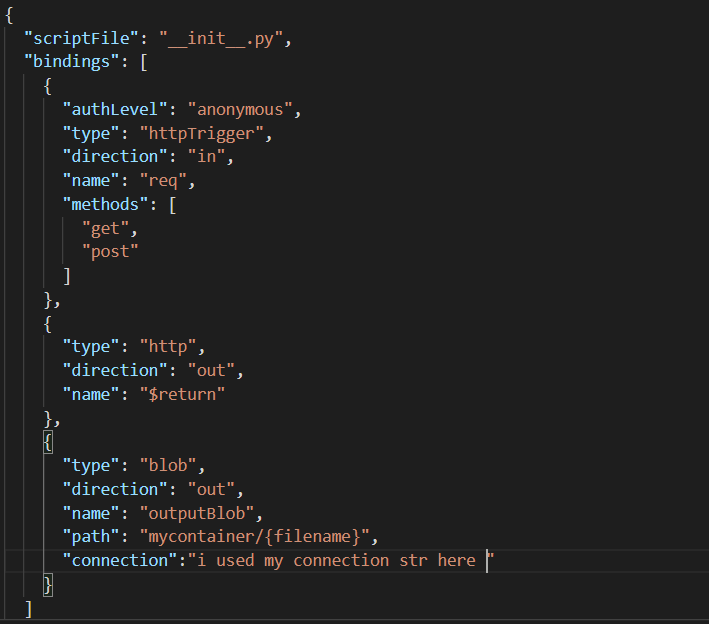
these are my init.py and function.json

' cx='32' cy='32' r='32' /%3E%3Ctext x='50%25' y='55%25' dominant-baseline='middle' text-anchor='middle' fill='%23FFF' %3EMM%3C/text%3E%3C/svg%3E)
Thanks for reaching out to Q&A and welcome to Azure Functions!
You are alredy using the Azure.storage.blob python SDK to upload the blob so there is no need to define the output binding in the Function.json. You have defined two output bindings, one is http and other is blob. You can remove the blob output binding and try again. The Function.json should look like the following for a http trigger. Also debug the code and see if the function is working as expected. Then try it in PostMan tool.
{
"scriptFile": "init.py",
"bindings": [
{
"authLevel": "function",
"type": "httpTrigger",
"direction": "in",
"name": "req",
"methods": [
"get",
"post"
]
},
{
"type": "http",
"direction": "out",
"name": "$return"
}
]
}
I hope this helps!
Please 'Accept as answer' and ‘Upvote’ if it helped so that it can help others in the community looking for help on similar topics.
thank you for these valuable informations ,
when debugging the code i got and error saying
"Value cannot be null. (Parameter 'provider')"
i've searched this error before and didn't find sth really usefull
@Achraf DRIDI , which line of code you are getting this error?
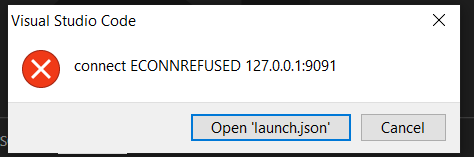
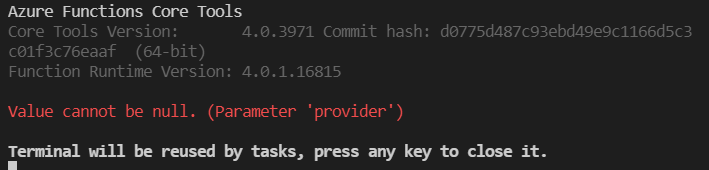
i got these
@Achraf DRIDI , Please try to create a new function app project and try to run it. The new project should work, please let me know if you still face the issue with the new one
@Achraf DRIDI , Please try to create a new function app project and try to run it. The new project should work, please let me know if you still face the issue with the new one