Developer technologies | ASP.NET | ASP.NET Core
A set of technologies in the .NET Framework for building web applications and XML web services.
This browser is no longer supported.
Upgrade to Microsoft Edge to take advantage of the latest features, security updates, and technical support.
' cx='32' cy='32' r='32' /%3E%3Ctext x='50%25' y='55%25' dominant-baseline='middle' text-anchor='middle' fill='%23FFF' %3EB%3C/text%3E%3C/svg%3E)
IIS-->w3wp.exe-->ASP.NET Core Module--> Loads Core CLR and Creates runtime environment and start execution.
' cx='32' cy='32' r='32' /%3E%3Ctext x='50%25' y='55%25' dominant-baseline='middle' text-anchor='middle' fill='%23FFF' %3EBS%3C/text%3E%3C/svg%3E)
if hosted by IIS in-process. if IIS out of process, then the core module creates a new process to run the .net core app, and reverse proxies to the new process.
note: .net core includes a c/c++ hosting library used to load and run a core app. the core module uses this, and the small exe generated at build uses this library.
Sir,
If hosted in-process, how does core module resolve which version of clr be used?
If we run the app with dotnet.exe then it uses
Hostfxr, does the asp.net core module also calls hostfxr or does it call dotnet. exe internally?
' cx='32' cy='32' r='32' /%3E%3Ctext x='50%25' y='55%25' dominant-baseline='middle' text-anchor='middle' fill='%23FFF' %3EA%3C/text%3E%3C/svg%3E)
Hi @bhavna ,
The ASP.NET Core Module is a native IIS module that plugs into the IIS pipeline, allowing ASP.NET Core applications to work with IIS. Run ASP.NET Core apps with IIS by either:
Hosting an ASP.NET Core app inside of the IIS worker process (w3wp.exe), called the in-process hosting model.
Forwarding web requests to a backend ASP.NET Core app running the Kestrel server, called the out-of-process hosting model.
The following diagram illustrates the relationship between IIS, the ASP.NET Core Module, and an app hosted in-process:
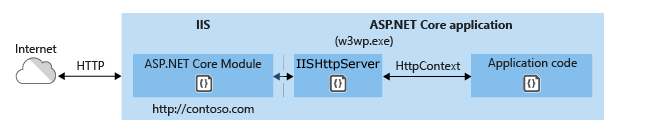
The following diagram illustrates the relationship between IIS, the ASP.NET Core Module, and an app hosted out-of-process:
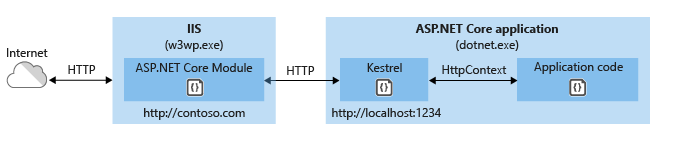
For more detail information about the flow of a request, you can check the in-process hosting model and out-of-process hosting model.
how does core module resolve which version of clr be used
When create a Asp.net core application, in the project file ({applicaton}.csproj), we will use the TargetFramework element to specify the version of .NET.
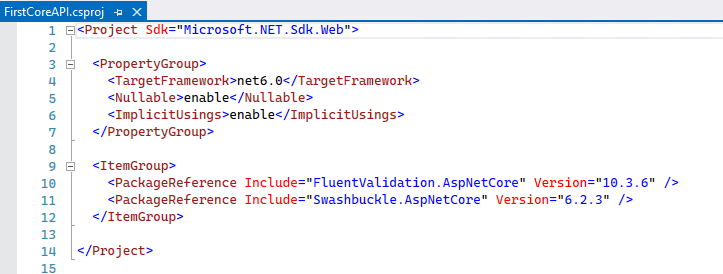
Then, when publish the Asp.net core application, it will generate a *.runtimeconfig.json config file, which contains the runtime version.
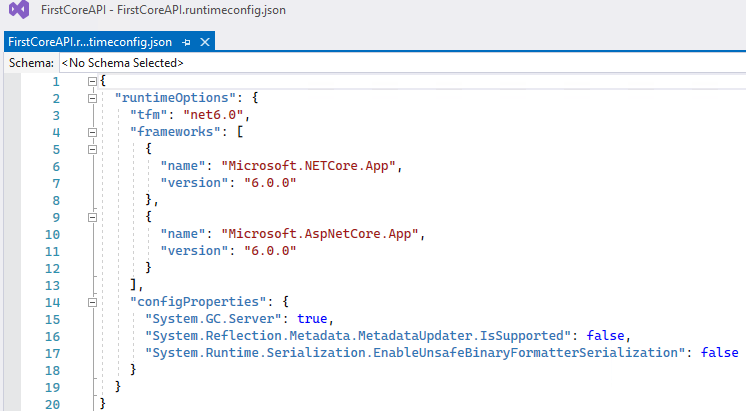
The process will according the config file to select the version. Here is an article about select the .NET version to use, you can refer to it.
If the answer is the right solution, please click "Accept Answer" and kindly upvote it. If you have extra questions about this answer, please click "Comment".
Note: Please follow the steps in our documentation to enable e-mail notifications if you want to receive the related email notification for this thread.
Best regards,
Dillion
see,
the documentation says
CreateDefaultBuilder adds an IServer instance (HttpServer) by calling the UseIIS method to boot the CoreCLR and host the app inside of the IIS worker process (w3wp.exe or iisexpress.exe).
But how is this possible? CreateDefaultBuilder will be called when Main() will be called and CLR will start executing the Main(), then what is meant by boot the CLR? the CLR must be called before the Main() method is called, isn't it?
Hi @bhavna ,
To this issue, I found you have posted a new thread about it, and it has been solved.
I will copy that comment here, hoping it can help other community members quickly fix similar issues:
the asp core module loads the clr, and class main. if you look at the IISHttpServer code, it just a simple interface that the core module call to pass request/response streams:
https://github.com/dotnet/aspnetcore/blob/c85baf8db0c72ae8e68643029d514b2e737c9fae/src/Servers/IIS/IIS/src/Core/IISHttpServer.cs
the UseIIIS extension just checks if it is hosted by aspnetcoremodule and injects a service:
https://github.com/dotnet/aspnetcore/blob/c85baf8db0c72ae8e68643029d514b2e737c9fae/src/Servers/IIS/IIS/src/WebHostBuilderIISExtensions.cs
And for the document issue, I suggest submit a feedback about that, Hoping the author will modify or add some description to make it more clear.
Have a nice day.
Dillion