Azure App Service
Azure App Service is a service used to create and deploy scalable, mission-critical web apps.
This browser is no longer supported.
Upgrade to Microsoft Edge to take advantage of the latest features, security updates, and technical support.
' cx='32' cy='32' r='32' /%3E%3Ctext x='50%25' y='55%25' dominant-baseline='middle' text-anchor='middle' fill='%23FFF' %3EB%3C/text%3E%3C/svg%3E)
Hi Team,
We have multiple applications in Azure app services.
One of the application (dms-fp-prd-kn) is very slow in azure.
Where as same application instance work very well in other server.
Can you please verify the performance issue and suggest some solution to improve the performance.
Please take this as a priority as this is impacting our client.
Thanks
Suresh
Azure App Service is a service used to create and deploy scalable, mission-critical web apps.
Answer accepted by question author
' cx='32' cy='32' r='32' /%3E%3Ctext x='50%25' y='55%25' dominant-baseline='middle' text-anchor='middle' fill='%23FFF' %3ESM%3C/text%3E%3C/svg%3E)
Thanks for asking question! As you mentioned you are having multiple applications and facing performance issue.
Below are the findings:
Your App Service Plan hosts more than the recommended active sites and is currently saturated.
We detected your app is running on a Small sized worker and the current App Service Plan, on an average, is running 10 simultaneously active apps.
You may want to know that Apps that are a part of the same App Service Plan, compete for the same set of resources.
Our data indicates that 8+ active apps in an App Service Plan running on a small sized worker deteriorates apps performance. It causes CPU and memory contention resulting in availability and reliability loss.
Consider stopping at least 2 apps in order to be within the recommended number of apps to host on a small instance or try one of the solutions described in the below steps:
Additional Information:
For production applications, it is recommended that an App Service Plan does not exceed a certain number of sites. The number may actually be lower depending on how resource intensive the hosted applications are, however as a general guidance, you may refer to the table below.
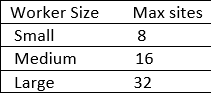
Note : An active slot is also classified as an active app as it too is competing for resources on the same App Service Plan.
Check: Azure App Service plan overview
Further there are also Slow Requests Detected and to troubleshoot performance issues or to identify the root cause of the issue, you need to collect additional data because, most likely, the issue lies within Application layer.
You may want to know that Application Insights allows you to debug exceptions and slowness within the application layer and helps you troubleshoot issues with your application code. If you have not integrated Application insights, it is strongly recommended that you integrate your app with application insights to identify application code issues.
Please follow these instructions to integrate app with Application Insights, if it is not already integrated
Let us know if there are further queries or issue remains.
Thanks for the elaborate answer. I reviewed app layer logic and found some issues. They have been taken care and noticed some improvement in performance. The fire is temporarily put off. However, there is still some room for improvement.
Before considering scaling up, I will follow the steps and update the progress.