Microsoft 365 and Office | SharePoint | For business | Windows
A group of Microsoft Products and technologies used for sharing and managing content, knowledge, and applications.

This browser is no longer supported.
Upgrade to Microsoft Edge to take advantage of the latest features, security updates, and technical support.
' cx='32' cy='32' r='32' /%3E%3Ctext x='50%25' y='55%25' dominant-baseline='middle' text-anchor='middle' fill='%23FFF' %3EJJ%3C/text%3E%3C/svg%3E)
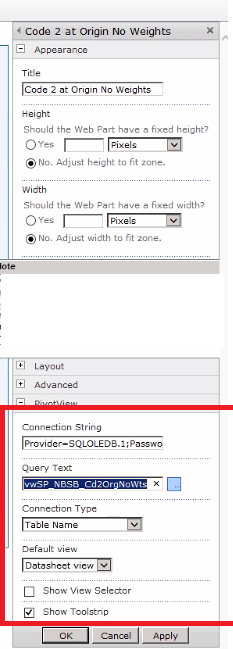
I am working on a migration from SharePoint 2010 to SharePoint Online. Where inside the on-premises the customer has a configurable Web Part (Server-side of course), which allow users to do the following:-
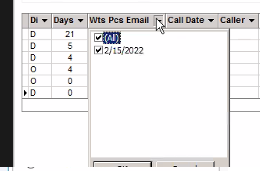
After that the web part will show the results from the database and allow the users to filter the data which will be shown in a tabular format.
Here is a screenshot of the web part setting:-
Here is a screenshot of a result from one web part instance:-
So can we build similar web part using SPFx? If the answer is Yes, then is there an available 3rd party SPFx web part we can benefit from? Finally , i am also open to other approaches to achieve our work other than build/using SPFx web part.
Thanks in advance for any help.
' cx='32' cy='32' r='32' /%3E%3Ctext x='50%25' y='55%25' dominant-baseline='middle' text-anchor='middle' fill='%23FFF' %3ER%3C/text%3E%3C/svg%3E)
Hi @john john ,
You can refer to the following document to create an authenticated API (I would use a .NET API project), making sure to use keep the connection strings in the project configuration (web.config/settings .json)
https://flow.microsoft.com/en-us/blog/on-premise-apis/
Deploy your API to Azure. Keep the connection string the same. Azure should resolve the connection string and route traffic through the gateway. Then create a web part that calls the authenticated API to query the data.
If the answer is helpful, please click "Accept Answer" and kindly upvote it. If you have extra questions about this answer, please click "Comment".
Note: Please follow the steps in our documentation to enable e-mail notifications if you want to receive the related email notification for this thread.
@RaytheonXie_MSFT Thanks for the reply...
I am already aware that i can create API for the DB and connect SharePoint to On-prem DB using gateways.. but my main question is; how we can develop a dynamic web part (similar to the current on-prem web part), which allow us to show & filter data from on-prem database's Tables,Views & Stored procedure, by just specifying which component (table,view or Stored Procedure) we want to show the data from .. Is there a documentation to create such SPFx web part? or if there are 3rd part SPFx web part that we can benefit from?
Thanks
Hi @john john ,
I think Dynamic Data Connections in the framwork is what you are looking for. You could refer to the documentation to implement: https://learn.microsoft.com/en-us/sharepoint/dev/spfx/dynamic-data
Here are some good samples that would help you:
https://www.netwoven.com/2019/12/18/data-flow-in-between-multiple-spfx-webparts-using-dynamic-data/
Hi @john john ,
I am checking to see if the problem has been resolved.