Microsoft Teams | Development
Building, integrating, or customizing apps and workflows within Microsoft Teams using developer tools and APIs

This browser is no longer supported.
Upgrade to Microsoft Edge to take advantage of the latest features, security updates, and technical support.
' cx='32' cy='32' r='32' /%3E%3Ctext x='50%25' y='55%25' dominant-baseline='middle' text-anchor='middle' fill='%23FFF' %3EDC%3C/text%3E%3C/svg%3E)
Hello,
I'm developing a system of activity feed. It works like a charm if I use an accessToken of a logged user.
My main problem occurs because I need that the feeds would be send by the application (I don't want to see an avatar of a user or his info, just app info.).
I read here: https://learn.microsoft.com/en-us/graph/teams-send-activityfeednotifications that the actor depends on the calls, but I can't find in the documentation how to do a request without accessToken, just as an app. I need to send it to a Tab, no chat or Team.
I'm using the next endpoint:
https://graph.microsoft.com/v1.0/users/{RECEIVER ID}/teamwork/sendActivityNotification
With the next body:
{
    "topic": {
        "source": "entityUrl",
        "value":
        "https://graph.microsoft.com/v1.0/users/{RECEIVER ID}/teamwork/installedApps/{INSTALLED APP ID}"
    },
    "activityType": "taskCreated",
    "previewText": {
        "content": "New Task Created"
    },
    "templateParameters": [
        {
        "name": "taskId",
        "value": "Task 12322"
        }
    ]
}
My permission for TeamsActivity.Send are of kind Application (not delegated).
So my question is, how can I send an activity feed as an application (NO as a user)?
Thank you very much for you help!
Building, integrating, or customizing apps and workflows within Microsoft Teams using developer tools and APIs
An API that connects multiple Microsoft services, enabling data access and automation across platforms

Additional features, settings, or issues not covered by specific Microsoft Teams categories
' cx='32' cy='32' r='32' /%3E%3Ctext x='50%25' y='55%25' dominant-baseline='middle' text-anchor='middle' fill='%23FFF' %3ESM%3C/text%3E%3C/svg%3E)
@DavidCabiellesHernndez-2443-We are looking into this I will get back to you soon.
To access the activity feed, you will need to use a Bot. Also, you can send notification only for message/card sent in 1:1 chat conversation.
If your bot posts cards/messages into a channel, they'll automatically show up in the user's feed if user has followed that channel.
Sample code to Starting personal conversations
  var parameters = new ConversationParameters
        {
            Members = new ChannelAccount[] { new ChannelAccount(userId) },
            ChannelData = new TeamsChannelData
            {
                Tenant = new TenantInfo(tenantId),
                Notification = new NotificationInfo() { Alert = true }
            }
        };

         MicrosoftAppCredentials.TrustServiceUrl(serviceUrl, DateTime.MaxValue);
        var connectorClient = new ConnectorClient(new Uri(activity.ServiceUrl));
        var response = await connectorClient.Conversations.CreateConversationAsync(parameters);
Thank you for your quick reply.
My problem is that I'm getting info from the user that sends the notification (I attach an example image):
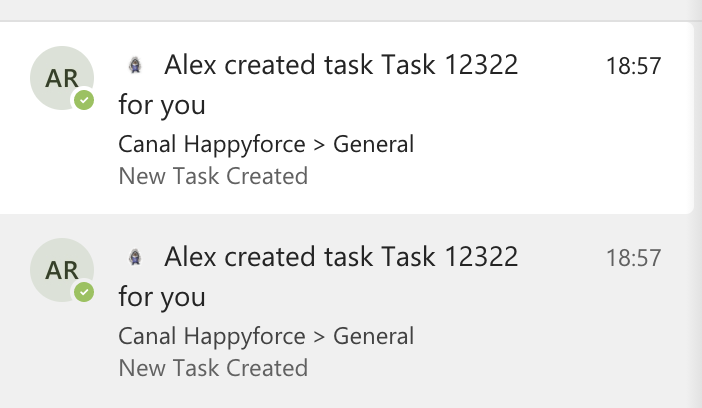
I would like to know how to send an activity feed without that info on the sender (just app info). It becomes on the accessToken passed as header, but I can't find how to do it without that token.
Best regards.
DavidCabiellesHernndez-2443-It's a Bydefault behavior.
Could you please raise a user voice here:
https://microsoftteams.uservoice.com/forums/555103-public/filters/new