Share via

PowerShell Help Required

DHoss 61 Reputation points
2022-02-22T18:25:15.917+00:00

This is my script. it works fine but just need the out formated.
Set-Location -Path C:\Users\dhossai\Desktop\Script

$ArrComputers = read-host -Prompt "Enter Computer Name"  
  
 function Decode {  
     If ($args[0] -is [System.Array]) {  
         [System.Text.Encoding]::ASCII.GetString($args[0])  
     }  
     Else {  
         "Not Found"  
     }  
 }  
  
 #check if machine online  
if (test-connection -Computername $Arrcomputers -count 1 -quiet){  
          
 Clear-Host  
 $result = foreach ($Computer in $ArrComputers)  
 {    
     $wmi_os = Get-WmiObject -Class Win32_OperatingSystem -ComputerName $Computer | select CSName,Caption,Version,OSArchitecture,LastBootUptime  


     $Monitors = Get-WmiObject -Class WmiMonitorID -Namespace root\wmi -ComputerName $Computer  
     $Manufacturer = @()  
     $Name = @()  
     $Serial = @()  
     $YofM = @()  
     $test = $computerSystem.Name  
     $test1 = "System Information for: "  
     foreach ( $Monitor in $Monitors) {  
         $Manufacturer += Decode $Monitor.ManufacturerName -notmatch 0  
         $Name += Decode $Monitor.UserFriendlyName -notmatch 0  
         $Serial += Decode $Monitor.SerialNumberID -notmatch 0  
         $YofM += $Monitor.YearOfManufacture  
     }  
                  
     #write-output "System Information for: " $computerSystem.Name  
     write-output "$test1 $test"  
         "-------------------------------------------------------"  
           
         "Monitor Mfgr    : " + $($Manufacturer)  
         "Monitor Name    : " + $($Name)  
         "Monior S/N      : " + $($Serial)  
         "Monitor Year    : " + $($YofM)  
                  
         ""  
         "-------------------------------------------------------"  
 }  
  
$result | Out-File -FilePath ".\Inventory_info.txt" -Encoding UTF8  
  
Invoke-Item ".\Inventory_info.txt"  
  
}  
else   {   
         write-host  $Arrcomputers ": Offline"-BackgroundColor DarkCyan  
         
	        
         }  

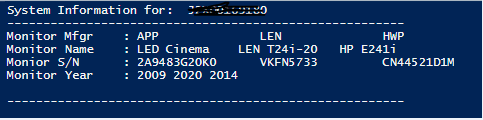
Out put comes as follows

176942-image.png

I want the Name and Monitor Year formated correctly

Windows for business | Windows Server | User experience | PowerShell

Answer accepted by question author

Andreas Baumgarten 132.1K Reputation points MVP Volunteer Moderator
2022-02-22T23:12:43.413+00:00

Hi @DHoss ,

the challenge is the variable length of the values. But maybe this helps to get a step further:

$result = @()  
$a = "App", "LEN", "HWP", "XYZ"  
$b = "12332434", "43234364", "232432443", "32424456e456"  
$c = "LED Cinema", "LEN T24i", "HP E2241i", "SJKSAL"  
$count = 0  
$a | ForEach-Object {  
  $r = New-Object PSCustomObject  
  $r | Add-Member -Type NoteProperty -Name Mfgr -Value $_  
  $r | Add-Member -Type NoteProperty -Name Serial -Value $b[($count)]  
  $r | Add-Member -Type NoteProperty -Name Name -Value $c[($count)]  
  $count ++  
  $result += $r  
}  
$l1 = $result.Mfgr -join "`t`t"  
$l2 = $result.Serial -join "`t"  
$l3 = $result.NAme -join "`t"  
Write-Output "---------------------------------------------------------------------"  
Write-Output "Mfgr   : $l1"  
Write-Output "Serial : $l2"  
Write-Output "Name   : $l3"  
Write-Output "---------------------------------------------------------------------"  

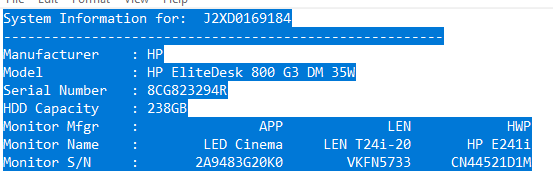
Output looks like this:

176993-image.png

----------

(If the reply was helpful please don't forget to upvote and/or accept as answer, thank you)

Regards
Andreas Baumgarten
Was this answer helpful?


2 additional answers

Sort by: Most helpful
  1. Rich Matheisen 48,116 Reputation points
    2022-02-23T03:41:59.913+00:00

    To put your combination of string data (the row headers) and array contents into columns, and do it in a way that doesn't depend on manually counting the number of tab characters to maintain the column alignment takes a bit of code.

    $mr = "Monitor Mfgr    : ","Monitor Name    : ","Monitor S/N     : ","Monitor Year    : "
    $mm = "APP","Len","HWP"
    $mn = "LED Cinema","LEN T24i-20","HP241i"
    $ms = "2A9483G20K0","VKFN5733","CN44521D1M"
    $my = "2009","2020","2014"
    $rows = @($mm,$mn,$ms, $my)
    
    $colXwidth = @()
    $col1width = 0
    # treat row headers (column 0 of final result) separately
    $mr | ForEach-Object{if($_.length -gt $col1width){$col1width = $_.length}}
    # get the widest string in each column
    $colXwidth += $col1width
    for ($c = 0;$c -le ($rows[0].Count - 1);$c++){
        $mxwidth = 0
        for ($r=0; $r -le ($rows.count - 1);$r++){
            if ($rows[$r][$c].length -gt $mxwidth){
                $mxwidth = $rows[$r][$c].length
            }
        }
        $colXwidth += $mxwidth
    }
    
    $fstr = "{0,$($colXwidth[0])}`t"
    for ($i=0;$i -lt ($colXwidth.count - 1);$i++){
        $fstr += "{$($i+1),$($colXwidth[$i+1])}`t"
    }
    $fstr = $fstr.Trim()    # remove the last tab
    $col = 0
    $mr | 
        ForEach-Object{
            $fstr -f (,$_ + $rows[$col])
            $col++
        }
    

    That will line up the columns no matter what their widths are.

    Was this answer helpful?


  2. DHoss 61 Reputation points
    2022-02-22T19:24:21.97+00:00

    Thanks for reply. what I meant is that I want them align correctly like Monitor year for the first one is just under the first monitor but the 2nd and 3rd is not. i was looking for way to align them
    Hope that make sense?

    Was this answer helpful?

    0 comments No comments

Your answer

Answers can be marked as 'Accepted' by the question author and 'Recommended' by moderators, which helps users know the answer solved the author's problem.